
- Sản phẩm & Dịch vụSản phẩm & Dịch vụ
- Giải phápGiải pháp
- Bảng giáBảng giá
- Công tyCông ty
- Tài liệuTài liệu

vi
vi
Chuyên mục với các bài viết hướng dẫn, nghiên cứu và phân tích chi tiết về kỹ thuật, các xu hướng công nghệ mới nhất dành cho lập trình viên.

Technical Writer

I have over 5 years of experience writing technical documentation for tech products, making them accessible and user-friendly. My focus is always on providing clear and precise information. @#@ Tôi đã có hơn 5 năm kinh nghiệm viết tài liệu kỹ thuật cho các sản phẩm công nghệ, giúp người dùng dễ dàng tiếp cận và sử dụng. Tôi luôn tập trung vào việc cung cấp thông tin chính xác và dễ hiểu.
Thảo luận (0)
Đăng nhập để thảo luận
Animation trong Android được sử dụng để tạo giao diện người dùng (UI) sống động, mang lại trải nghiệm trực quan và hấp dẫn hơn. Trong các ứng dụng Android, bạn có thể thực hiện animation thông qua XML hoặc viết trực tiếp bằng mã Java/Kotlin. Trong hướng dẫn này, chúng ta sẽ sử dụng mã XML để thêm các hiệu ứng animation vào ứng dụng.

Animation trong Android là quá trình tạo chuyển động và thay đổi hình dạng. Các loại animation cơ bản mà chúng ta sẽ tìm hiểu trong bài viết này bao gồm:
Chúng ta sẽ tạo một thư mục tài nguyên mới có tên anim trong thư mục res/, dùng để chứa tất cả các file XML định nghĩa logic animation. Dưới đây là một ví dụ file XML đơn giản mô tả logic animation trong Android: sample_animation.xml
<?xml version="1.0" encoding="utf-8"?>
<scale xmlns:android="<https://schemas.android.com/apk/res/android>"
  android:interpolator="@android:anim/accelerate_decelerate_interpolator"
  android:duration="300"
  android:fillAfter="true"
  android:fromXScale="0.0"
  android:fromYScale="0.0"
  android:toXScale="1.0"
  android:toYScale="1.0" />
android:fromTRANSFORMATION
android:toTRANSFORMATION
Mục tiêu của chúng ta là hiển thị một animation khi bất kỳ widget nào (ví dụ như TextView) được nhấn vào. Để làm điều đó, chúng ta cần sử dụng lớp Animation. Tệp XML chứa logic animation sẽ được tải bằng lớp AnimationUtils bằng cách gọi hàm loadAnimation(). Phần bên dưới minh họa cách triển khai này.
Animation animation;
animation = AnimationUtils.loadAnimation(getApplicationContext(),
                R.anim.sample_animation);
Để bắt đầu animation, chúng ta cần gọi hàm startAnimation() trên phần tử giao diện người dùng, như minh họa trong đoạn mã bên dưới.
sampleTextView.startAnimation(animation);
Ở đây, chúng ta thực hiện animation trên một thành phần textview bằng cách truyền kiểu Animation làm tham số.
Chúng ta chỉ cần phần này nếu muốn lắng nghe các sự kiện như bắt đầu, kết thúc hoặc lặp lại animation. Để làm điều đó, activity cần implement AnimationListener và override các phương thức sau:
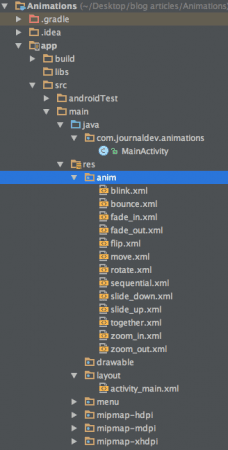
Như bạn có thể thấy, chúng ta đã bao gồm các tệp XML cho hầu hết các loại animation chính được đề cập ở trên.
Dưới đây là các đoạn mã ví dụ cho hầu hết các animation phổ biến trong Android.
Fade In Animation
fade_in.xml
<set xmlns:android="<https://schemas.android.com/apk/res/android>"
android:fillAfter="true" >
<alpha
android:duration="1000"
android:fromAlpha="0.0"
android:interpolator="@android:anim/accelerate_interpolator"
android:toAlpha="1.0" />
</set>
Trong đoạn này, alpha đại diện cho độ mờ của một đối tượng. Một đối tượng có giá trị alpha thấp sẽ trong suốt hơn, còn một đối tượng có giá trị alpha cao thì ít trong suốt hơn, tức là đục hơn. Animation dạng “fade in” đơn giản là quá trình tăng giá trị alpha từ 0 đến 1.
Fade Out Animation
fade_out.xml
<set xmlns:android="<https://schemas.android.com/apk/res/android>"
android:fillAfter="true" >
<alpha
android:duration="1000"
android:fromAlpha="1.0"
android:interpolator="@android:anim/accelerate_interpolator"
android:toAlpha="0.0" />
</set>
Fade out animation trong Android là quá trình ngược lại so với fade in, tức là giảm giá trị alpha từ 1 xuống 0.
Cross Fading Animation
Cross fading là hiệu ứng đồng thời: một TextView thực hiện animation fade in trong khi một TextView khác thực hiện fade out. Có thể đạt được hiệu ứng này bằng cách áp dụng fade_in.xml và fade_out.xml lần lượt cho hai TextView. Mã nguồn ví dụ sẽ được trình bày trong MainActivity.java.
Blink Animation
blink.xml
<set xmlns:android="<https://schemas.android.com/apk/res/android>">
    <alpha android:fromAlpha="0.0"
        android:toAlpha="1.0"
        android:interpolator="@android:anim/accelerate_interpolator"
        android:duration="600"
        android:repeatMode="reverse"
        android:repeatCount="infinite"/>
</set>
Ở đây, hiệu ứng fade in và fade out được thực hiện lặp lại vô hạn, mỗi lần sẽ đảo ngược chế độ (reverse mode) so với lần trước.
Zoom In Animation zoom_in.xml
<set xmlns:android="<https://schemas.android.com/apk/res/android>"
android:fillAfter="true" >
<scale
xmlns:android="<https://schemas.android.com/apk/res/android>"
android:duration="1000"
android:fromXScale="1"
android:fromYScale="1"
android:pivotX="50%"
android:pivotY="50%"
android:toXScale="3"
android:toYScale="3" >
</scale>
</set>
Chúng ta sử dụng pivotX="50%" và pivotY="50%" để thực hiện thu nhỏ từ tâm của phần tử.
Zoom Out Animation zoom_out.xml
<set xmlns:android="<https://schemas.android.com/apk/res/android>"
android:fillAfter="true" >
<scale
xmlns:android="<https://schemas.android.com/apk/res/android>"
android:duration="1000"
android:fromXScale="1.0"
android:fromYScale="1.0"
android:pivotX="50%"
android:pivotY="50%"
android:toXScale="0.5"
android:toYScale="0.5" >
</scale>
</set>
Lưu ý rằng android:from và android:to có giá trị ngược nhau trong zoom_in.xml và zoom_out.xml.
Rotate Animation rotate.xml
<set xmlns:android="<https://schemas.android.com/apk/res/android>">
    <rotate android:fromDegrees="0"
        android:toDegrees="360"
        android:pivotX="50%"
        android:pivotY="50%"
        android:duration="600"
        android:repeatMode="restart"
        android:repeatCount="infinite"
        android:interpolator="@android:anim/cycle_interpolator"/>
</set>
Thẻ from/toDegrees được sử dụng ở đây để xác định góc độ, và một bộ nội suy chu kỳ (cyclic interpolator) được sử dụng.
Move Animation move.xml
<set
    xmlns:android="<https://schemas.android.com/apk/res/android>"
    android:interpolator="@android:anim/linear_interpolator"
    android:fillAfter="true">
<translate
android:fromXDelta="0%p"
android:toXDelta="75%p"
android:duration="800" />
</set>
Slide Up Animation slide_up.xml
<set xmlns:android="<https://schemas.android.com/apk/res/android>"
android:fillAfter="true" >
<scale
android:duration="500"
android:fromXScale="1.0"
android:fromYScale="1.0"
android:interpolator="@android:anim/linear_interpolator"
android:toXScale="1.0"
android:toYScale="0.0" />
</set>
Điều này được thực hiện bằng cách thiết lập android:fromYScale=”1.0″ và android:toYScale=”0.0″ bên trong thẻ scale.
Slide Down Animation slide_down.xml
<set xmlns:android="<https://schemas.android.com/apk/res/android>"
android:fillAfter="true">
<scale
android:duration="500"
android:fromXScale="1.0"
android:fromYScale="0.0"
android:toXScale="1.0"
android:toYScale="1.0" />
</set>
Bounce Animation bounce.xml
<set xmlns:android="<https://schemas.android.com/apk/res/android>"
android:fillAfter="true"
android:interpolator="@android:anim/bounce_interpolator">
<scale
android:duration="500"
android:fromXScale="1.0"
android:fromYScale="0.0"
android:toXScale="1.0"
android:toYScale="1.0" />
</set>
Sequential Animation sequential.xml
<set xmlns:android="<https://schemas.android.com/apk/res/android>"
android:fillAfter="true"
android:interpolator="@android:anim/linear_interpolator" >
<!-- Move -->
<translate
android:duration="800"
android:fillAfter="true"
android:fromXDelta="0%p"
android:startOffset="300"
android:toXDelta="75%p" />
<translate
android:duration="800"
android:fillAfter="true"
android:fromYDelta="0%p"
android:startOffset="1100"
android:toYDelta="70%p" />
<translate
android:duration="800"
android:fillAfter="true"
android:fromXDelta="0%p"
android:startOffset="1900"
android:toXDelta="-75%p" />
<translate
android:duration="800"
android:fillAfter="true"
android:fromYDelta="0%p"
android:startOffset="2700"
android:toYDelta="-70%p" />
<!-- Rotate 360 degrees -->
<rotate
android:duration="1000"
android:fromDegrees="0"
android:interpolator="@android:anim/cycle_interpolator"
android:pivotX="50%"
android:pivotY="50%"
android:startOffset="3800"
android:repeatCount="infinite"
android:repeatMode="restart"
android:toDegrees="360" />
</set>
Một giá trị android:startOffset khác được sử dụng cho các chuyển động để đảm bảo chúng diễn ra tuần tự.
Together Animation together.xml
<set xmlns:android="<https://schemas.android.com/apk/res/android>"
android:fillAfter="true"
android:interpolator="@android:anim/linear_interpolator" >
<!-- Move -->
<scale
xmlns:android="<https://schemas.android.com/apk/res/android>"
android:duration="4000"
android:fromXScale="1"
android:fromYScale="1"
android:pivotX="50%"
android:pivotY="50%"
android:toXScale="4"
android:toYScale="4" >
</scale>
<!-- Rotate 180 degrees -->
<rotate
android:duration="500"
android:fromDegrees="0"
android:pivotX="50%"
android:pivotY="50%"
android:repeatCount="infinite"
android:repeatMode="restart"
android:toDegrees="360" />
</set>
Layout activity_main.xml bao gồm một ScrollView và RelativeLayout (chúng ta sẽ thảo luận phần này trong một hướng dẫn sau), trong đó mỗi loại animation được kích hoạt trên văn bản thông qua các nút tương ứng. Tệp xml được trình bày bên dưới: activity_main.xml
<ScrollView xmlns:android="<https://schemas.android.com/apk/res/android>"
android:layout_width="fill_parent"
android:layout_height="fill_parent" >
<RelativeLayout
android:layout_width="match_parent"
android:layout_height="match_parent">
<Button
android:id="@+id/btnFadeIn"
android:layout_width="wrap_content"
android:layout_height="wrap_content"
android:layout_margin="5dp"
android:text="Fade In" />
<TextView
android:layout_width="wrap_content"
android:layout_height="wrap_content"
android:textAppearance="?android:attr/textAppearanceMedium"
android:text="Fade In"
android:id="@+id/txt_fade_in"
android:layout_alignBottom="@+id/btnFadeIn"
android:layout_alignLeft="@+id/txt_fade_out"
android:layout_alignStart="@+id/txt_fade_out" />
<Button
android:id="@+id/btnFadeOut"
android:layout_width="wrap_content"
android:layout_height="wrap_content"
android:layout_margin="5dp"
android:layout_below="@id/btnFadeIn"
android:text="Fade Out" />
<Button
android:id="@+id/btnCrossFade"
android:layout_width="wrap_content"
android:layout_height="wrap_content"
android:layout_margin="5dp"
android:layout_below="@id/btnFadeOut"
android:text="Cross Fade" />
<TextView
android:layout_width="wrap_content"
android:layout_height="wrap_content"
android:textAppearance="?android:attr/textAppearanceMedium"
android:text="Cross Fade In"
android:id="@+id/txt_out"
android:visibility="gone"
android:layout_gravity="center_horizontal"
android:layout_alignTop="@+id/txt_in"
android:layout_alignLeft="@+id/txt_in"
android:layout_alignStart="@+id/txt_in" />
<Button
android:id="@+id/btnBlink"
android:layout_width="wrap_content"
android:layout_height="wrap_content"
android:layout_margin="5dp"
android:layout_below="@id/btnCrossFade"
android:text="Blink" />
<Button
android:id="@+id/btnZoomIn"
android:layout_width="wrap_content"
android:layout_height="wrap_content"
android:layout_margin="5dp"
android:layout_below="@id/btnBlink"
android:text="Zoom In" />
<TextView
android:layout_width="wrap_content"
android:layout_height="wrap_content"
android:textAppearance="?android:attr/textAppearanceMedium"
android:text="Blink"
android:id="@+id/txt_blink"
android:layout_gravity="center_horizontal"
android:layout_alignBottom="@+id/btnBlink"
android:layout_alignLeft="@+id/txt_zoom_in"
android:layout_alignStart="@+id/txt_zoom_in" />
<Button
android:id="@+id/btnZoomOut"
android:layout_width="wrap_content"
android:layout_height="wrap_content"
android:layout_margin="5dp"
android:layout_below="@id/btnZoomIn"
android:text="Zoom Out" />
<Button
android:id="@+id/btnRotate"
android:layout_width="wrap_content"
android:layout_height="wrap_content"
android:layout_margin="5dp"
android:layout_below="@id/btnZoomOut"
android:text="Rotate" />
<Button
android:id="@+id/btnMove"
android:layout_width="wrap_content"
android:layout_height="wrap_content"
android:layout_margin="5dp"
android:layout_below="@id/btnRotate"
android:text="Move" />
<Button
android:id="@+id/btnSlideUp"
android:layout_width="wrap_content"
android:layout_height="wrap_content"
android:layout_margin="5dp"
android:layout_below="@id/btnMove"
android:text="Slide Up" />
<TextView
android:layout_width="wrap_content"
android:layout_height="wrap_content"
android:textAppearance="?android:attr/textAppearanceMedium"
android:text="Fade Out"
android:id="@+id/txt_fade_out"
android:layout_gravity="center_horizontal"
android:layout_alignBottom="@+id/btnFadeOut"
android:layout_alignLeft="@+id/txt_in"
android:layout_alignStart="@+id/txt_in" />
<Button
android:id="@+id/btnSlideDown"
android:layout_width="wrap_content"
android:layout_height="wrap_content"
android:layout_margin="5dp"
android:layout_below="@id/btnSlideUp"
android:text="Slide Down" />
<Button
android:id="@+id/btnBounce"
android:layout_width="wrap_content"
android:layout_height="wrap_content"
android:layout_margin="5dp"
android:layout_below="@id/btnSlideDown"
android:text="Bounce" />
<Button
android:id="@+id/btnSequential"
android:layout_width="wrap_content"
android:layout_height="wrap_content"
android:layout_margin="5dp"
android:layout_below="@id/btnBounce"
android:text="Sequential Animation" />
<Button
android:id="@+id/btnTogether"
android:layout_width="wrap_content"
android:layout_height="wrap_content"
android:layout_below="@id/btnSequential"
android:layout_margin="5dp"
android:text="Together Animation" />
<TextView
android:layout_width="wrap_content"
android:layout_height="wrap_content"
android:textAppearance="?android:attr/textAppearanceMedium"
android:text="Cross Fade Out"
android:id="@+id/txt_in"
android:layout_gravity="center_horizontal"
android:layout_alignBottom="@+id/btnCrossFade"
android:layout_alignLeft="@+id/txt_blink"
android:layout_alignStart="@+id/txt_blink" />
<TextView
android:layout_width="wrap_content"
android:layout_height="wrap_content"
android:textAppearance="?android:attr/textAppearanceMedium"
android:text="Zoom In"
android:id="@+id/txt_zoom_in"
android:layout_alignBottom="@+id/btnZoomIn"
android:layout_alignLeft="@+id/txt_zoom_out"
android:layout_alignStart="@+id/txt_zoom_out" />
<TextView
android:layout_width="wrap_content"
android:layout_height="wrap_content"
android:textAppearance="?android:attr/textAppearanceMedium"
android:text="Zoom Out"
android:id="@+id/txt_zoom_out"
android:layout_alignBottom="@+id/btnZoomOut"
android:layout_toRightOf="@+id/btnSequential"
android:layout_toEndOf="@+id/btnSequential" />
<TextView
android:layout_width="wrap_content"
android:layout_height="wrap_content"
android:textAppearance="?android:attr/textAppearanceMedium"
android:text="Rotate"
android:id="@+id/txt_rotate"
android:layout_above="@+id/btnMove"
android:layout_toRightOf="@+id/btnSequential"
android:layout_toEndOf="@+id/btnSequential" />
<TextView
android:layout_width="wrap_content"
android:layout_height="wrap_content"
android:textAppearance="?android:attr/textAppearanceMedium"
android:text="Move"
android:id="@+id/txt_move"
android:layout_alignBottom="@+id/btnMove"
android:layout_alignLeft="@+id/txt_slide_up"
android:layout_alignStart="@+id/txt_slide_up" />
<TextView
android:layout_width="wrap_content"
android:layout_height="wrap_content"
android:textAppearance="?android:attr/textAppearanceMedium"
android:text="Slide Up"
android:id="@+id/txt_slide_up"
android:layout_alignBottom="@+id/btnSlideUp"
android:layout_toRightOf="@+id/btnSequential"
android:layout_toEndOf="@+id/btnSequential" />
<TextView
android:layout_width="wrap_content"
android:layout_height="wrap_content"
android:textAppearance="?android:attr/textAppearanceMedium"
android:text="Slide Down"
android:id="@+id/txt_slide_down"
android:layout_alignBottom="@+id/btnSlideDown"
android:layout_alignLeft="@+id/txt_slide_up"
android:layout_alignStart="@+id/txt_slide_up" />
<TextView
android:layout_width="wrap_content"
android:layout_height="wrap_content"
android:textAppearance="?android:attr/textAppearanceMedium"
android:text="Bounce"
android:id="@+id/txt_bounce"
android:layout_alignBottom="@+id/btnBounce"
android:layout_alignLeft="@+id/txt_slide_down"
android:layout_alignStart="@+id/txt_slide_down" />
<TextView
android:layout_width="wrap_content"
android:layout_height="wrap_content"
android:textAppearance="?android:attr/textAppearanceMedium"
android:text="Sequential"
android:id="@+id/txt_seq"
android:layout_alignBottom="@+id/btnSequential"
android:layout_alignLeft="@+id/txt_bounce"
android:layout_alignStart="@+id/txt_bounce" />
<TextView
android:layout_width="wrap_content"
android:layout_height="wrap_content"
android:textAppearance="?android:attr/textAppearanceMedium"
android:text="Together"
android:id="@+id/txt_tog"
android:layout_alignBottom="@+id/btnTogether"
android:layout_toRightOf="@+id/btnSequential"
android:layout_toEndOf="@+id/btnSequential" />
</RelativeLayout>
</ScrollView>
Tóm lại, RelativeLayout sắp xếp các thành phần giao diện UI dựa trên vị trí tương đối với nhau. Tệp MainActivity.java chứa các onclick listener (trình lắng nghe sự kiện nhấp chuột) cho từng nút tương ứng với loại animation của nó. Mã nguồn được trình bày bên dưới.
package com.journaldev.animations;import android.app.Activity; import android.content.Intent; import android.os.Bundle; import android.view.View; import android.view.animation.Animation; import android.view.animation.AnimationUtils; import android.widget.Button; import android.widget.TextView;
public class MainActivity extends Activity {
Button btnFadeIn, btnFadeOut, btnCrossFade, btnBlink, btnZoomIn, btnZoomOut, btnRotate, btnMove, btnSlideUp, btnSlideDown, btnBounce, btnSequential, btnTogether; Animation animFadeIn,animFadeOut,animBlink,animZoomIn,animZoomOut,animRotate ,animMove,animSlideUp,animSlideDown,animBounce,animSequential,animTogether,animCrossFadeIn,animCrossFadeOut; TextView txtFadeIn,txtFadeOut,txtBlink,txtZoomIn,txtZoomOut,txtRotate,txtMove,txtSlideUp, txtSlideDown,txtBounce,txtSeq,txtTog,txtIn,txtOut; @Override protected void onCreate(Bundle savedInstanceState) { super.onCreate(savedInstanceState); setContentView(R.layout.activity_main); btnFadeIn = (Button) findViewById(R.id.btnFadeIn); btnFadeOut = (Button) findViewById(R.id.btnFadeOut); btnCrossFade = (Button) findViewById(R.id.btnCrossFade); btnBlink = (Button) findViewById(R.id.btnBlink); btnZoomIn = (Button) findViewById(R.id.btnZoomIn); btnZoomOut = (Button) findViewById(R.id.btnZoomOut); btnRotate = (Button) findViewById(R.id.btnRotate); btnMove = (Button) findViewById(R.id.btnMove); btnSlideUp = (Button) findViewById(R.id.btnSlideUp); btnSlideDown = (Button) findViewById(R.id.btnSlideDown); btnBounce = (Button) findViewById(R.id.btnBounce); btnSequential = (Button) findViewById(R.id.btnSequential); btnTogether = (Button) findViewById(R.id.btnTogether); txtFadeIn=(TextView)findViewById(R.id.txt_fade_in); txtFadeOut=(TextView)findViewById(R.id.txt_fade_out); txtBlink=(TextView)findViewById(R.id.txt_blink); txtZoomIn=(TextView)findViewById(R.id.txt_zoom_in); txtZoomOut=(TextView)findViewById(R.id.txt_zoom_out); txtRotate=(TextView)findViewById(R.id.txt_rotate); txtMove=(TextView)findViewById(R.id.txt_move); txtSlideUp=(TextView)findViewById(R.id.txt_slide_up); txtSlideDown=(TextView)findViewById(R.id.txt_slide_down); txtBounce=(TextView)findViewById(R.id.txt_bounce); txtSeq=(TextView)findViewById(R.id.txt_seq); txtTog=(TextView)findViewById(R.id.txt_tog); txtIn=(TextView)findViewById(R.id.txt_in); txtOut=(TextView)findViewById(R.id.txt_out); animFadeIn = AnimationUtils.loadAnimation(getApplicationContext(), R.anim.fade_in); animFadeIn = AnimationUtils.loadAnimation(getApplicationContext(), R.anim.fade_in); // fade in btnFadeIn.setOnClickListener(new View.OnClickListener() { @Override public void onClick(View v) { txtFadeIn.setVisibility(View.VISIBLE); txtFadeIn.startAnimation(animFadeIn); } }); animFadeOut = AnimationUtils.loadAnimation(getApplicationContext(), R.anim.fade_out); // fade out btnFadeOut.setOnClickListener(new View.OnClickListener() { @Override public void onClick(View v) { txtFadeOut.setVisibility(View.VISIBLE); txtFadeOut.startAnimation(animFadeOut); } }); animCrossFadeIn = AnimationUtils.loadAnimation(getApplicationContext(), R.anim.fade_in); animCrossFadeOut = AnimationUtils.loadAnimation(getApplicationContext(), R.anim.fade_out); // cross fade btnCrossFade.setOnClickListener(new View.OnClickListener() { @Override public void onClick(View v) { txtOut.setVisibility(View.VISIBLE); // start fade in animation txtOut.startAnimation(animCrossFadeIn); // start fade out animation txtIn.startAnimation(animCrossFadeOut); } }); animBlink = AnimationUtils.loadAnimation(getApplicationContext(), R.anim.blink); // blink btnBlink.setOnClickListener(new View.OnClickListener() { @Override public void onClick(View v) { txtBlink.setVisibility(View.VISIBLE); txtBlink.startAnimation(animBlink); } }); animZoomIn = AnimationUtils.loadAnimation(getApplicationContext(), R.anim.zoom_in); // Zoom In btnZoomIn.setOnClickListener(new View.OnClickListener() { @Override public void onClick(View v) { txtZoomIn.setVisibility(View.VISIBLE); txtZoomIn.startAnimation(animZoomIn); } }); animZoomOut = AnimationUtils.loadAnimation(getApplicationContext(), R.anim.zoom_out); // Zoom Out btnZoomOut.setOnClickListener(new View.OnClickListener() { @Override public void onClick(View v) { txtZoomOut.setVisibility(View.VISIBLE); txtZoomOut.startAnimation(animZoomOut); } }); animRotate = AnimationUtils.loadAnimation(getApplicationContext(), R.anim.rotate); // Rotate btnRotate.setOnClickListener(new View.OnClickListener() { @Override public void onClick(View v) { txtRotate.startAnimation(animRotate); } }); animMove = AnimationUtils.loadAnimation(getApplicationContext(), R.anim.move); // Move btnMove.setOnClickListener(new View.OnClickListener() { @Override public void onClick(View v) { txtMove.startAnimation(animMove); } }); animSlideUp = AnimationUtils.loadAnimation(getApplicationContext(), R.anim.slide_up); // Slide Up btnSlideUp.setOnClickListener(new View.OnClickListener() { @Override public void onClick(View v) { txtSlideUp.startAnimation(animSlideUp); } }); animSlideDown = AnimationUtils.loadAnimation(getApplicationContext(), R.anim.slide_down); // Slide Down btnSlideDown.setOnClickListener(new View.OnClickListener() { @Override public void onClick(View v) { txtSlideDown.startAnimation(animSlideDown); } }); animBounce = AnimationUtils.loadAnimation(getApplicationContext(), R.anim.bounce); // Slide Down btnBounce.setOnClickListener(new View.OnClickListener() { @Override public void onClick(View v) { txtBounce.startAnimation(animBounce); } }); animSequential = AnimationUtils.loadAnimation(getApplicationContext(), R.anim.sequential); // Sequential btnSequential.setOnClickListener(new View.OnClickListener() { @Override public void onClick(View v) { txtSeq.startAnimation(animSequential); } }); animTogether = AnimationUtils.loadAnimation(getApplicationContext(), R.anim.together); // Together btnTogether.setOnClickListener(new View.OnClickListener() { @Override public void onClick(View v) { txtTog.startAnimation(animTogether); } }); }}
Như đã đề cập trước đó, mỗi animation cho TextView được bắt đầu bằng cách gọi đối tượng animation tương ứng, trong đó logic animation được tải bằng phương thức AnimationUtils.loadAnimation(). Animation crossFade bao gồm hai TextView, một cái mờ dần biến mất (fade out) và cái còn lại hiện dần lên (fade in). Bên dưới là một đoạn video ngắn trình bày tất cả các animation trong ứng dụng của chúng ta.
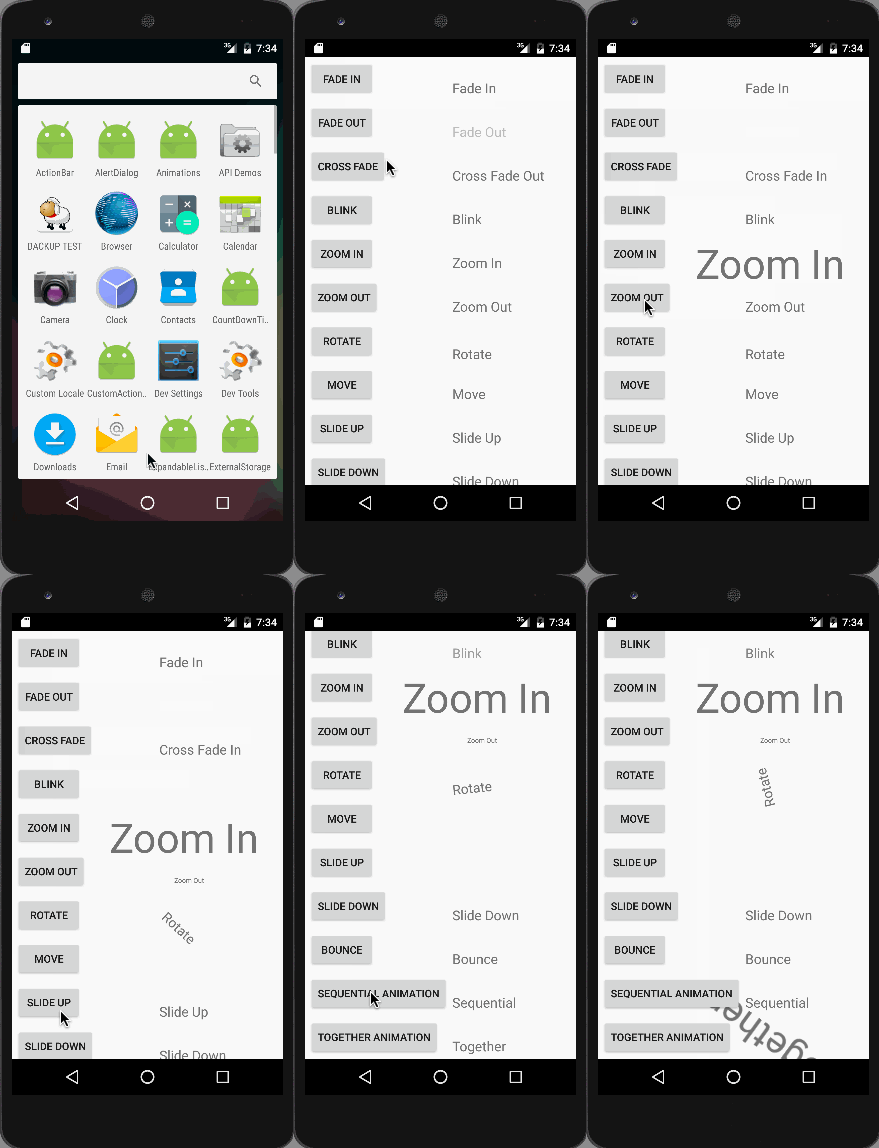
Animation together được minh họa trong hình phía trên. Lưu ý rằng các animation này khi chạy trên trình giả lập có thể không mượt, vì vậy nên chạy ứng dụng trên thiết bị thật.