
- Sản phẩm & Dịch vụSản phẩm & Dịch vụ
- Giải phápGiải pháp
- Bảng giáBảng giá
- Công tyCông ty
- Tài liệuTài liệu

vi
vi
Chuyên mục với các bài viết hướng dẫn, nghiên cứu và phân tích chi tiết về kỹ thuật, các xu hướng công nghệ mới nhất dành cho lập trình viên.

I’m passionate about web development and sharing my insights through articles, with over 8 years of experience. I hope these sharings inspire you and help build a strong web development community. @#@ Tôi đam mê phát triển web và chia sẻ những hiểu biết của mình thông qua các bài viết, với hơn 8 năm kinh nghiệm. Tôi hy vọng những chia sẻ này sẽ truyền cảm hứng cho các bạn và giúp xây dựng một cộng đồng phát triển web mạnh mẽ.
Thảo luận (0)
Đăng nhập để thảo luận
Spring Batch là một công cụ mạnh mẽ, được xây dựng dựa trên Spring Framework, chuyên biệt cho việc phát triển các ứng dụng batch với khả năng mở rộng và khả năng quản lý lỗi ưu việt. Nó cung cấp một kiến trúc rõ ràng và các thành phần có thể tái sử dụng, giúp bạn dễ dàng thiết kế và triển khai các tác vụ phức tạp một cách hiệu quả.
Trước khi chúng ta bắt tay vào ví dụ chương trình Spring Batch, hãy cùng nắm bắt một vài thuật ngữ quan trọng của Spring Batch:
Job có thể bao gồm n số lượng Step. Mỗi Step chứa một tác vụ Read-Process-Write hoặc nó có thể có một hoạt động duy nhất, được gọi là Tasklet.Read-Process-Write là quá trình đọc dữ liệu từ một nguồn (như Database, CSV, v.v.), sau đó xử lý dữ liệu và ghi nó ra một nguồn đích (như Database, CSV, XML, v.v.).Tasklet đơn giản là việc thực hiện một tác vụ hoặc thao tác duy nhất, chẳng hạn như dọn dẹp các kết nối, giải phóng tài nguyên sau khi quá trình xử lý hoàn tất.Read-Process-Write và Tasklet lại với nhau để chạy một Job hoàn chỉnh.Chúng ta sẽ xem xét một ví dụ thực tế để triển khai Spring Batch. Kịch bản của chúng ta là: một tệp CSV chứa dữ liệu cần được chuyển đổi sang định dạng XML. Các thẻ (tags) trong XML sẽ được đặt tên theo tên cột của dữ liệu.
Dưới đây là các công cụ và thư viện quan trọng chúng ta sử dụng cho ví dụ Spring Batch này:
Dưới đây là một mô tả về các thành phần trong dự án Spring Batch ví dụ của chúng ta.
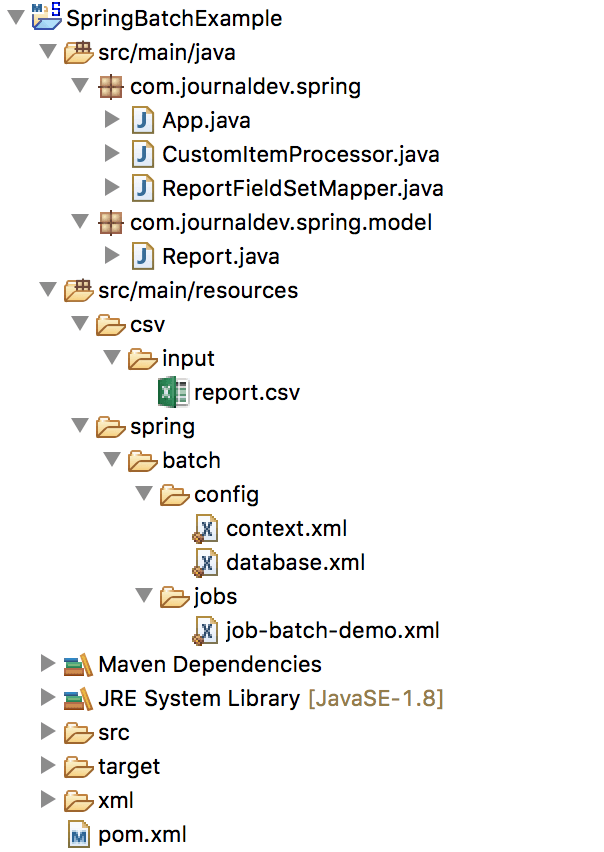
Dưới đây là nội dung tệp pom.xml với tất cả các thư viện phụ thuộc cần thiết cho dự án Spring Batch ví dụ của chúng ta. Bạn cần thêm các dependency này để Maven có thể tải và quản lý các thư viện cần thiết cho ứng dụng.
<project xmlns="<https://maven.apache.org/POM/4.0.0>" xmlns:xsi="<https://www.w3.org/2001/XMLSchema-instance>" xsi:schemaLocation="<https://maven.apache.org/POM/4.0.0> <https://maven.apache.org/xsd/maven-4.0.0.xsd>"> <modelVersion>4.0.0</modelVersion><groupId>com.journaldev.spring</groupId> <artifactId>SpringBatchExample</artifactId> <version>0.0.1-SNAPSHOT</version> <packaging>jar</packaging> <name>SpringBatchDemo</name> <url><https://maven.apache.org></url> <properties> <jdk.version>1.8</jdk.version> <spring.version>4.3.12.RELEASE</spring.version> <spring.batch.version>3.0.8.RELEASE</spring.batch.version> <mysql.driver.version>5.1.25</mysql.driver.version> <junit.version>4.11</junit.version> </properties> <dependencies> <!-- Spring Core --> <dependency> <groupId>org.springframework</groupId> <artifactId>spring-core</artifactId> <version>${spring.version}</version> </dependency> <!-- Spring jdbc, for database --> <dependency> <groupId>org.springframework</groupId> <artifactId>spring-jdbc</artifactId> <version>${spring.version}</version> </dependency> <!-- Spring XML to/back object --> <dependency> <groupId>org.springframework</groupId> <artifactId>spring-oxm</artifactId> <version>${spring.version}</version> </dependency> <!-- MySQL database driver --> <dependency> <groupId>mysql</groupId> <artifactId>mysql-connector-java</artifactId> <version>${mysql.driver.version}</version> </dependency> <!-- Spring Batch dependencies --> <dependency> <groupId>org.springframework.batch</groupId> <artifactId>spring-batch-core</artifactId> <version>${spring.batch.version}</version> </dependency> <dependency> <groupId>org.springframework.batch</groupId> <artifactId>spring-batch-infrastructure</artifactId> <version>${spring.batch.version}</version> </dependency> <!-- Spring Batch unit test --> <dependency> <groupId>org.springframework.batch</groupId> <artifactId>spring-batch-test</artifactId> <version>${spring.batch.version}</version> </dependency> <!-- Junit --> <dependency> <groupId>junit</groupId> <artifactId>junit</artifactId> <version>${junit.version}</version> <scope>test</scope> </dependency> <dependency> <groupId>com.thoughtworks.xstream</groupId> <artifactId>xstream</artifactId> <version>1.4.10</version> </dependency> </dependencies> <build> <finalName>spring-batch</finalName> <plugins> <plugin> <groupId>org.apache.maven.plugins</groupId> <artifactId>maven-eclipse-plugin</artifactId> <version>2.9</version> <configuration> <downloadSources>true</downloadSources> <downloadJavadocs>false</downloadJavadocs> </configuration> </plugin> <plugin> <groupId>org.apache.maven.plugins</groupId> <artifactId>maven-compiler-plugin</artifactId> <version>2.3.2</version> <configuration> <source>${jdk.version}</source> <target>${jdk.version}</target> </configuration> </plugin> </build></project>
Đây là nội dung tệp CSV mẫu của chúng ta cho quá trình xử lý Spring Batch. Bạn hãy tạo một tệp report.csv trong thư mục src/main/resources/csv/input/.
1001,Tom,Moody, 29/7/2013
1002,John,Parker, 30/7/2013
1003,Henry,Williams, 31/7/2013
Chúng ta phải định nghĩa các spring bean và spring batch job trong một tệp cấu hình. Dưới đây là nội dung của tệp job-batch-demo.xml, đây là phần quan trọng nhất của dự án Spring Batch. Bạn sẽ đặt tệp này trong thư mục src/main/resources/spring/batch/jobs/.
job-batch-demo.xml
<beans xmlns="<https://www.springframework.org/schema/beans>" xmlns:batch="<https://www.springframework.org/schema/batch>" xmlns:xsi="<https://www.w3.org/2001/XMLSchema-instance>" xsi:schemaLocation="<https://www.springframework.org/schema/batch> <https://www.springframework.org/schema/batch/spring-batch-3.0.xsd> <https://www.springframework.org/schema/beans> <https://www.springframework.org/schema/beans/spring-beans-4.3.xsd> "><import resource="../config/context.xml" /> <import resource="../config/database.xml" /> <bean id="report" class="com.journaldev.spring.model.Report" scope="prototype" /> <bean id="itemProcessor" class="com.journaldev.spring.CustomItemProcessor" /> <batch:job id="DemoJobXMLWriter"> <batch:step id="step1"> <batch:tasklet> <batch:chunk reader="csvFileItemReader" writer="xmlItemWriter" processor="itemProcessor" commit-interval="10"> </batch:chunk> </batch:tasklet> </batch:step> </batch:job> <bean id="csvFileItemReader" class="org.springframework.batch.item.file.FlatFileItemReader"> <property name="resource" value="classpath:csv/input/report.csv" /> <property name="lineMapper"> <bean class="org.springframework.batch.item.file.mapping.DefaultLineMapper"> <property name="lineTokenizer"> <bean class="org.springframework.batch.item.file.transform.DelimitedLineTokenizer"> <property name="names" value="id,firstname,lastname,dob" /> </bean> </property> <property name="fieldSetMapper"> <bean class="com.journaldev.spring.ReportFieldSetMapper" /> <!-- if no data type conversion, use BeanWrapperFieldSetMapper to map by name <bean class="org.springframework.batch.item.file.mapping.BeanWrapperFieldSetMapper"> <property name="prototypeBeanName" value="report" /> </bean> --> </property> </bean> </property> </bean> <bean id="xmlItemWriter" class="org.springframework.batch.item.xml.StaxEventItemWriter"> <property name="resource" value="file:xml/outputs/report.xml" /> <property name="marshaller" ref="reportMarshaller" /> <property name="rootTagName" value="report" /> </bean> <bean id="reportMarshaller" class="org.springframework.oxm.jaxb.Jaxb2Marshaller"> <property name="classesToBeBound"> <list> <value>com.journaldev.spring.model.Report</value> </list> </property> </bean></beans>
Chúng ta đang sử dụng FlatFileItemReader để đọc tệp CSV, CustomItemProcessor để xử lý dữ liệu và ghi vào tệp XML bằng StaxEventItemWriter.
Hãy phân tích các thành phần chính:
batch:job: Thẻ này định nghĩa job mà chúng ta muốn tạo. Thuộc tính id chỉ định ID của job. Bạn có thể định nghĩa nhiều job trong một tệp XML duy nhất.batch:step: Thẻ này dùng để định nghĩa các bước khác nhau của một job Spring Batch.batch:chunk: Spring Batch Framework cung cấp hai kiểu xử lý chính: “TaskletStep Oriented” và “Chunk Oriented”. Trong ví dụ này, chúng ta sử dụng kiểu “Chunk Oriented”, nghĩa là bạn đọc dữ liệu từng mục một, xử lý nó và sau đó ghi các “chunk” (khối) dữ liệu ra trong phạm vi một giao dịch.reader: spring bean được sử dụng để đọc dữ liệu. Chúng ta sử dụng csvFileItemReader trong ví dụ này, là một thể hiện của FlatFileItemReader.processor: Đây là lớp dùng để xử lý dữ liệu. Chúng ta sử dụng CustomItemProcessor trong ví dụ này.writer: bean được sử dụng để ghi dữ liệu vào tệp XML.commit-interval: Thuộc tính này định nghĩa kích thước của chunk sẽ được commit sau khi quá trình xử lý hoàn tất. Về cơ bản, nó có nghĩa là ItemReader sẽ đọc dữ liệu từng dòng một và ItemProcessor cũng sẽ xử lý theo cách tương tự, nhưng ItemWriter chỉ ghi dữ liệu khi số lượng mục đạt đến kích thước của commit-interval.ItemReader, ItemProcessor và ItemWriter từ gói org.springframework.batch.item.Đầu tiên, chúng ta đọc tệp CSV vào đối tượng Java và sau đó sử dụng JAXB để ghi nó ra tệp XML. Dưới đây là lớp model của chúng ta với các annotation JAXB cần thiết. Bạn hãy tạo lớp Report.java trong gói com.journaldev.spring.model.
package com.journaldev.spring.model;import java.util.Date;
import javax.xml.bind.annotation.XmlAttribute; import javax.xml.bind.annotation.XmlElement; import javax.xml.bind.annotation.XmlRootElement;
@XmlRootElement(name = "record") public class Report {
private int id; private String firstName; private String lastName; private Date dob; @XmlAttribute(name = "id") public int getId() { return id; } public void setId(int id) { this.id = id; } @XmlElement(name = "firstname") public String getFirstName() { return firstName; } public void setFirstName(String firstName) { this.firstName = firstName; } @XmlElement(name = "lastname") public String getLastName() { return lastName; } public void setLastName(String lastName) { this.lastName = lastName; } @XmlElement(name = "dob") public Date getDob() { return dob; } public void setDob(Date dob) { this.dob = dob; } @Override public String toString() { return "Report [id=" + id + ", firstname=" + firstName + ", lastName=" + lastName + ", DateOfBirth=" + dob + "]"; }}
Lưu ý rằng các trường của lớp model phải giống với các trường được định nghĩa trong cấu hình spring batch mapper của chúng ta, tức là property name="names" value="id,firstname,lastname,dob" trong tệp XML cấu hình FlatFileItemReader.
Chúng ta cần một FieldSetMapper tùy chỉnh để chuyển đổi định dạng Date từ String trong CSV sang đối tượng Date trong Java. Nếu không yêu cầu chuyển đổi kiểu dữ liệu, chúng ta có thể sử dụng BeanWrapperFieldSetMapper để tự động ánh xạ các giá trị theo tên. Lớp Java của chúng ta mở rộng FieldSetMapper là ReportFieldSetMapper. Bạn hãy tạo lớp này trong gói com.journaldev.spring.
package com.journaldev.spring;import java.text.ParseException; import java.text.SimpleDateFormat;
import org.springframework.batch.item.file.mapping.FieldSetMapper; import org.springframework.batch.item.file.transform.FieldSet; import org.springframework.validation.BindException;
import com.journaldev.spring.model.Report;
public class ReportFieldSetMapper implements FieldSetMapper<Report> {
private SimpleDateFormat dateFormat = new SimpleDateFormat("dd/MM/yyyy"); public Report mapFieldSet(FieldSet fieldSet) throws BindException { Report report = new Report(); report.setId(fieldSet.readInt(0)); report.setFirstName(fieldSet.readString(1)); report.setLastName(fieldSet.readString(2)); // default format yyyy-MM-dd // fieldSet.readDate(4); String date = fieldSet.readString(3); try { report.setDob(dateFormat.parse(date)); } catch (ParseException e) { e.printStackTrace(); } return report; }}
Như đã định nghĩa trong cấu hình job, một itemProcessor sẽ được kích hoạt trước itemWriter. Chúng ta đã tạo lớp CustomItemProcessor.java cho mục đích này. Lớp này sẽ xử lý dữ liệu trước khi nó được ghi ra. Bạn hãy tạo lớp này trong gói com.journaldev.spring.
package com.journaldev.spring;import org.springframework.batch.item.ItemProcessor;
import com.journaldev.spring.model.Report;
public class CustomItemProcessor implements ItemProcessor<Report, Report> {
public Report process(Report item) throws Exception { System.out.println("Processing..." + item); String fname = item.getFirstName(); String lname = item.getLastName(); item.setFirstName(fname.toUpperCase()); item.setLastName(lname.toUpperCase()); return item; }}
Bạn có thể thao tác dữ liệu trong triển khai ItemProcessor. Như bạn thấy, tôi đang chuyển đổi giá trị của firstName và lastName thành chữ in hoa. Đây là nơi bạn đặt logic nghiệp vụ để biến đổi dữ liệu.
Trong tệp cấu hình Spring Batch của chúng ta (job-batch-demo.xml), chúng ta đã import hai tệp cấu hình bổ sung: context.xml và database.xml. Bạn hãy tạo các tệp này trong thư mục src/main/resources/config/.
context.xml
<beans xmlns="<https://www.springframework.org/schema/beans>" xmlns:xsi="<https://www.w3.org/2001/XMLSchema-instance>" xsi:schemaLocation=" <https://www.springframework.org/schema/beans> <https://www.springframework.org/schema/beans/spring-beans-4.3.xsd>"><!-- stored job-meta in memory --> <!-- <bean id="jobRepository" class="org.springframework.batch.core.repository.support.MapJobRepositoryFactoryBean"> <property name="transactionManager" ref="transactionManager" /> </bean> --> <!-- stored job-meta in database --> <bean id="jobRepository" class="org.springframework.batch.core.repository.support.JobRepositoryFactoryBean"> <property name="dataSource" ref="dataSource" /> <property name="transactionManager" ref="transactionManager" /> <property name="databaseType" value="mysql" /> </bean> <bean id="transactionManager" class="org.springframework.batch.support.transaction.ResourcelessTransactionManager" /> <bean id="jobLauncher" class="org.springframework.batch.core.launch.support.SimpleJobLauncher"> <property name="jobRepository" ref="jobRepository" /> </bean></beans>
Chúng ta cùng nhau giải thích các bean quan trọng trong context.xml:
jobRepository: JobRepository chịu trách nhiệm lưu trữ từng đối tượng Java vào các bảng meta-data tương ứng của Spring Batch.transactionManager: Cái này chịu trách nhiệm commit giao dịch khi kích thước commit-interval và dữ liệu đã xử lý bằng nhau.jobLauncher: Đây là trái tim của Spring Batch. Giao diện này chứa phương thức run được sử dụng để kích hoạt một job.database.xml
<beans xmlns="<https://www.springframework.org/schema/beans>" xmlns:jdbc="<https://www.springframework.org/schema/jdbc>" xmlns:xsi="<https://www.w3.org/2001/XMLSchema-instance>" xsi:schemaLocation="<https://www.springframework.org/schema/beans> <https://www.springframework.org/schema/beans/spring-beans-4.3.xsd> <https://www.springframework.org/schema/jdbc> <https://www.springframework.org/schema/jdbc/spring-jdbc-4.3.xsd>"><!-- connect to database --> <bean id="dataSource" class="org.springframework.jdbc.datasource.DriverManagerDataSource"> <property name="driverClassName" value="com.mysql.jdbc.Driver" /> <property name="url" value="jdbc:mysql://localhost:3306/Test" /> <property name="username" value="test" /> <property name="password" value="test123" /> </bean> <bean id="transactionManager" class="org.springframework.batch.support.transaction.ResourcelessTransactionManager" /> <!-- create job-meta tables automatically --> <!-- <jdbc:initialize-database data-source="dataSource"> <jdbc:script location="org/springframework/batch/core/schema-drop-mysql.sql" /> <jdbc:script location="org/springframework/batch/core/schema-mysql.sql" /> </jdbc:initialize-database> --></beans>
Spring Batch sử dụng một số bảng metadata để lưu trữ thông tin job batch. Bạn có thể để chúng được tạo tự động từ cấu hình Spring Batch, nhưng tốt hơn hết là tạo chúng thủ công bằng cách thực thi các tệp SQL. Về mặt bảo mật, tốt hơn là không cấp quyền thực thi DDL (Data Definition Language) cho người dùng cơ sở dữ liệu của Spring Batch.
Các bảng Spring Batch khớp rất chặt chẽ với các đối tượng Domain đại diện cho chúng trong Java. Ví dụ: JobInstance, JobExecution, JobParameters và StepExecution lần lượt ánh xạ tới BATCH_JOB_INSTANCE, BATCH_JOB_EXECUTION, BATCH_JOB_EXECUTION_PARAMS và BATCH_STEP_EXECUTION. ExecutionContext ánh xạ tới cả BATCH_JOB_EXECUTION_CONTEXT và BATCH_STEP_EXECUTION_CONTEXT. JobRepository chịu trách nhiệm lưu và lưu trữ từng đối tượng Java vào bảng chính xác của nó.
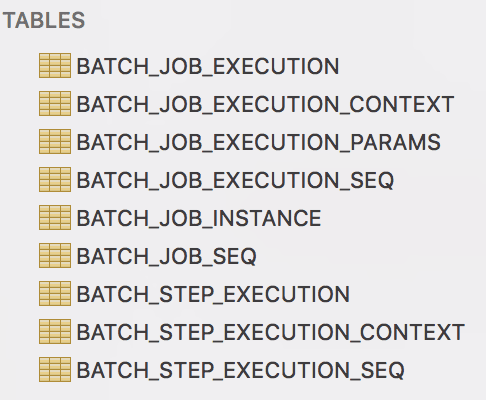
Dưới đây là chi tiết về từng bảng meta-data:
BATCH_JOB_INSTANCE: Bảng này lưu trữ tất cả thông tin liên quan đến một JobInstance.BATCH_JOB_EXECUTION_PARAMS: Bảng này lưu trữ tất cả thông tin liên quan đến đối tượng JobParameters.BATCH_JOB_EXECUTION: Bảng này lưu trữ dữ liệu liên quan đến đối tượng JobExecution. Một hàng mới được thêm vào mỗi khi một Job được chạy.BATCH_STEP_EXECUTION: Bảng này lưu trữ tất cả thông tin liên quan đến đối tượng StepExecution.BATCH_JOB_EXECUTION_CONTEXT: Bảng này lưu trữ dữ liệu liên quan đến ExecutionContext của một Job. Có chính xác một Job ExecutionContext cho mỗi JobExecution, và nó chứa tất cả dữ liệu cấp job cần thiết cho việc thực thi job cụ thể đó. Dữ liệu này thường đại diện cho trạng thái phải được truy xuất sau khi một lỗi xảy ra để một JobInstance có thể khởi động lại từ nơi nó đã thất bại.BATCH_STEP_EXECUTION_CONTEXT: Bảng này lưu trữ dữ liệu liên quan đến ExecutionContext của một Step. Có chính xác một ExecutionContext cho mỗi StepExecution, và nó chứa tất cả dữ liệu cần được lưu trữ cho một lần thực thi step cụ thể. Dữ liệu này thường đại diện cho trạng thái phải được truy xuất sau khi một lỗi xảy ra để một JobInstance có thể khởi động lại từ nơi nó đã thất bại.BATCH_JOB_EXECUTION_SEQ: Bảng này lưu trữ dữ liệu về chuỗi thực thi của job.BATCH_STEP_EXECUTION_SEQ: Bảng này lưu trữ dữ liệu về chuỗi thực thi step.BATCH_JOB_SEQ: Bảng này lưu trữ dữ liệu về chuỗi job trong trường hợp chúng ta có nhiều job, chúng ta sẽ nhận được nhiều hàng.Dự án Spring Batch ví dụ của chúng ta đã sẵn sàng. Bước cuối cùng là viết một lớp kiểm thử để thực thi nó như một chương trình Java độc lập. Bạn hãy tạo lớp App.java trong gói com.journaldev.spring.
package com.journaldev.spring;import org.springframework.batch.core.Job; import org.springframework.batch.core.JobExecution; import org.springframework.batch.core.JobParameters; import org.springframework.batch.core.JobParametersBuilder; import org.springframework.batch.core.launch.JobLauncher; import org.springframework.context.support.ClassPathXmlApplicationContext;
public class App { public static void main(String[] args) {
String[] springConfig = { "spring/batch/jobs/job-batch-demo.xml" }; ClassPathXmlApplicationContext context = new ClassPathXmlApplicationContext(springConfig); JobLauncher jobLauncher = (JobLauncher) context.getBean("jobLauncher"); Job job = (Job) context.getBean("DemoJobXMLWriter"); JobParameters jobParameters = new JobParametersBuilder().addLong("time", System.currentTimeMillis()) .toJobParameters(); try { JobExecution execution = jobLauncher.run(job, jobParameters); System.out.println("Exit Status : " + execution.getStatus()); } catch (Exception e) { e.printStackTrace(); } System.out.println("Done"); context.close(); }}
Bạn chỉ cần chạy chương trình trên và bạn sẽ nhận được tệp XML đầu ra như dưới đây trong thư mục xml/outputs/ của dự án bạn.
<?xml version="1.0" encoding="UTF-8"?><report><record id="1001"><dob>2013-07-29T00:00:00+05:30</dob><firstname>TOM</firstname><lastname>MOODY</lastname></record><record id="1002"><dob>2013-07-30T00:00:00+05:30</dob><firstname>JOHN</firstname><lastname>PARKER</lastname></record><record id="1003"><dob>2013-07-31T00:00:00+05:30</dob><firstname>HENRY</firstname><lastname>WILLIAMS</lastname></record></report>
Qua bài viết này, chúng ta đã khám phá Spring Batch, một module của Spring Framework giúp bạn thực thi các batch job một cách hiệu quả và tin cậy. Với kiến thức này, bạn có thể tự tin áp dụng Spring Batch vào các tác vụ xử lý dữ liệu thực tế trong công việc của mình.
