
- Sản phẩm & Dịch vụSản phẩm & Dịch vụ
- Giải phápGiải pháp
- Bảng giáBảng giá
- Công tyCông ty
- Tài liệuTài liệu

vi
vi
Chuyên mục với các bài viết hướng dẫn, nghiên cứu và phân tích chi tiết về kỹ thuật, các xu hướng công nghệ mới nhất dành cho lập trình viên.

Technical Writer

I have over 5 years of experience writing technical documentation for tech products, making them accessible and user-friendly. My focus is always on providing clear and precise information. @#@ Tôi đã có hơn 5 năm kinh nghiệm viết tài liệu kỹ thuật cho các sản phẩm công nghệ, giúp người dùng dễ dàng tiếp cận và sử dụng. Tôi luôn tập trung vào việc cung cấp thông tin chính xác và dễ hiểu.
Thảo luận (0)
Đăng nhập để thảo luận
Chào mừng bạn đến với hướng dẫn Hibernate dành cho người mới bắt đầu!

Hibernate là một trong những công cụ ORM Java được sử dụng rộng rãi nhất trên thế giới. ORM là kỹ thuật lập trình cho phép chúng ta ánh xạ các đối tượng vào các bảng cơ sở dữ liệu quan hệ. Hibernate cung cấp một framework mạnh mẽ để thực hiện việc ánh xạ hai chiều này, giúp chúng ta tập trung vào logic nghiệp vụ thay vì lo lắng về các chi tiết kỹ thuật của việc tương tác với cơ sở dữ liệu.
Hibernate giải quyết những hạn chế của JDBC bằng cách cung cấp một lớp trừu tượng giữa ứng dụng Java của chúng ta và cơ sở dữ liệu. Nó chuyển đổi các lệnh gọi phương thức Java thành các truy vấn SQL và ngược lại, tự động ánh xạ dữ liệu giữa các đối tượng Java (POJO – Plain Old Java Objects) và các hàng trong bảng cơ sở dữ liệu.
Dưới đây là một số lợi ích nổi bật khi chúng ta sử dụng Hibernate làm công cụ ORM:
Tôi hy vọng những lợi ích trên đã thuyết phục bạn rằng Hibernate là lựa chọn tuyệt vời cho các yêu cầu ánh xạ đối tượng-quan hệ của ứng dụng của bạn. Bây giờ, hãy cùng tìm hiểu kiến trúc của Hibernate Framework, sau đó chúng ta sẽ bắt tay vào một dự án mẫu để khám phá các cách cấu hình và sử dụng Hibernate trong ứng dụng Java độc lập.
Kiến trúc Hibernate hoạt động như một lớp trừu tượng giữa các lớp ứng dụng và JDBC/JTA API cho các thao tác cơ sở dữ liệu. Rõ ràng là Hibernate được xây dựng dựa trên JDBC và JTA APIs.
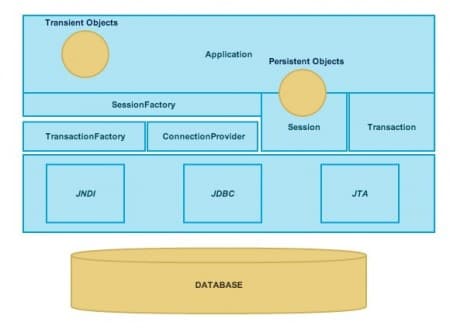
Hãy cùng tìm hiểu các thành phần cốt lõi của kiến trúc Hibernate một cách chi tiết:
org.hibernate.Session bằng cách sử dụng SessionFactory.java.sql.Connection của JDBC và hoạt động như một factory cho org.hibernate.Transaction.org.hibernate.Session.org.hibernate.Session nào. Chúng có thể đã được ứng dụng khởi tạo nhưng chưa được lưu trữ , hoặc chúng có thể đã được khởi tạo bởi một org.hibernate.Session đã đóng.org.hibernate.Session có thể trải rộng nhiều org.hibernate.Transaction trong một số trường hợp.javax.sql.DataSource hoặc java.sql.DriverManager cơ bản.Thành phần này không được trực tiếp lộ ra cho ứng dụng, nhưng lập trình viên có thể mở rộng nó khi cần.org.hibernate.Transaction instancesHibernate cung cấp khả năng triển khai Java Persistence API, cho phép chúng ta sử dụng các chú thích JPA với các đối tượng model của mình. Hibernate sẽ tự động xử lý việc cấu hình chúng để sử dụng trong các thao tác CRUD. Chúng ta sẽ tìm hiểu chi tiết về điều này trong ví dụ về chú thích.
Khi phát triển ứng dụng Hibernate, chúng ta cần cung cấp hai bộ cấu hình: Bộ cấu hình đầu tiên chứa các thuộc tính cụ thể của cơ sở dữ liệu sẽ được sử dụng để tạo kết nối cơ sở dữ liệu và các đối tượng Session. Bộ cấu hình thứ hai chứa ánh xạ giữa các lớp model và các bảng cơ sở dữ liệu.
Chúng ta có thể sử dụng cấu hình dựa trên XML hoặc dựa trên thuộc tính cho các cấu hình liên quan đến kết nối cơ sở dữ liệu. Đối với việc cung cấp ánh xạ lớp model và bảng cơ sở dữ liệu, chúng ta cũng có thể sử dụng cấu hình dựa trên XML hoặc dựa trên chú thích. Chúng ta sẽ sử dụng các chú thích JPA từ javax.persistence cho ánh xạ dựa trên chú thích. Dự án cuối cùng của chúng ta sẽ trông như hình minh họa bên dưới.
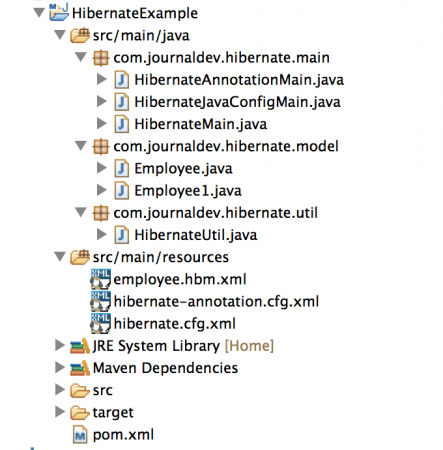
Hãy tạo một dự án Maven trong Eclipse hoặc IDE yêu thích của bạn, bạn có thể đặt bất kỳ tên nào bạn muốn. Trước khi đi sâu vào các thành phần khác nhau của dự án, chúng ta cần thiết lập cơ sở dữ liệu.
Trong ví dụ của tôi, tôi đang sử dụng cơ sở dữ liệu MySQL và tập lệnh dưới đây được sử dụng để tạo bảng cần thiết:
CREATE TABLE `Employee` (
  `id` int(11) unsigned NOT NULL AUTO_INCREMENT,
  `name` varchar(20) DEFAULT NULL,
  `role` varchar(20) DEFAULT NULL,
  `insert_time` datetime DEFAULT NULL,
  PRIMARY KEY (`id`)
) ENGINE=InnoDB AUTO_INCREMENT=19 DEFAULT CHARSET=utf8;
Lưu ý rằng cột “id” của bảng Employee được MySQL tự động tạo (AUTO_INCREMENT), vì vậy chúng ta không cần chèn giá trị này trong mã Java.
Tệp pom.xml cuối cùng của chúng ta sẽ trông như dưới đây:
<project xmlns="<https://maven.apache.org/POM/4.0.0>" xmlns:xsi="<https://www.w3.org/2001/XMLSchema-instance>" xsi:schemaLocation="<https://maven.apache.org/POM/4.0.0> <https://maven.apache.org/xsd/maven-4.0.0.xsd>"> <modelVersion>4.0.0</modelVersion> <groupId>com.journaldev.hibernate</groupId> <artifactId>HibernateExample</artifactId> <version>0.0.1-SNAPSHOT</version> <name>HibernateExample</name><dependencies> <dependency> <groupId>org.hibernate</groupId> <artifactId>hibernate-core</artifactId> <version>4.3.5.Final</version> </dependency> <!-- Hibernate 4 uses Jboss logging, but older versions slf4j for logging --> <dependency> <groupId>org.slf4j</groupId> <artifactId>slf4j-simple</artifactId> <version>1.7.5</version> </dependency> <dependency> <groupId>mysql</groupId> <artifactId>mysql-connector-java</artifactId> <version>5.0.5</version> </dependency> </dependencies>
<build> <finalName>${project.artifactId}</finalName> </build> </project>
Artifact hibernate-core chứa tất cả các lớp Hibernate cốt lõi, vì vậy chúng ta sẽ có được tất cả các tính năng cần thiết bằng cách đưa nó vào dự án. Lưu ý rằng tôi đang sử dụng phiên bản Hibernate 4.3.5.Final cho dự án mẫu của mình. Hibernate vẫn đang tiếp tục phát triển và nhiều lớp cốt lõi thay đổi giữa mỗi bản phát hành chính. Vì vậy, nếu bạn đang sử dụng bất kỳ phiên bản nào khác, có một khả năng nhỏ là bạn sẽ phải sửa đổi cấu hình Hibernate để nó hoạt động. Tuy nhiên, tôi chắc chắn rằng nó sẽ hoạt động tốt cho tất cả các bản phát hành 4.x.x.
Hibernate 4 sử dụng JBoss logging nhưng các phiên bản cũ hơn sử dụng slf4j cho mục đích ghi nhật ký, vì vậy tôi đã thêm artifact slf4j-simple vào dự án của mình, mặc dù không thực sự cần thiết vì tôi đang dùng Hibernate 4.
mysql-connector-java là driver MySQL để kết nối với cơ sở dữ liệu MySQL. Nếu bạn đang sử dụng bất kỳ cơ sở dữ liệu nào khác, hãy thêm artifact driver tương ứng.
Chúng ta có hai lớp model: Employee và Employee1. Lớp Employee là một lớp Java Bean đơn giản và chúng ta sẽ sử dụng cấu hình dựa trên XML để cung cấp chi tiết ánh xạ của nó. Lớp Employee1 là một Java Bean mà các trường của nó được chú thích bằng các chú thích JPA, vì vậy chúng ta không cần cung cấp ánh xạ trong một tệp XML riêng biệt.
package com.journaldev.hibernate.model;import java.util.Date;
public class Employee {
private int id; private String name; private String role; private Date insertTime; public int getId() { return id; } public void setId(int id) { this.id = id; } public String getName() { return name; } public void setName(String name) { this.name = name; } public String getRole() { return role; } public void setRole(String role) { this.role = role; } public Date getInsertTime() { return insertTime; } public void setInsertTime(Date insertTime) { this.insertTime = insertTime; }}
Lớp Employee là một POJO đơn giản, không có gì đặc biệt để thảo luận ở đây.
package com.journaldev.hibernate.model;import java.util.Date;
import javax.persistence.Column; import javax.persistence.Entity; import javax.persistence.GeneratedValue; import javax.persistence.GenerationType; import javax.persistence.Id; import javax.persistence.Table; import javax.persistence.UniqueConstraint;
@Entity @Table(name="Employee", uniqueConstraints={@UniqueConstraint(columnNames={"ID"})}) public class Employee1 {
@Id @GeneratedValue(strategy=GenerationType.IDENTITY) @Column(name="ID", nullable=false, unique=true, length=11) private int id; @Column(name="NAME", length=20, nullable=true) private String name; @Column(name="ROLE", length=20, nullable=true) private String role; @Column(name="insert_time", nullable=true) private Date insertTime; public int getId() { return id; } public void setId(int id) { this.id = id; } public String getName() { return name; } public void setName(String name) { this.name = name; } public String getRole() { return role; } public void setRole(String role) { this.role = role; } public Date getInsertTime() { return insertTime; } public void setInsertTime(Date insertTime) { this.insertTime = insertTime; }}
@javax.persistence.Entity: Chúng ta sử dụng chú thích này để đánh dấu một lớp là Entity bean mà Hibernate có thể lưu trữ bền vững, do Hibernate cung cấp triển khai JPA.@javax.persistence.Table: Chú thích này định nghĩa ánh xạ bảng và các ràng buộc duy nhất (unique constraints) cho các cột.@javax.persistence.Id: Chúng ta dùng chú thích này để định nghĩa khóa chính cho bảng.@javax.persistence.GeneratedValue: Chú thích này xác định rằng trường sẽ được tự động tạo và GenerationType.IDENTITY là chiến lược được sử dụng để giá trị “id” được tạo ra được ánh xạ vào bean và có thể được truy xuất trong chương trình Java.@javax.persistence.Column: Chúng ta sử dụng chú thích này để ánh xạ trường với cột của bảng. Chúng ta cũng có thể chỉ định độ dài, khả năng cho phép giá trị null và tính duy nhất cho các thuộc tính của bean.Như đã đề cập ở trên, chúng ta sẽ sử dụng cấu hình dựa trên XML cho ánh xạ lớp Employee. Chúng ta có thể chọn bất kỳ tên nào, nhưng tốt nhất là chọn tên theo bảng hoặc tên Java bean để dễ hiểu. Tệp ánh xạ Hibernate của chúng ta cho bean Employee sẽ trông như dưới đây:
<?xml version="1.0"?> <!DOCTYPE hibernate-mapping PUBLIC "-//Hibernate/Hibernate Mapping DTD 3.0//EN" "<https://hibernate.org/dtd/hibernate-mapping-3.0.dtd>"><hibernate-mapping> <class name="com.journaldev.hibernate.model.Employee" table="EMPLOYEE"> <id name="id" type="int"> <column name="ID" /> <generator class="increment" /> </id> <property name="name" type="java.lang.String"> <column name="NAME" /> </property> <property name="role" type="java.lang.String"> <column name="ROLE" /> </property> <property name="insertTime" type="timestamp"> <column name="insert_time" /> </property> </class> </hibernate-mapping>
Cấu hình XML này đơn giản và thực hiện những điều tương tự như cấu hình dựa trên chú thích.
Chúng ta sẽ tạo hai tệp XML cấu hình Hibernate một cho cấu hình dựa trên XML và một cho cấu hình dựa trên chú thích.
hibernate.cfg.xml<?xml version="1.0" encoding="UTF-8"?> <!DOCTYPE hibernate-configuration PUBLIC "-//Hibernate/Hibernate Configuration DTD 3.0//EN" "<https://hibernate.org/dtd/hibernate-configuration-3.0.dtd>"> <hibernate-configuration> <session-factory> <!-- Database connection properties - Driver, URL, user, password --> <property name="hibernate.connection.driver_class">com.mysql.jdbc.Driver</property> <property name="hibernate.connection.url">jdbc:mysql://localhost/TestDB</property> <property name="hibernate.connection.username">pankaj</property> <property name="hibernate.connection.password">pankaj123</property> <!-- Connection Pool Size --> <property name="hibernate.connection.pool_size">1</property><!-- org.hibernate.HibernateException: No CurrentSessionContext configured! --> <property name="hibernate.current_session_context_class">thread</property> <!-- Outputs the SQL queries, should be disabled in Production --> <property name="hibernate.show_sql">true</property> <!-- Dialect is required to let Hibernate know the Database Type, MySQL, Oracle etc Hibernate 4 automatically figure out Dialect from Database Connection Metadata --> <property name="hibernate.dialect">org.hibernate.dialect.MySQLDialect</property> <!-- mapping file, we can use Bean annotations too --> <mapping resource="employee.hbm.xml" /> </session-factory></hibernate-configuration>
Hầu hết các thuộc tính liên quan đến cấu hình cơ sở dữ liệu, chi tiết các thuộc tính khác được đưa ra trong phần chú thích. Lưu ý cấu hình cho tệp ánh xạ Hibernate: chúng ta có thể định nghĩa nhiều tệp ánh xạ Hibernate và cấu hình chúng ở đây. Cũng cần lưu ý rằng ánh xạ là dành riêng cho từng session factory.
hibernate-annotation.cfg.xml<?xml version="1.0" encoding="UTF-8"?> <!DOCTYPE hibernate-configuration PUBLIC "-//Hibernate/Hibernate Configuration DTD 3.0//EN" "<https://hibernate.org/dtd/hibernate-configuration-3.0.dtd>"> <hibernate-configuration> <session-factory> <!-- Database connection properties - Driver, URL, user, password --> <property name="hibernate.connection.driver_class">com.mysql.jdbc.Driver</property> <property name="hibernate.connection.url">jdbc:mysql://localhost/TestDB</property> <property name="hibernate.connection.username">pankaj</property> <property name="hibernate.connection.password">pankaj123</property><!-- org.hibernate.HibernateException: No CurrentSessionContext configured! --> <property name="hibernate.current_session_context_class">thread</property> <!-- Mapping with model class containing annotations --> <mapping class="com.journaldev.hibernate.model.Employee1"/> </session-factory></hibernate-configuration>
Hầu hết các cấu hình tương tự như cấu hình dựa trên XML, sự khác biệt duy nhất là cấu hình ánh xạ. Chúng ta có thể cung cấp cấu hình ánh xạ cho các lớp cũng như các gói.
Tôi đã tạo một lớp tiện ích nơi tôi tạo SessionFactory từ cấu hình dựa trên XML cũng như cấu hình dựa trên thuộc tính. Đối với cấu hình dựa trên thuộc tính, chúng ta có thể có một tệp thuộc tính và đọc nó trong lớp, nhưng để đơn giản, tôi đang tạo instance Properties ngay trong lớp.
package com.journaldev.hibernate.util;import java.util.Properties;
import org.hibernate.SessionFactory; import org.hibernate.boot.registry.StandardServiceRegistryBuilder; import org.hibernate.cfg.Configuration; import org.hibernate.service.ServiceRegistry;
import com.journaldev.hibernate.model.Employee1;
public class HibernateUtil {
//XML based configuration private static SessionFactory sessionFactory; //Annotation based configuration private static SessionFactory sessionAnnotationFactory; //Property based configuration private static SessionFactory sessionJavaConfigFactory; private static SessionFactory buildSessionFactory() { try { // Create the SessionFactory from hibernate.cfg.xml Configuration configuration = new Configuration(); configuration.configure("hibernate.cfg.xml"); System.out.println("Hibernate Configuration loaded"); ServiceRegistry serviceRegistry = new StandardServiceRegistryBuilder().applySettings(configuration.getProperties()).build(); System.out.println("Hibernate serviceRegistry created"); SessionFactory sessionFactory = configuration.buildSessionFactory(serviceRegistry); return sessionFactory; } catch (Throwable ex) { // Make sure you log the exception, as it might be swallowed System.err.println("Initial SessionFactory creation failed." + ex); throw new ExceptionInInitializerError(ex); } } private static SessionFactory buildSessionAnnotationFactory() { try { // Create the SessionFactory from hibernate.cfg.xml Configuration configuration = new Configuration(); configuration.configure("hibernate-annotation.cfg.xml"); System.out.println("Hibernate Annotation Configuration loaded"); ServiceRegistry serviceRegistry = new StandardServiceRegistryBuilder().applySettings(configuration.getProperties()).build(); System.out.println("Hibernate Annotation serviceRegistry created"); SessionFactory sessionFactory = configuration.buildSessionFactory(serviceRegistry); return sessionFactory; } catch (Throwable ex) { // Make sure you log the exception, as it might be swallowed System.err.println("Initial SessionFactory creation failed." + ex); throw new ExceptionInInitializerError(ex); } } private static SessionFactory buildSessionJavaConfigFactory() { try { Configuration configuration = new Configuration(); //Create Properties, can be read from property files too Properties props = new Properties(); props.put("hibernate.connection.driver_class", "com.mysql.jdbc.Driver"); props.put("hibernate.connection.url", "jdbc:mysql://localhost/TestDB"); props.put("hibernate.connection.username", "pankaj"); props.put("hibernate.connection.password", "pankaj123"); props.put("hibernate.current_session_context_class", "thread"); configuration.setProperties(props); //we can set mapping file or class with annotation //addClass(Employee1.class) will look for resource // com/journaldev/hibernate/model/Employee1.hbm.xml (not good) configuration.addAnnotatedClass(Employee1.class); ServiceRegistry serviceRegistry = new StandardServiceRegistryBuilder().applySettings(configuration.getProperties()).build(); System.out.println("Hibernate Java Config serviceRegistry created"); SessionFactory sessionFactory = configuration.buildSessionFactory(serviceRegistry); return sessionFactory; } catch (Throwable ex) { System.err.println("Initial SessionFactory creation failed." + ex); throw new ExceptionInInitializerError(ex); } } public static SessionFactory getSessionFactory() { if(sessionFactory == null) sessionFactory = buildSessionFactory(); return sessionFactory; } public static SessionFactory getSessionAnnotationFactory() { if(sessionAnnotationFactory == null) sessionAnnotationFactory = buildSessionAnnotationFactory(); return sessionAnnotationFactory; } public static SessionFactory getSessionJavaConfigFactory() { if(sessionJavaConfigFactory == null) sessionJavaConfigFactory = buildSessionJavaConfigFactory(); return sessionJavaConfigFactory; }}
Việc tạo SessionFactory cho cấu hình dựa trên XML giống nhau dù ánh xạ dựa trên XML hay chú thích. Đối với cấu hình dựa trên thuộc tính, chúng ta cần thiết lập các thuộc tính trong đối tượng Configuration và thêm các lớp chú thích trước khi tạo SessionFactory. Nhìn chung, việc tạo SessionFactory bao gồm các bước sau:
Configuration và cấu hình nó.ServiceRegistry và áp dụng các cài đặt cấu hình.configuration.buildSessionFactory() bằng cách truyền đối tượng ServiceRegistry làm đối số để lấy đối tượng SessionFactory.Ứng dụng của chúng ta gần như đã sẵn sàng, hãy viết một số chương trình kiểm thử và thực thi chúng.
Chương trình kiểm thử của chúng ta trông như dưới đây:
package com.journaldev.hibernate.main;import java.util.Date;
import org.hibernate.Session;
import com.journaldev.hibernate.model.Employee; import com.journaldev.hibernate.util.HibernateUtil;
public class HibernateMain {
public static void main(String[] args) { Employee emp = new Employee(); emp.setName("Pankaj"); emp.setRole("CEO"); emp.setInsertTime(new Date()); //Get Session Session session = HibernateUtil.getSessionFactory().getCurrentSession(); //start transaction session.beginTransaction(); //Save the Model object session.save(emp); //Commit transaction session.getTransaction().commit(); System.out.println("Employee ID="+emp.getId()); //terminate session factory, otherwise program won't end HibernateUtil.getSessionFactory().close(); }}
Khi chúng ta thực thi chương trình kiểm thử, chúng ta nhận được đầu ra sau:
May 06, 2014 12:40:06 AM org.hibernate.annotations.common.reflection.java.JavaReflectionManager <clinit>
INFO: HCANN000001: Hibernate Commons Annotations {4.0.4.Final}
May 06, 2014 12:40:06 AM org.hibernate.Version logVersion
INFO: HHH000412: Hibernate Core {4.3.5.Final}
May 06, 2014 12:40:06 AM org.hibernate.cfg.Environment <clinit>
INFO: HHH000206: hibernate.properties not found
May 06, 2014 12:40:06 AM org.hibernate.cfg.Environment buildBytecodeProvider
INFO: HHH000021: Bytecode provider name : javassist
May 06, 2014 12:40:06 AM org.hibernate.cfg.Configuration configure
INFO: HHH000043: Configuring from resource: hibernate.cfg.xml
May 06, 2014 12:40:06 AM org.hibernate.cfg.Configuration getConfigurationInputStream
INFO: HHH000040: Configuration resource: hibernate.cfg.xml
May 06, 2014 12:40:07 AM org.hibernate.cfg.Configuration addResource
INFO: HHH000221: Reading mappings from resource: employee.hbm.xml
May 06, 2014 12:40:08 AM org.hibernate.cfg.Configuration doConfigure
INFO: HHH000041: Configured SessionFactory: null
Hibernate Configuration loaded
Hibernate serviceRegistry created
May 06, 2014 12:40:08 AM org.hibernate.engine.jdbc.connections.internal.DriverManagerConnectionProviderImpl configure
WARN: HHH000402: Using Hibernate built-in connection pool (not for production use!)
May 06, 2014 12:40:08 AM org.hibernate.engine.jdbc.connections.internal.DriverManagerConnectionProviderImpl buildCreator
INFO: HHH000401: using driver [com.mysql.jdbc.Driver] at URL [jdbc:mysql://localhost/TestDB]
May 06, 2014 12:40:08 AM org.hibernate.engine.jdbc.connections.internal.DriverManagerConnectionProviderImpl buildCreator
INFO: HHH000046: Connection properties: {user=pankaj, password=****}
May 06, 2014 12:40:08 AM org.hibernate.engine.jdbc.connections.internal.DriverManagerConnectionProviderImpl buildCreator
INFO: HHH000006: Autocommit mode: false
May 06, 2014 12:40:08 AM org.hibernate.engine.jdbc.connections.internal.DriverManagerConnectionProviderImpl configure
INFO: HHH000115: Hibernate connection pool size: 1 (min=1)
May 06, 2014 12:40:08 AM org.hibernate.dialect.Dialect <init>
INFO: HHH000400: Using dialect: org.hibernate.dialect.MySQLDialect
May 06, 2014 12:40:08 AM org.hibernate.engine.jdbc.internal.LobCreatorBuilder useContextualLobCreation
INFO: HHH000423: Disabling contextual LOB creation as JDBC driver reported JDBC version [3] less than 4
May 06, 2014 12:40:08 AM org.hibernate.engine.transaction.internal.TransactionFactoryInitiator initiateService
INFO: HHH000399: Using default transaction strategy (direct JDBC transactions)
May 06, 2014 12:40:08 AM org.hibernate.hql.internal.ast.ASTQueryTranslatorFactory <init>
INFO: HHH000397: Using ASTQueryTranslatorFactory
Hibernate: select max(ID) from EMPLOYEE
Hibernate: insert into EMPLOYEE (NAME, ROLE, insert_time, ID) values (?, ?, ?, ?)
Employee ID=19
May 06, 2014 12:40:08 AM org.hibernate.engine.jdbc.connections.internal.DriverManagerConnectionProviderImpl stop
INFO: HHH000030: Cleaning up connection pool [jdbc:mysql://localhost/TestDB]
Lưu ý rằng nó in ra ID nhân viên được tạo, bạn có thể kiểm tra bảng cơ sở dữ liệu để xác nhận điều này.
package com.journaldev.hibernate.main;import java.util.Date;
import org.hibernate.Session; import org.hibernate.SessionFactory;
import com.journaldev.hibernate.model.Employee1; import com.journaldev.hibernate.util.HibernateUtil;
public class HibernateAnnotationMain {
public static void main(String[] args) { Employee1 emp = new Employee1(); emp.setName("David"); emp.setRole("Developer"); emp.setInsertTime(new Date()); //Get Session SessionFactory sessionFactory = HibernateUtil.getSessionAnnotationFactory(); Session session = sessionFactory.getCurrentSession(); //start transaction session.beginTransaction(); //Save the Model object session.save(emp); //Commit transaction session.getTransaction().commit(); System.out.println("Employee ID="+emp.getId()); //terminate session factory, otherwise program won't end sessionFactory.close(); }}
Khi chúng ta thực thi chương trình trên, chúng ta nhận được đầu ra sau:
May 06, 2014 12:42:22 AM org.hibernate.annotations.common.reflection.java.JavaReflectionManager <clinit>
INFO: HCANN000001: Hibernate Commons Annotations {4.0.4.Final}
May 06, 2014 12:42:22 AM org.hibernate.Version logVersion
INFO: HHH000412: Hibernate Core {4.3.5.Final}
May 06, 2014 12:42:22 AM org.hibernate.cfg.Environment <clinit>
INFO: HHH000206: hibernate.properties not found
May 06, 2014 12:42:22 AM org.hibernate.cfg.Environment buildBytecodeProvider
INFO: HHH000021: Bytecode provider name : javassist
May 06, 2014 12:42:22 AM org.hibernate.cfg.Configuration configure
INFO: HHH000043: Configuring from resource: hibernate-annotation.cfg.xml
May 06, 2014 12:42:22 AM org.hibernate.cfg.Configuration getConfigurationInputStream
INFO: HHH000040: Configuration resource: hibernate-annotation.cfg.xml
May 06, 2014 12:42:23 AM org.hibernate.cfg.Configuration doConfigure
INFO: HHH000041: Configured SessionFactory: null
Hibernate Annotation Configuration loaded
Hibernate Annotation serviceRegistry created
May 06, 2014 12:42:23 AM org.hibernate.engine.jdbc.connections.internal.DriverManagerConnectionProviderImpl configure
WARN: HHH000402: Using Hibernate built-in connection pool (not for production use!)
May 06, 2014 12:42:23 AM org.hibernate.engine.jdbc.connections.internal.DriverManagerConnectionProviderImpl buildCreator
INFO: HHH000401: using driver [com.mysql.jdbc.Driver] at URL [jdbc:mysql://localhost/TestDB]
May 06, 2014 12:42:23 AM org.hibernate.engine.jdbc.connections.internal.DriverManagerConnectionProviderImpl buildCreator
INFO: HHH000046: Connection properties: {user=pankaj, password=****}
May 06, 2014 12:42:23 AM org.hibernate.engine.jdbc.connections.internal.DriverManagerConnectionProviderImpl buildCreator
INFO: HHH000006: Autocommit mode: false
May 06, 2014 12:42:23 AM org.hibernate.engine.jdbc.connections.internal.DriverManagerConnectionProviderImpl configure
INFO: HHH000115: Hibernate connection pool size: 20 (min=1)
May 06, 2014 12:42:23 AM org.hibernate.dialect.Dialect <init>
INFO: HHH000400: Using dialect: org.hibernate.dialect.MySQL5Dialect
May 06, 2014 12:42:23 AM org.hibernate.engine.jdbc.internal.LobCreatorBuilder useContextualLobCreation
INFO: HHH000423: Disabling contextual LOB creation as JDBC driver reported JDBC version [3] less than 4
May 06, 2014 12:42:23 AM org.hibernate.engine.transaction.internal.TransactionFactoryInitiator initiateService
INFO: HHH000399: Using default transaction strategy (direct JDBC transactions)
May 06, 2014 12:42:23 AM org.hibernate.hql.internal.ast.ASTQueryTranslatorFactory <init>
INFO: HHH000397: Using ASTQueryTranslatorFactory
Employee ID=20
May 06, 2014 12:42:23 AM org.hibernate.engine.jdbc.connections.internal.DriverManagerConnectionProviderImpl stop
INFO: HHH000030: Cleaning up connection pool [jdbc:mysql://localhost/TestDB]
Hãy xem xét đầu ra và so sánh nó với đầu ra từ cấu hình dựa trên XML, bạn sẽ nhận thấy một số khác biệt. Ví dụ, chúng ta không đặt kích thước pool kết nối cho cấu hình dựa trên chú thích, vì vậy nó được đặt thành giá trị mặc định là 20.
package com.journaldev.hibernate.main;import java.util.Date;
import org.hibernate.Session; import org.hibernate.SessionFactory;
import com.journaldev.hibernate.model.Employee1; import com.journaldev.hibernate.util.HibernateUtil;
public class HibernateJavaConfigMain {
public static void main(String[] args) { Employee1 emp = new Employee1(); emp.setName("Lisa"); emp.setRole("Manager"); emp.setInsertTime(new Date()); //Get Session SessionFactory sessionFactory = HibernateUtil.getSessionJavaConfigFactory(); Session session = sessionFactory.getCurrentSession(); //start transaction session.beginTransaction(); //Save the Model object session.save(emp); //Commit transaction session.getTransaction().commit(); System.out.println("Employee ID="+emp.getId()); //terminate session factory, otherwise program won't end sessionFactory.close(); }}
Đầu ra của chương trình kiểm thử trên là:
May 06, 2014 12:45:09 AM org.hibernate.annotations.common.reflection.java.JavaReflectionManager <clinit>
INFO: HCANN000001: Hibernate Commons Annotations {4.0.4.Final}
May 06, 2014 12:45:09 AM org.hibernate.Version logVersion
INFO: HHH000412: Hibernate Core {4.3.5.Final}
May 06, 2014 12:45:09 AM org.hibernate.cfg.Environment <clinit>
INFO: HHH000206: hibernate.properties not found
May 06, 2014 12:45:09 AM org.hibernate.cfg.Environment buildBytecodeProvider
INFO: HHH000021: Bytecode provider name : javassist
Hibernate Java Config serviceRegistry created
May 06, 2014 12:45:09 AM org.hibernate.engine.jdbc.connections.internal.DriverManagerConnectionProviderImpl configure
WARN: HHH000402: Using Hibernate built-in connection pool (not for production use!)
May 06, 2014 12:45:09 AM org.hibernate.engine.jdbc.connections.internal.DriverManagerConnectionProviderImpl buildCreator
INFO: HHH000401: using driver [com.mysql.jdbc.Driver] at URL [jdbc:mysql://localhost/TestDB]
May 06, 2014 12:45:09 AM org.hibernate.engine.jdbc.connections.internal.DriverManagerConnectionProviderImpl buildCreator
INFO: HHH000046: Connection properties: {user=pankaj, password=****}
May 06, 2014 12:45:09 AM org.hibernate.engine.jdbc.connections.internal.DriverManagerConnectionProviderImpl buildCreator
INFO: HHH000006: Autocommit mode: false
May 06, 2014 12:45:09 AM org.hibernate.engine.jdbc.connections.internal.DriverManagerConnectionProviderImpl configure
INFO: HHH000115: Hibernate connection pool size: 20 (min=1)
May 06, 2014 12:45:10 AM org.hibernate.dialect.Dialect <init>
INFO: HHH000400: Using dialect: org.hibernate.dialect.MySQL5Dialect
May 06, 2014 12:45:10 AM org.hibernate.engine.jdbc.internal.LobCreatorBuilder useContextualLobCreation
INFO: HHH000423: Disabling contextual LOB creation as JDBC driver reported JDBC version [3] less than 4
May 06, 2014 12:45:10 AM org.hibernate.engine.transaction.internal.TransactionFactoryInitiator initiateService
INFO: HHH000399: Using default transaction strategy (direct JDBC transactions)
May 06, 2014 12:45:10 AM org.hibernate.hql.internal.ast.ASTQueryTranslatorFactory <init>
INFO: HHH000397: Using ASTQueryTranslatorFactory
Employee ID=21
May 06, 2014 12:45:10 AM org.hibernate.engine.jdbc.connections.internal.DriverManagerConnectionProviderImpl stop
INFO: HHH000030: Cleaning up connection pool [jdbc:mysql://localhost/TestDB]
Qua bài viết này, chúng ta đã cùng nhau khám phá những kiến thức cơ bản nhưng vô cùng quan trọng về Hibernate một công cụ ORM mạnh mẽ và phổ biến trong hệ sinh thái Java. Chúng ta đã tìm hiểu lý do tại sao Hibernate trở thành một giải pháp thay thế hiệu quả cho JDBC thuần túy, khắc phục những nhược điểm về mã boilerplate, quản lý tài nguyên và tính nhất quán dữ liệu.
Với những kiến thức này, bạn đã sẵn sàng áp dụng Hibernate vào các dự án thực tế của mình. Nó không chỉ giúp bạn giảm đáng kể thời gian phát triển mà còn nâng cao chất lượng mã nguồn, dễ dàng bảo trì và mở rộng hơn.