
- Sản phẩm & Dịch vụSản phẩm & Dịch vụ
- Giải phápGiải pháp
- Bảng giáBảng giá
- Công tyCông ty
- Tài liệuTài liệu

vi
vi
Chuyên mục với các bài viết hướng dẫn, nghiên cứu và phân tích chi tiết về kỹ thuật, các xu hướng công nghệ mới nhất dành cho lập trình viên.

Technical Writer

I have over 5 years of experience writing technical documentation for tech products, making them accessible and user-friendly. My focus is always on providing clear and precise information. @#@ Tôi đã có hơn 5 năm kinh nghiệm viết tài liệu kỹ thuật cho các sản phẩm công nghệ, giúp người dùng dễ dàng tiếp cận và sử dụng. Tôi luôn tập trung vào việc cung cấp thông tin chính xác và dễ hiểu.
Thảo luận (0)
Đăng nhập để thảo luận
Google Guice là một framework mã nguồn mở do Google phát triển, dùng để quản lý Dependency Injection (DI) trong ứng dụng Java.

Trong bài viết này, chúng ta sẽ tìm hiểu cách sử dụng Google Guice để tự động hóa quá trình triển khai cho dependency injection. Các dependency của Google Guice có sẵn trên maven central, vì vậy đối với các dự án Maven, bạn có thể thêm dependency dưới đây cho nó.
<dependency>
	<groupId>com.google.inject</groupId>
	<artifactId>guice</artifactId>
	<version>3.0</version>
</dependency>
Nếu bạn có một ứng dụng Java đơn giản, bạn có thể tải file jar từ trang chủ của Google Guice trên Google Code. Lưu ý rằng trong trường hợp này, bạn cũng sẽ cần phải có các transitive dependency (phụ thuộc gián tiếp) vào classpath, nếu không bạn sẽ gặp runtime exception. Với ví dụ của tôi, tôi có một dự án Maven có cấu trúc dự án trông giống như hình dưới đây.
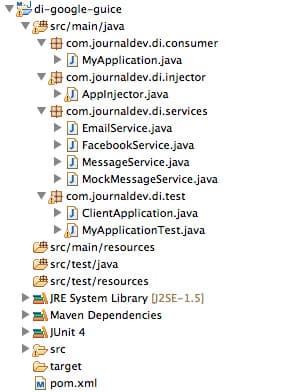
Hãy cùng xem từng component một.
package com.journaldev.di.services;public interface MessageService {
boolean sendMessage(String msg, String receipient);}
Interface MessageService cung cấp base contract cho các service.
package com.journaldev.di.services;import javax.inject.Singleton;
//import com.google.inject.Singleton;
@Singleton public class EmailService implements MessageService {
public boolean sendMessage(String msg, String receipient) { //some fancy code to send email System.out.println("Email Message sent to "+receipient+" with message="+msg); return true; }}
EmailService là một trong những lớp triển khai (implementation) của MessageService. Hãy chú ý rằng lớp này được đánh dấu bằng @Singleton annotation. Vì các service object sẽ được tạo thông qua các lớp injector, annotation này được cung cấp để cho chúng biết rằng các lớp service nên là các singleton object. Google Guice 3.0 đã thêm hỗ trợ cho JSR-330 và chúng ta có thể sử dụng các annotation từ package com.google.inject hoặc javax.inject. Giả sử chúng ta có một triển khai service khác để gửi tin nhắn Facebook.
package com.journaldev.di.services;import javax.inject.Singleton;
//import com.google.inject.Singleton;
@Singleton public class FacebookService implements MessageService {
public boolean sendMessage(String msg, String receipient) { //some complex code to send Facebook message System.out.println("Message sent to Facebook user "+receipient+" with message="+msg); return true; }}
Vì chúng ta đang triển khai dependency injection trong ứng dụng của mình, chúng ta sẽ không khởi tạo service class trong ứng dụng. Google Guice hỗ trợ cả setter-based và constructor-based dependency injection. Application class của chúng ta, vốn sử dụng service, trông như dưới đây.
package com.journaldev.di.consumer;import javax.inject.Inject;
//import com.google.inject.Inject; import com.journaldev.di.services.MessageService;
public class MyApplication {
private MessageService service;// constructor based injector // @Inject // public MyApplication(MessageService svc){ // this.service=svc; // }
//setter method injector @Inject public void setService(MessageService svc){ this.service=svc; } public boolean sendMessage(String msg, String rec){ //some business logic here return service.sendMessage(msg, rec); }}
Lưu ý rằng tôi đã để phần mã tiêm phụ thuộc qua constructor dưới dạng comment điều này rất tiện lợi khi ứng dụng của bạn cũng cung cấp một số tính năng khác không cần serviceobject. Ngoài ra, hãy chú ý đến @Inject annotation, Google Guice sẽ sử dụng nó tự động tiêm service implementation class.
Rõ ràng Google Guice sẽ không tự biết sử dụng service nào, chúng ta phải cấu hình nó bằng cách mở rộng abstract class AbstractModule và cung cấp implementation cho method configure().
package com.journaldev.di.injector;import com.google.inject.AbstractModule; import com.journaldev.di.services.EmailService; import com.journaldev.di.services.FacebookService; import com.journaldev.di.services.MessageService;
public class AppInjector extends AbstractModule {
@Override protected void configure() { //bind the service to implementation class //bind(MessageService.class).to(EmailService.class); //bind MessageService to Facebook Message implementation bind(MessageService.class).to(FacebookService.class); }}
Bạn có thể thấy rằng chúng ta có thể liên kết (bind) bất kỳ implementation nào cho service class. Ví dụ, nếu chúng ta muốn thay đổi sang EmailService, chúng ta chỉ cần thay đổi các binding.
Việc thiết lập của chúng ta đã sẵn sàng, hãy cùng xem cách sử dụng nó với một Java class đơn giản.
package com.journaldev.di.test;import com.google.inject.Guice; import com.google.inject.Injector;
import com.journaldev.di.consumer.MyApplication; import com.journaldev.di.injector.AppInjector;
public class ClientApplication {
public static void main(String[] args) { Injector injector = Guice.createInjector(new AppInjector()); MyApplication app = injector.getInstance(MyApplication.class); app.sendMessage("Hi Pankaj", "pankaj@abc.com"); }}
Việc triển khai rất dễ hiểu. Chúng ta cần tạo Injector object bằng cách sử dụng method createInjector() của Guice class và truyền vào object triển khai injector class của chúng ta. Sau đó, chúng ta sử dụng injector để khởi tạo consumer class của mình. Nếu chúng ta chạy class trên, nó sẽ tạo ra output như sau.
Message sent to Facebook user pankaj@abc.com with message=Hi Pankaj
Nếu chúng ta thay đổi các binding sang EmailService trong AppInjector class thì nó sẽ tạo ra output như sau.
Email Message sent to pankaj@abc.com with message=Hi Pankaj
Vì chúng ta muốn kiểm thử MyApplication class, chúng ta không cần phải tạo triển khai service thực tế. Chúng ta có thể có một Mock service implementation class đơn giản như dưới đây.
package com.journaldev.di.services;public class MockMessageService implements MessageService{
public boolean sendMessage(String msg, String receipient) { return true; }}
JUnit 4 test class của tôi trông như dưới đây.
package com.journaldev.di.test;import org.junit.After; import org.junit.Assert; import org.junit.Before; import org.junit.Test;
import com.google.inject.AbstractModule; import com.google.inject.Guice; import com.google.inject.Injector; import com.journaldev.di.consumer.MyApplication; import com.journaldev.di.services.MessageService; import com.journaldev.di.services.MockMessageService;
public class MyApplicationTest {
private Injector injector; @Before public void setUp() throws Exception { injector = Guice.createInjector(new AbstractModule() { @Override protected void configure() { bind(MessageService.class).to(MockMessageService.class); } }); } @After public void tearDown() throws Exception { injector = null; } @Test public void test() { MyApplication appTest = injector.getInstance(MyApplication.class); Assert.assertEquals(true, appTest.sendMessage("Hi Pankaj", "pankaj@abc.com"));; }}
Hãy chú ý rằng tôi đang liên kết lớp MockMessageService với MessageService bằng cách có một triển khai anonymous class (lớp ẩn danh) của AbstractModule. Điều này được thực hiện trong method setUp() chạy trước các test method.
Vậy là chúng ta đã hoàn thành hướng dẫn và ví dụ về Google Guice. Việc sử dụng Google Guice để triển khai dependency injection trong ứng dụng rất đơn giản và hiệu quả. Nó được sử dụng trong các API của Google nên chúng ta có thể giả định rằng nó là code đã được kiểm thử kỹ lưỡng và đáng tin cậy. Hãy tải xuống dự án từ trên và thử nghiệm với nó để tìm hiểu thêm.