
- Sản phẩm & Dịch vụSản phẩm & Dịch vụ
- Giải phápGiải pháp
- Bảng giáBảng giá
- Công tyCông ty
- Tài liệuTài liệu

vi
vi
Chuyên mục với các bài viết hướng dẫn, nghiên cứu và phân tích chi tiết về kỹ thuật, các xu hướng công nghệ mới nhất dành cho lập trình viên.

I’m passionate about web development and sharing my insights through articles, with over 8 years of experience. I hope these sharings inspire you and help build a strong web development community. @#@ Tôi đam mê phát triển web và chia sẻ những hiểu biết của mình thông qua các bài viết, với hơn 8 năm kinh nghiệm. Tôi hy vọng những chia sẻ này sẽ truyền cảm hứng cho các bạn và giúp xây dựng một cộng đồng phát triển web mạnh mẽ.
Thảo luận (0)
Đăng nhập để thảo luận
Có nhiều cách để đọc file txt trong Java. Chúng ta sẽ cùng tìm hiểu lần lượt từng phương pháp.
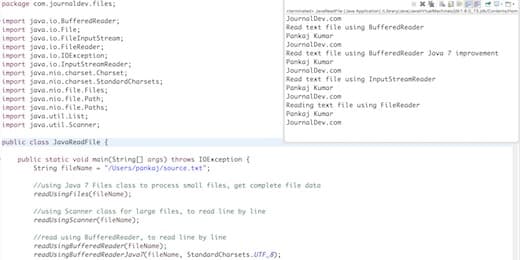
Minh họa quy trình đọc file trong Java bằng nhiều cách
Một tập tin văn bản gồm các ký tự, vì vậy có thể dùng các lớp Reader hoặc một số lớp tiện ích khác để đọc, chẳng hạn: Files, FileReader, BufferedReader và Scanner.
java.nio.file.FilesChúng ta có thể dùng Files class để đọc toàn bộ nội dung tập tin vào mảng byte hoặc tất cả các dòng trong danh sách chuỗi.
Được giới thiệu từ Java 7, Files rất hiệu quả khi cần tải toàn bộ nội dung, nhưng chỉ nên áp dụng với tập tin nhỏ vì phải nạp hết vào bộ nhớ.
String fileName = "/Users/pankaj/source.txt";
Path path = Paths.get(fileName);
byte[] bytes = Files.readAllBytes(path);
List<String> allLines = Files.readAllLines(path, StandardCharsets.UTF_8);
java.io.FileReaderBạn có thể dùng FileReader để tạo BufferedReader rồi đọc từng dòng. Tuy nhiên, FileReader không hỗ trợ encoding mà sử dụng encoding mặc định của hệ thống, nên đây không phải là cách hiệu quả để đọc tập tin văn bản.
String fileName = "/Users/pankaj/source.txt";
File file = new File(fileName);
FileReader fr = new FileReader(file);
BufferedReader br = new BufferedReader(fr);
String line;
while((line = br.readLine()) != null){
    System.out.println(line);
}
java.io.BufferedReaderBufferedReader phù hợp khi cần đọc tập tin theo từng dòng và xử lý. Tiện ích này hỗ trợ encoding, thích hợp cho tập tin lớn và an toàn khi dùng đa luồng vì được đồng bộ hóa. Kích thước bộ đệm mặc định của BufferedReader là 8KB.
String fileName = "/Users/pankaj/source.txt"; File file = new File(fileName); FileInputStream fis = new FileInputStream(file); InputStreamReader isr = new InputStreamReader(fis, cs); BufferedReader br = new BufferedReader(isr);String line; while((line = br.readLine()) != null){ System.out.println(line); } br.close();
Nếu bạn muốn đọc tập tin từng dòng hoặc dựa trên biểu thức chính quy, Scanner đáp ứng tốt nhu cầu này.
Scanner phân tích đầu vào thành các token dựa trên một pattern (mặc định là khoảng trắng). Các token có thể được chuyển đổi sang các kiểu dữ liệu khác nhau qua các phương thức next. Tuy nhiên, Scanner không đồng bộ, nên không an toàn trong môi trường đa luồng.
Path path = Paths.get(fileName);
Scanner scanner = new Scanner(path);
System.out.println("Read text file using Scanner");
while(scanner.hasNextLine()){
    String line = scanner.nextLine();
    System.out.println(line);
}
scanner.close();
Dưới đây là lớp ví dụ thể hiện nhiều cách đọc tập tin văn bản trong Java, sử dụng Scanner, Files, BufferedReader (có hỗ trợ encoding) và FileReader.
package com.journaldev.files;import java.io.; import java.nio.charset.Charset; import java.nio.charset.StandardCharsets; import java.nio.file.; import java.util.List; import java.util.Scanner;
public class JavaReadFile {
public static void main(String[] args) throws IOException { String fileName = "/Users/pankaj/source.txt"; readUsingFiles(fileName); readUsingScanner(fileName); readUsingBufferedReader(fileName); readUsingBufferedReaderJava7(fileName, StandardCharsets.UTF_8); readUsingBufferedReader(fileName, StandardCharsets.UTF_8); readUsingFileReader(fileName); } private static void readUsingFileReader(String fileName) throws IOException { File file = new File(fileName); FileReader fr = new FileReader(file); BufferedReader br = new BufferedReader(fr); String line; System.out.println("Reading text file using FileReader"); while((line = br.readLine()) != null){ System.out.println(line); } br.close(); fr.close(); } private static void readUsingBufferedReader(String fileName, Charset cs) throws IOException { File file = new File(fileName); FileInputStream fis = new FileInputStream(file); InputStreamReader isr = new InputStreamReader(fis, cs); BufferedReader br = new BufferedReader(isr); String line; System.out.println("Read text file using InputStreamReader"); while((line = br.readLine()) != null){ System.out.println(line); } br.close(); } private static void readUsingBufferedReaderJava7(String fileName, Charset cs) throws IOException { Path path = Paths.get(fileName); BufferedReader br = Files.newBufferedReader(path, cs); String line; System.out.println("Read text file using BufferedReader Java 7 improvement"); while((line = br.readLine()) != null){ System.out.println(line); } br.close(); } private static void readUsingBufferedReader(String fileName) throws IOException { File file = new File(fileName); FileReader fr = new FileReader(file); BufferedReader br = new BufferedReader(fr); String line; System.out.println("Read text file using BufferedReader"); while((line = br.readLine()) != null){ System.out.println(line); } br.close(); fr.close(); } private static void readUsingScanner(String fileName) throws IOException { Path path = Paths.get(fileName); Scanner scanner = new Scanner(path); System.out.println("Read text file using Scanner"); while(scanner.hasNextLine()){ String line = scanner.nextLine(); System.out.println(line); } scanner.close(); } private static void readUsingFiles(String fileName) throws IOException { Path path = Paths.get(fileName); byte[] bytes = Files.readAllBytes(path); System.out.println("Read text file using Files class"); @SuppressWarnings("unused") List<String> allLines = Files.readAllLines(path, StandardCharsets.UTF_8); System.out.println(new String(bytes)); }}
Việc chọn Scanner, BufferedReader hay Files để đọc tập tin phụ thuộc vào yêu cầu dự án. Nếu chỉ cần ghi log nội dung, bạn có thể dùng Files hoặc BufferedReader. Nếu cần phân tích dựa trên dấu tách, hãy dùng Scanner.
Ngoài ra, cũng có thể dùng RandomAccessFile để đọc tập tin văn bản trong Java.
RandomAccessFile file = new RandomAccessFile("/Users/pankaj/Downloads/myfile.txt", "r");
String str;
while ((str = file.readLine()) != null) {
System.out.println(str);
}
file.close();
Trên đây là những ví dụ minh họa cách đọc tập tin văn bản trong Java. Hy vọng chúng sẽ giúp bạn dễ dàng lựa chọn phương pháp phù hợp cho dự án của mình.
