Chuyển đổi Excel sang JSON bằng Python
3 phút đọc15/09/2025
Về tác giả
I have over 5 years of experience writing technical documentation for tech products, making them accessible and user-friendly. My focus is always on providing clear and precise information.
@#@
Tôi đã có hơn 5 năm kinh nghiệm viết tài liệu kỹ thuật cho các sản phẩm công nghệ, giúp người dùng dễ dàng tiếp cận và sử dụng. Tôi luôn tập trung vào việc cung cấp thông tin chính xác và dễ hiểu.
Cập nhật thông tin mới nhấtNhận các thông tin mới nhất về mối đe dọa, báo cáo an ninh mạng từ CyStack về hòm thư điện tử của bạn
{"success":true,"head":"<title>Chuyển đổi Excel sang JSON bằng Python - CyStack Tutorial</title>\n<meta name=\"description\" content=\"Trong hướng dẫn này, chúng ta sẽ cùng tìm hiểu 2 module Python để chuyển đổi Excel sang JSON:\"/>\n<meta name=\"robots\" content=\"index, follow, max-snippet:-1, max-video-preview:-1, max-image-preview:large\"/>\n<link rel=\"canonical\" href=\"https://blog.cystack.org/tutorial/vi/2025/09/15/chuyen-doi-excel-sang-json-bang-python/\" />\n<meta property=\"og:locale\" content=\"en_US\" />\n<meta property=\"og:type\" content=\"article\" />\n<meta property=\"og:title\" content=\"Chuyển đổi Excel sang JSON bằng Python - CyStack Tutorial\" />\n<meta property=\"og:description\" content=\"Trong hướng dẫn này, chúng ta sẽ cùng tìm hiểu 2 module Python để chuyển đổi Excel sang JSON:\" />\n<meta property=\"og:url\" content=\"https://blog.cystack.org/tutorial/vi/2025/09/15/chuyen-doi-excel-sang-json-bang-python/\" />\n<meta property=\"og:site_name\" content=\"CyStack Tutorial\" />\n<meta property=\"article:tag\" content=\"vi\" />\n<meta property=\"article:section\" content=\"Python\" />\n<meta property=\"og:updated_time\" content=\"2026-08-03T18:17:51+07:00\" />\n<meta property=\"og:image\" content=\"https://s2.cystack.net/tutorial/15112400/chuyen-doi-excel-sang-json-bang-python.jpg\" />\n<meta property=\"og:image:secure_url\" content=\"https://s2.cystack.net/tutorial/15112400/chuyen-doi-excel-sang-json-bang-python.jpg\" />\n<meta property=\"og:image:width\" content=\"1200\" />\n<meta property=\"og:image:height\" content=\"630\" />\n<meta property=\"og:image:alt\" content=\"Chuyển đổi Excel sang JSON bằng Python\" />\n<meta property=\"og:image:type\" content=\"image/jpeg\" />\n<meta property=\"article:published_time\" content=\"2025-09-15T11:29:16+07:00\" />\n<meta property=\"article:modified_time\" content=\"2026-08-03T18:17:51+07:00\" />\n<meta name=\"twitter:card\" content=\"summary_large_image\" />\n<meta name=\"twitter:title\" content=\"Chuyển đổi Excel sang JSON bằng Python - CyStack Tutorial\" />\n<meta name=\"twitter:description\" content=\"Trong hướng dẫn này, chúng ta sẽ cùng tìm hiểu 2 module Python để chuyển đổi Excel sang JSON:\" />\n<meta name=\"twitter:image\" content=\"https://s2.cystack.net/tutorial/15112400/chuyen-doi-excel-sang-json-bang-python.jpg\" />\n<meta name=\"twitter:label1\" content=\"Written by\" />\n<meta name=\"twitter:data1\" content=\"Chris Pham\" />\n<meta name=\"twitter:label2\" content=\"Time to read\" />\n<meta name=\"twitter:data2\" content=\"2 minutes\" />\n<script type=\"application/ld+json\" class=\"rank-math-schema\">{\"@context\":\"https://schema.org\",\"@graph\":[{\"@type\":[\"Person\",\"Organization\"],\"@id\":\"https://blog.cystack.org/tutorial/#person\",\"name\":\"CyStack Tutorial\"},{\"@type\":\"WebSite\",\"@id\":\"https://blog.cystack.org/tutorial/#website\",\"url\":\"https://blog.cystack.org/tutorial\",\"name\":\"CyStack Tutorial\",\"publisher\":{\"@id\":\"https://blog.cystack.org/tutorial/#person\"},\"inLanguage\":\"en-US\"},{\"@type\":\"ImageObject\",\"@id\":\"https://s2.cystack.net/tutorial/15112400/chuyen-doi-excel-sang-json-bang-python.jpg\",\"url\":\"https://s2.cystack.net/tutorial/15112400/chuyen-doi-excel-sang-json-bang-python.jpg\",\"width\":\"1200\",\"height\":\"630\",\"caption\":\"Chuy\\u1ec3n \\u0111\\u1ed5i Excel sang JSON b\\u1eb1ng Python\",\"inLanguage\":\"en-US\"},{\"@type\":\"BreadcrumbList\",\"@id\":\"https://blog.cystack.org/tutorial/vi/2025/09/15/chuyen-doi-excel-sang-json-bang-python/#breadcrumb\",\"itemListElement\":[{\"@type\":\"ListItem\",\"position\":\"1\",\"item\":{\"@id\":\"https://blog.cystack.org/tutorial\",\"name\":\"Home\"}},{\"@type\":\"ListItem\",\"position\":\"2\",\"item\":{\"@id\":\"https://blog.cystack.org/tutorial/vi/category/python/\",\"name\":\"Python\"}},{\"@type\":\"ListItem\",\"position\":\"3\",\"item\":{\"@id\":\"https://blog.cystack.org/tutorial/vi/2025/09/15/chuyen-doi-excel-sang-json-bang-python/\",\"name\":\"Chuy\\u1ec3n \\u0111\\u1ed5i Excel sang JSON b\\u1eb1ng Python\"}}]},{\"@type\":\"WebPage\",\"@id\":\"https://blog.cystack.org/tutorial/vi/2025/09/15/chuyen-doi-excel-sang-json-bang-python/#webpage\",\"url\":\"https://blog.cystack.org/tutorial/vi/2025/09/15/chuyen-doi-excel-sang-json-bang-python/\",\"name\":\"Chuy\\u1ec3n \\u0111\\u1ed5i Excel sang JSON b\\u1eb1ng Python - CyStack Tutorial\",\"datePublished\":\"2025-09-15T11:29:16+07:00\",\"dateModified\":\"2026-08-03T18:17:51+07:00\",\"isPartOf\":{\"@id\":\"https://blog.cystack.org/tutorial/#website\"},\"primaryImageOfPage\":{\"@id\":\"https://s2.cystack.net/tutorial/15112400/chuyen-doi-excel-sang-json-bang-python.jpg\"},\"inLanguage\":\"en-US\",\"breadcrumb\":{\"@id\":\"https://blog.cystack.org/tutorial/vi/2025/09/15/chuyen-doi-excel-sang-json-bang-python/#breadcrumb\"}},{\"@type\":\"Person\",\"@id\":\"https://blog.cystack.org/tutorial/author/codeweaver/\",\"name\":\"Chris Pham\",\"url\":\"https://blog.cystack.org/tutorial/author/codeweaver/\",\"image\":{\"@type\":\"ImageObject\",\"@id\":\"https://secure.gravatar.com/avatar/7a3584c941fa360ac061b2a8f15684ced7b92daa1f09481be135a684d989e9b9?s=96&d=mm&r=g\",\"url\":\"https://secure.gravatar.com/avatar/7a3584c941fa360ac061b2a8f15684ced7b92daa1f09481be135a684d989e9b9?s=96&d=mm&r=g\",\"caption\":\"Chris Pham\",\"inLanguage\":\"en-US\"}},{\"@type\":\"BlogPosting\",\"headline\":\"Chuy\\u1ec3n \\u0111\\u1ed5i Excel sang JSON b\\u1eb1ng Python - CyStack Tutorial\",\"keywords\":\"Chuy\\u1ec3n \\u0111\\u1ed5i Excel sang JSON\",\"datePublished\":\"2025-09-15T11:29:16+07:00\",\"dateModified\":\"2026-08-03T18:17:51+07:00\",\"articleSection\":\"Python\",\"author\":{\"@id\":\"https://blog.cystack.org/tutorial/author/codeweaver/\",\"name\":\"Chris Pham\"},\"publisher\":{\"@id\":\"https://blog.cystack.org/tutorial/#person\"},\"description\":\"Trong h\\u01b0\\u1edbng d\\u1eabn n\\u00e0y, ch\\u00fang ta s\\u1ebd c\\u00f9ng t\\u00ecm hi\\u1ec3u 2 module Python \\u0111\\u1ec3 chuy\\u1ec3n \\u0111\\u1ed5i Excel sang JSON:\",\"name\":\"Chuy\\u1ec3n \\u0111\\u1ed5i Excel sang JSON b\\u1eb1ng Python - CyStack Tutorial\",\"@id\":\"https://blog.cystack.org/tutorial/vi/2025/09/15/chuyen-doi-excel-sang-json-bang-python/#richSnippet\",\"isPartOf\":{\"@id\":\"https://blog.cystack.org/tutorial/vi/2025/09/15/chuyen-doi-excel-sang-json-bang-python/#webpage\"},\"image\":{\"@id\":\"https://s2.cystack.net/tutorial/15112400/chuyen-doi-excel-sang-json-bang-python.jpg\"},\"inLanguage\":\"en-US\",\"mainEntityOfPage\":{\"@id\":\"https://blog.cystack.org/tutorial/vi/2025/09/15/chuyen-doi-excel-sang-json-bang-python/#webpage\"}}]}</script>\n"}

Trong hướng dẫn này, chúng ta sẽ cùng tìm hiểu 2 module Python để chuyển đổi Excel sang JSON:
Chuyển đổi Excel sang JSON bằng module excel2json-3
Đây là một module rất đơn giản để chuyển đổi tệp Excel thành tệp JSON. Nội dung từ sheet Excel được chuyển thành chuỗi JSON và lưu trong tệp. Tên tệp JSON được lấy từ tên sheet Excel.
Ví dụ, nếu có 2 sheet tên là “Numbers” và “Cars”, các tệp JSON sẽ được đặt tên tương ứng là Numbers.json và Cars.json.
Module này hỗ trợ chuyển đổi cả định dạng .xls và .xlsx. Chúng ta có thể đọc tệp Excel từ hệ thống file hoặc từ URL. Cài đặt module này bằng lệnh PIP:
$ pip install excel2json-3
Trong ví dụ này, chúng ta có một tệp Excel tên records.xlsx chứa 3 sheet.
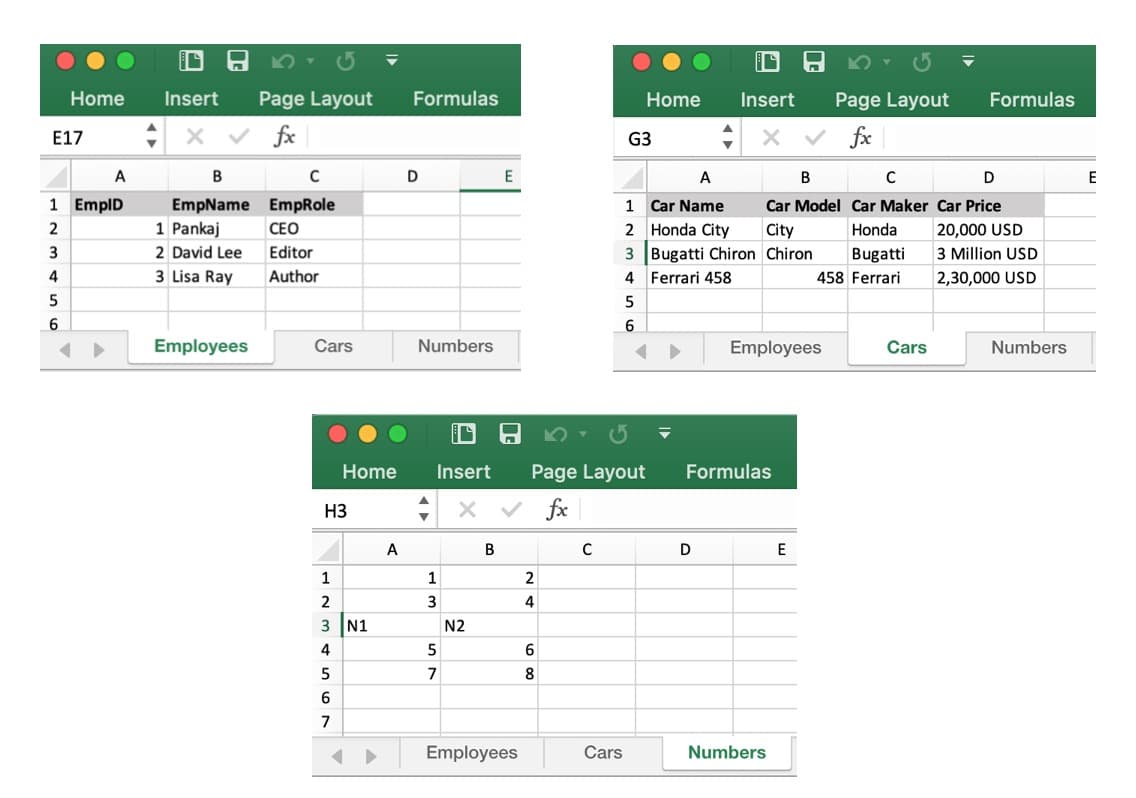
Ví dụ tệp Excel chuyển sang JSON bằng Python
Dưới đây là script để chuyển đổi tệp Excel này thành các tệp JSON:
import excel2json
excel2json.convert_from_file('records.xlsx')
Script này sẽ tạo ra 3 tệp JSON.
Employees.json
[
    {
        "EmpID": 1.0,
        "EmpName": "Pankaj",
        "EmpRole": "CEO"
    },
    {
        "EmpID": 2.0,
        "EmpName": "David Lee",
        "EmpRole": "Editor"
    },
    {
        "EmpID": 3.0,
        "EmpName": "Lisa Ray",
        "EmpRole": "Author"
    }
]
Cars.json
[
    {
        "Car Name": "Honda City",
        "Car Model": "City",
        "Car Maker": "Honda",
        "Car Price": "20,000 USD"
    },
    {
        "Car Name": "Bugatti Chiron",
        "Car Model": "Chiron",
        "Car Maker": "Bugatti",
        "Car Price": "3 Million USD"
    },
    {
        "Car Name": "Ferrari 458",
        "Car Model": 458.0,
        "Car Maker": "Ferrari",
        "Car Price": "2,30,000 USD"
    }
]
Numbers.json
[
    {
        "1.0": 3.0,
        "2.0": 4.0
    },
    {
        "1.0": "N1",
        "2.0": "N2"
    },
    {
        "1.0": 5.0,
        "2.0": 6.0
    },
    {
        "1.0": 7.0,
        "2.0": 8.0
    }
]
Nếu cần đọc tệp Excel từ URL, có thể sử dụng hàm convert_from_url().
Hạn chế của module excel2json-3
- Tính năng rất hạn chế
- Không có tùy chọn nào để bỏ qua sheet, hàng hoặc cột, gây khó khăn với tệp Excel lớn
- JSON được lưu vào tệp, trong khi nhiều trường hợp chúng ta muốn chuyển sang JSON và dùng trực tiếp trong chương trình thay vì lưu ra file
- Số nguyên bị chuyển thành số thực
Chuyển đổi sheet Excel sang chuỗi JSON bằng module Pandas
Module Pandas cung cấp các hàm đọc sheet Excel vào đối tượng DataFrame. Nó hỗ trợ nhiều tùy chọn như chỉ định header, đọc cột cụ thể, bỏ qua hàng… Bạn có thể tham khảo thêm tại tài liệu pandas.read_excel(). Chúng ta có thể dùng hàm to_json() để chuyển đổi DataFrame thành chuỗi JSON.
Ví dụ đọc sheet “Employees” và chuyển thành chuỗi JSON:
import pandas
excel_data_df = pandas.read_excel('records.xlsx', sheet_name='Employees')
json_str = excel_data_df.to_json()
print('Excel Sheet to JSON:\n', json_str)
Đầu ra:
Excel Sheet to JSON:
 {"EmpID":{"0":1,"1":2,"2":3},"EmpName":{"0":"Pankaj","1":"David Lee","2":"Lisa Ray"},"EmpRole":{"0":"CEO","1":"Editor","2":"Author"}}
Theo mặc định, dữ liệu JSON được tạo theo hướng cột. Nếu muốn dữ liệu theo từng dòng, truyền tham số orient='records':
json_str = excel_data_df.to_json(orient='records')
Đầu ra:
Excel Sheet to JSON:
 [{"EmpID":1,"EmpName":"Pankaj","EmpRole":"CEO"},{"EmpID":2,"EmpName":"David Lee","EmpRole":"Editor"},{"EmpID":3,"EmpName":"Lisa Ray","EmpRole":"Author"}]
Kết luận
Đối với tệp Excel đơn giản và có cấu trúc rõ ràng, bạn nên dùng module excel2json-3 để chuyển sang tệp JSON. Nhưng nếu cần kiểm soát chi tiết hơn cách đọc dữ liệu Excel và cách chuyển sang JSON string, module pandas là lựa chọn phù hợp hơn.
Tham khảo
- excel2json-3 PyPI.org Page
- Pandas DataFrame
to_json() API Doc



