
- Sản phẩm & Dịch vụSản phẩm & Dịch vụ
- Giải phápGiải pháp
- Bảng giáBảng giá
- Công tyCông ty
- Tài liệuTài liệu

vi
vi
Chuyên mục với các bài viết hướng dẫn, nghiên cứu và phân tích chi tiết về kỹ thuật, các xu hướng công nghệ mới nhất dành cho lập trình viên.

Technical Writer

I have over 5 years of experience writing technical documentation for tech products, making them accessible and user-friendly. My focus is always on providing clear and precise information. @#@ Tôi đã có hơn 5 năm kinh nghiệm viết tài liệu kỹ thuật cho các sản phẩm công nghệ, giúp người dùng dễ dàng tiếp cận và sử dụng. Tôi luôn tập trung vào việc cung cấp thông tin chính xác và dễ hiểu.
Thảo luận (0)
Đăng nhập để thảo luận
Bất cứ khi nào nhận dữ liệu đầu vào từ người dùng cho một ứng dụng web, ta đều cần phải validate (xác thực tính hợp lệ) của chúng. Quá trình này có thể thực hiện ở phía client bằng JavaScript, nhưng việc validate ở phía server cũng rất quan trọng. Điều này giúp đảm bảo rằng chúng ta chỉ xử lý dữ liệu hợp lệ, ngay cả khi người dùng đã tắt JavaScript trên trình duyệt.
Trong bài này, chúng ta sẽ cùng nhau tìm hiểu các xác thực form trong Spring MVC.
Spring MVC Framework mặc định đã hỗ trợ tiêu chuẩn JSR-303. Tất cả những gì chúng ta cần làm là thêm các dependency của nó vào ứng dụng. Spring cũng cung cấp annotation @Valid và class BindingResult để ta có thể lấy các lỗi phát sinh từ triển khai của validator (bộ kiểm tra tính hợp lệ của dữ liệu) ngay trong phương thức xử lý request của controller.
Ta có thể tạo ra các custom validator theo hai cách. Cách đầu tiên là tạo một annotation tuân thủ tiêu chuẩn JSR-303 và triển khai class Validator tương ứng. Cách thứ hai là triển khai interface org.springframework.validation.Validator và thiết lập nó làm validator trong class Controller thông qua annotation @InitBinder.
Bây giờ, chúng ta sẽ tạo một dự án Spring MVC đơn giản trong Spring Tool Suite, sử dụng bản triển khai của tiêu chuẩn JSR-303 là hibernate-validator. Ta sẽ dùng validation form (biểu mẫu xác thực) dựa trên annotation và tạo một custom validator theo chuẩn JSR-303. Đồng thời, ta cũng sẽ tạo một custom validator class khác bằng cách triển khai interface Validator và dùng nó trong một phương thức xử lý của controller.
Cấu trúc dự án cuối cùng sẽ trông giống như hình dưới.
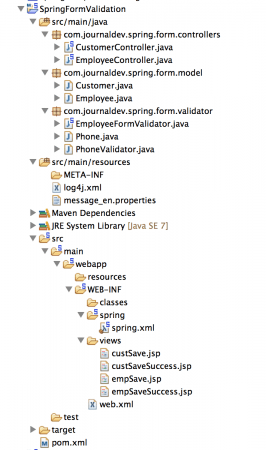
Bây giờ chúng ta sẽ xem xét chi tiết lần lượt từng thành phần.
File pom.xml cuối cùng sẽ trông như bên dưới. Ngoài các thành phần chuẩn của Spring MVC, dự án còn có thêm hai dependency là validation-api và hibernate-validator.
<?xml version="1.0" encoding="UTF-8"?> <project xmlns="<https://maven.apache.org/POM/4.0.0>" xmlns:xsi="<https://www.w3.org/2001/XMLSchema-instance>" xsi:schemaLocation="<https://maven.apache.org/POM/4.0.0> <https://maven.apache.org/maven-v4_0_0.xsd>"> <modelVersion>4.0.0</modelVersion> <groupId>com.journaldev</groupId> <artifactId>spring</artifactId> <name>SpringFormValidation</name> <packaging>war</packaging> <version>1.0.0-BUILD-SNAPSHOT</version> <properties> <java-version>1.7</java-version> <org.springframework-version>4.0.2.RELEASE</org.springframework-version> <org.aspectj-version>1.7.4</org.aspectj-version> <org.slf4j-version>1.7.5</org.slf4j-version> </properties> <dependencies> <!-- Form Validation using Annotations --> <dependency> <groupId>javax.validation</groupId> <artifactId>validation-api</artifactId> <version>1.1.0.Final</version> </dependency> <dependency> <groupId>org.hibernate</groupId> <artifactId>hibernate-validator</artifactId> <version>4.1.0.Final</version> </dependency><!-- Spring --> <dependency> <groupId>org.springframework</groupId> <artifactId>spring-context</artifactId> <version>${org.springframework-version}</version> <exclusions> <!-- Exclude Commons Logging in favor of SLF4j --> <exclusion> <groupId>commons-logging</groupId> <artifactId>commons-logging</artifactId> </exclusion> </exclusions> </dependency> <dependency> <groupId>org.springframework</groupId> <artifactId>spring-webmvc</artifactId> <version>${org.springframework-version}</version> </dependency> <!-- AspectJ --> <dependency> <groupId>org.aspectj</groupId> <artifactId>aspectjrt</artifactId> <version>${org.aspectj-version}</version> </dependency> <!-- Logging --> <dependency> <groupId>org.slf4j</groupId> <artifactId>slf4j-api</artifactId> <version>${org.slf4j-version}</version> </dependency> <dependency> <groupId>org.slf4j</groupId> <artifactId>jcl-over-slf4j</artifactId> <version>${org.slf4j-version}</version> <scope>runtime</scope> </dependency> <dependency> <groupId>org.slf4j</groupId> <artifactId>slf4j-log4j12</artifactId> <version>${org.slf4j-version}</version> <scope>runtime</scope> </dependency> <dependency> <groupId>log4j</groupId> <artifactId>log4j</artifactId> <version>1.2.15</version> <exclusions> <exclusion> <groupId>javax.mail</groupId> <artifactId>mail</artifactId> </exclusion> <exclusion> <groupId>javax.jms</groupId> <artifactId>jms</artifactId> </exclusion> <exclusion> <groupId>com.sun.jdmk</groupId> <artifactId>jmxtools</artifactId> </exclusion> <exclusion> <groupId>com.sun.jmx</groupId> <artifactId>jmxri</artifactId> </exclusion> </exclusions> <scope>runtime</scope> </dependency> <!-- @Inject --> <dependency> <groupId>javax.inject</groupId> <artifactId>javax.inject</artifactId> <version>1</version> </dependency> <!-- Servlet --> <dependency> <groupId>javax.servlet</groupId> <artifactId>servlet-api</artifactId> <version>2.5</version> <scope>provided</scope> </dependency> <dependency> <groupId>javax.servlet.jsp</groupId> <artifactId>jsp-api</artifactId> <version>2.1</version> <scope>provided</scope> </dependency> <dependency> <groupId>javax.servlet</groupId> <artifactId>jstl</artifactId> <version>1.2</version> </dependency> <!-- Test --> <dependency> <groupId>junit</groupId> <artifactId>junit</artifactId> <version>4.7</version> <scope>test</scope> </dependency> </dependencies> <build> <plugins> <plugin> <artifactId>maven-eclipse-plugin</artifactId> <version>2.9</version> <configuration> <additionalProjectnatures> <projectnature>org.springframework.ide.eclipse.core.springnature</projectnature> </additionalProjectnatures> <additionalBuildcommands> <buildcommand>org.springframework.ide.eclipse.core.springbuilder</buildcommand> </additionalBuildcommands> <downloadSources>true</downloadSources> <downloadJavadocs>true</downloadJavadocs> </configuration> </plugin> <plugin> <groupId>org.apache.maven.plugins</groupId> <artifactId>maven-compiler-plugin</artifactId> <version>2.5.1</version> <configuration> <source>1.6</source> <target>1.6</target> <compilerArgument>-Xlint:all</compilerArgument> <showWarnings>true</showWarnings> <showDeprecation>true</showDeprecation> </configuration> </plugin> <plugin> <groupId>org.codehaus.mojo</groupId> <artifactId>exec-maven-plugin</artifactId> <version>1.2.1</version> <configuration> <mainClass>org.test.int1.Main</mainClass> </configuration> </plugin> </plugins> </build></project>
Khi tạo một dự án Spring MVC từ STS, công cụ này sẽ tạo ra hai file cấu hình cho context. Ở đây, ta đã tinh gọn lại và chỉ giữ một file cấu hình Spring bean duy nhất. File web.xml cuối cùng sẽ như sau.
<?xml version="1.0" encoding="UTF-8"?> <web-app version="2.5" xmlns="<https://java.sun.com/xml/ns/javaee>" xmlns:xsi="<https://www.w3.org/2001/XMLSchema-instance>" xsi:schemaLocation="<https://java.sun.com/xml/ns/javaee> <https://java.sun.com/xml/ns/javaee/web-app_2_5.xsd>"><!-- Processes application requests --> <servlet> <servlet-name>appServlet</servlet-name> <servlet-class>org.springframework.web.servlet.DispatcherServlet</servlet-class> <init-param> <param-name>contextConfigLocation</param-name> <param-value>/WEB-INF/spring/spring.xml</param-value> </init-param> <load-on-startup>1</load-on-startup> </servlet> <servlet-mapping> <servlet-name>appServlet</servlet-name> <url-pattern>/</url-pattern> </servlet-mapping></web-app>
Thường thì ta sẽ xem xét các thiết lập kết nối của Spring sau cùng, nhưng lần này file cấu hình Spring bean cũng không quá phức tạp. File spring.xml cuối cùng của chúng ta sẽ trông như sau:
<?xml version="1.0" encoding="UTF-8"?> <beans:beans xmlns="<https://www.springframework.org/schema/mvc>" xmlns:xsi="<https://www.w3.org/2001/XMLSchema-instance>" xmlns:beans="<https://www.springframework.org/schema/beans>" xmlns:context="<https://www.springframework.org/schema/context>" xsi:schemaLocation="<https://www.springframework.org/schema/mvc> <https://www.springframework.org/schema/mvc/spring-mvc.xsd> <https://www.springframework.org/schema/beans> <https://www.springframework.org/schema/beans/spring-beans.xsd> <https://www.springframework.org/schema/context> <https://www.springframework.org/schema/context/spring-context.xsd>"><!-- DispatcherServlet Context: defines this servlet's request-processing infrastructure --> <!-- Enables the Spring MVC @Controller programming model --> <annotation-driven /> <!-- Handles HTTP GET requests for /resources/** by efficiently serving up static resources in the ${webappRoot}/resources directory --> <resources mapping="/resources/**" location="/resources/" /> <!-- Resolves views selected for rendering by @Controllers to .jsp resources in the /WEB-INF/views directory --> <beans:bean class="org.springframework.web.servlet.view.InternalResourceViewResolver"> <beans:property name="prefix" value="/WEB-INF/views/" /> <beans:property name="suffix" value=".jsp" /> </beans:bean> <beans:bean id="employeeValidator" class="com.journaldev.spring.form.validator.EmployeeFormValidator" /> <beans:bean id="messageSource" class="org.springframework.context.support.ReloadableResourceBundleMessageSource"> <beans:property name="basename" value="classpath:message" /> <beans:property name="defaultEncoding" value="UTF-8" /> </beans:bean> <context:component-scan base-package="com.journaldev.spring" /></beans:beans>
Điểm đáng chú ý duy nhất ở đây là bean employeeValidator (sẽ được thêm vào một controller) và bean messageSource (dùng để đọc dữ liệu đã được bản địa hóa từ các resource bundle – tập hợp file chứa dữ liệu đa ngôn ngữ). Các phần còn lại dùng để hỗ trợ annotation, bộ phân giải view, và khai báo package cần quét để tìm các class Controller và các thành phần khác.
Trong dự án này, ta có hai model class (class định nghĩa cấu trúc và hành vi của dữ liệu). Một class sử dụng annotation của JSR-303 và custom validator dựa trên annotation, và một class thứ hai chỉ sử dụng trong triển khai Validator của riêng ta.
Code file Customer.java:
package com.journaldev.spring.form.model;import java.util.Date;
import javax.validation.constraints.Max; import javax.validation.constraints.Min; import javax.validation.constraints.NotNull; import javax.validation.constraints.Past; import javax.validation.constraints.Size;
import org.hibernate.validator.constraints.Email; import org.hibernate.validator.constraints.NotEmpty; import org.springframework.format.annotation.DateTimeFormat;
import com.journaldev.spring.form.validator.Phone;
public class Customer {
@Size(min=2, max=30) private String name; @NotEmpty @Email private String email; @NotNull @Min(18) @Max(100) private Integer age; @NotNull private Gender gender; @DateTimeFormat(pattern="MM/dd/yyyy") @NotNull @Past private Date birthday; @Phone private String phone; public enum Gender { MALE, FEMALE } public String getName() { return name; } public void setName(String name) { this.name = name; } public String getEmail() { return email; } public void setEmail(String email) { this.email = email; } public Integer getAge() { return age; } public void setAge(Integer age) { this.age = age; } public Gender getGender() { return gender; } public void setGender(Gender gender) { this.gender = gender; } public Date getBirthday() { return birthday; } public void setBirthday(Date birthday) { this.birthday = birthday; } public String getPhone() { return phone; } public void setPhone(String phone) { this.phone = phone; }}
Lưu ý rằng ta đang dùng các annotation @Email, @NotEmpty và @DateTimeFormat. Đây là các annotation bổ sung cho JSR-303, được cung cấp bởi triển khai của Hibernate Validator. Ta cũng sử dụng một vài annotation chuẩn của JSR-303 như @Size, @NotNull. Annotation @Phone là một triển khai tùy chỉnh dựa trên JSR-303 mà ta sẽ tìm hiểu thêm ở phần sau.
Code file Employee.java:
package com.journaldev.spring.form.model;public class Employee {
private int id; private String name; private String role; public int getId() { return id; } public void setId(int id) { this.id = id; } public String getName() { return name; } public void setName(String name) { this.name = name; } public String getRole() { return role; } public void setRole(String role) { this.role = role; }}
Employee là một Java bean tiêu chuẩn. Ta sẽ dùng một triển khai tùy biến của Validator để xác thực form có sử dụng bean này.
Code trong file Phone.java:
package com.journaldev.spring.form.validator;import java.lang.annotation.Documented; import java.lang.annotation.Retention; import java.lang.annotation.Target; import java.lang.annotation.ElementType; import java.lang.annotation.RetentionPolicy;
import javax.validation.Constraint; import javax.validation.Payload;
@Documented @Constraint(validatedBy = PhoneValidator.class) @Target( { ElementType.METHOD, ElementType.FIELD }) @Retention(RetentionPolicy.RUNTIME) public @interface Phone {
String message() default "{Phone}"; Class<?>[] groups() default {}; Class<? extends Payload>[] payload() default {};}
Hầu hết trong file này chứa code mẫu để tuân thủ JSR-303. Phần quan trọng nhất là annotation @Constraint. Ở đó ta khai báo class sẽ được dùng cho việc xác thực, cụ thể là PhoneValidator.
package com.journaldev.spring.form.validator;import javax.validation.ConstraintValidator; import javax.validation.ConstraintValidatorContext;
public class PhoneValidator implements ConstraintValidator<Phone, String> {
@Override public void initialize(Phone paramA) { } @Override public boolean isValid(String phoneNo, ConstraintValidatorContext ctx) { if(phoneNo == null){ return false; } //validate phone numbers of format "1234567890" if (phoneNo.matches("\\\\d{10}")) return true; //validating phone number with -, . or spaces else if(phoneNo.matches("\\\\d{3}[-\\\\.\\\\s]\\\\d{3}[-\\\\.\\\\s]\\\\d{4}")) return true; //validating phone number with extension length from 3 to 5 else if(phoneNo.matches("\\\\d{3}-\\\\d{3}-\\\\d{4}\\\\s(x|(ext))\\\\d{3,5}")) return true; //validating phone number where area code is in braces () else if(phoneNo.matches("\\\\(\\\\d{3}\\\\)-\\\\d{3}-\\\\d{4}")) return true; //return false if nothing matches the input else return false; }}
Triển khai xác thực theo tiêu chuẩn JSR-303 của ta cần tạo một interface ConstraintValidator. Nếu cần dùng đến resource nào đó như DataSource, ta có thể khởi tạo chúng trong phương thức initialize(). Phương thức thực hiện việc xác thực là isValid(). Nó trả về true nếu dữ liệu hợp lệ và false nếu ngược lại.
Code của file EmployeeFormValidator.java:
package com.journaldev.spring.form.validator;import org.springframework.validation.Errors; import org.springframework.validation.ValidationUtils; import org.springframework.validation.Validator;
import com.journaldev.spring.form.model.Employee;
public class EmployeeFormValidator implements Validator {
//which objects can be validated by this validator @Override public boolean supports(Class<?> paramClass) { return Employee.class.equals(paramClass); } @Override public void validate(Object obj, Errors errors) { ValidationUtils.rejectIfEmptyOrWhitespace(errors, "id", "id.required"); Employee emp = (Employee) obj; if(emp.getId() <=0){ errors.rejectValue("id", "negativeValue", new Object[]{"'id'"}, "id can't be negative"); } ValidationUtils.rejectIfEmptyOrWhitespace(errors, "name", "name.required"); ValidationUtils.rejectIfEmptyOrWhitespace(errors, "role", "role.required"); }}
EmployeeFormValidator là một triển khai của validator dành riêng cho Spring Framework. Phương thức supports() được Spring dùng để xác định đối tượng nào có thể áp dụng các xác thực này.
Ta triển khai phương thức validate() và thêm lỗi nếu có bất kỳ trường nào không hợp lệ. Spring cung cấp class ValidationUtils cho các validation cơ bản như kiểm tra null hoặc rỗng. Sau khi phương thức này trả về, Spring sẽ bind (ràng buộc) đối tượng Errors vào đối tượng BindingResult mà ta sử dụng trong phương thức handler của controller.
Lưu ý rằng đối số cuối cùng của rejectIfEmptyOrWhitespace() nhận vào tên key của tài nguyên message. Bằng cách này, ta có thể cung cấp các thông báo lỗi đã được bản địa hóa cho người dùng.
Chúng ta có hai controller class: một cho biểu mẫu xác thực dựa trên annotation và một cho custom validator.
Code của file CustomerController.java:
package com.journaldev.spring.form.controllers;import java.util.HashMap; import java.util.Map;
import javax.validation.Valid;
import org.slf4j.Logger; import org.slf4j.LoggerFactory; import org.springframework.stereotype.Controller; import org.springframework.ui.Model; import org.springframework.validation.BindingResult; import org.springframework.web.bind.annotation.RequestMapping; import org.springframework.web.bind.annotation.RequestMethod;
import com.journaldev.spring.form.model.Customer;
@Controller public class CustomerController {
private static final Logger logger = LoggerFactory .getLogger(CustomerController.class); private Map<String, Customer> customers = null; public CustomerController(){ customers = new HashMap<String, Customer>(); } @RequestMapping(value = "/cust/save", method = RequestMethod.GET) public String saveCustomerPage(Model model) { logger.info("Returning custSave.jsp page"); model.addAttribute("customer", new Customer()); return "custSave"; } @RequestMapping(value = "/cust/save.do", method = RequestMethod.POST) public String saveCustomerAction( @Valid Customer customer, BindingResult bindingResult, Model model) { if (bindingResult.hasErrors()) { logger.info("Returning custSave.jsp page"); return "custSave"; } logger.info("Returning custSaveSuccess.jsp page"); model.addAttribute("customer", customer); customers.put(customer.getEmail(), customer); return "custSaveSuccess"; }}
Khi sử dụng validation dựa trên annotation, ta chỉ cần thay đổi một chút triển khai của phương thức handler trong controller để nó chạy được. Đầu tiên, cần đánh dấu model object mà ta muốn xác thực bằng annotation @Valid. Sau đó, thêm một tham số BindingResult trong phương thức. Spring sẽ tự động điền các thông báo lỗi vào đó.
Logic của phương thức handler rất đơn giản: nếu có lỗi, ta trả về trang cũ; nếu không, ta chuyển hướng người dùng đến trang thành công. Một điểm quan trọng khác cần lưu ý là ta đang thêm thuộc tính “customer” vào model. Điều này giúp Spring Framework biết model object nào sẽ được dùng trong trang form. Nếu không, việc binding (liên kết) đối tượng vào dữ liệu form và xác thực của ta sẽ không diễn ra.
Code của file EmployeeController.java:
package com.journaldev.spring.form.controllers;import java.util.HashMap; import java.util.Map;
import org.slf4j.Logger; import org.slf4j.LoggerFactory; import org.springframework.beans.factory.annotation.Autowired; import org.springframework.beans.factory.annotation.Qualifier; import org.springframework.stereotype.Controller; import org.springframework.ui.Model; import org.springframework.validation.BindingResult; import org.springframework.validation.Validator; import org.springframework.validation.annotation.Validated; import org.springframework.web.bind.WebDataBinder; import org.springframework.web.bind.annotation.InitBinder; import org.springframework.web.bind.annotation.ModelAttribute; import org.springframework.web.bind.annotation.RequestMapping; import org.springframework.web.bind.annotation.RequestMethod;
import com.journaldev.spring.form.model.Employee;
@Controller public class EmployeeController {
private static final Logger logger = LoggerFactory .getLogger(EmployeeController.class); private Map<Integer, Employee> emps = null; @Autowired @Qualifier("employeeValidator") private Validator validator; @InitBinder private void initBinder(WebDataBinder binder) { binder.setValidator(validator); } public EmployeeController() { emps = new HashMap<Integer, Employee>(); } @ModelAttribute("employee") public Employee createEmployeeModel() { // ModelAttribute value should be same as used in the empSave.jsp return new Employee(); } @RequestMapping(value = "/emp/save", method = RequestMethod.GET) public String saveEmployeePage(Model model) { logger.info("Returning empSave.jsp page"); return "empSave"; } @RequestMapping(value = "/emp/save.do", method = RequestMethod.POST) public String saveEmployeeAction( @ModelAttribute("employee") @Validated Employee employee, BindingResult bindingResult, Model model) { if (bindingResult.hasErrors()) { logger.info("Returning empSave.jsp page"); return "empSave"; } logger.info("Returning empSaveSuccess.jsp page"); model.addAttribute("emp", employee); emps.put(employee.getId(), employee); return "empSaveSuccess"; }}
Để sử dụng custom validator, trước tiên ta cần chèn (inject) nó vào controller class. Ta đang sử dụng cơ chế tự động liên kết của Spring để làm điều này thông qua các annotation @Autowired và @Qualifier.
Tiếp theo, ta cần một phương thức nhận WebDataBinder làm tham số và thiết lập custom validator để sử dụng. Phương thức này cần được đánh dấu bằng annotation @InitBinder. Việc sử dụng @ModelAttribute là một cách khác để thêm đối tượng bean vào Model. Phần còn lại của code tương tự như triển khai của customer controller.
Bây giờ là lúc xem xét resource bundle, nơi chứa các loại thông báo lỗi khác nhau sẽ được dùng trong việc xác thực.
Nội dung file message_en.properties:
#application defined error messsages
id.required=Employee ID is required
name.required=Employee Name is required
role.required=Employee Role is required
negativeValue={0} can't be negative or zero
#Spring framework error messages to be used when conversion from form data to bean fails
typeMismatch.int={0} Value must be an integer
typeMismatch.java.lang.Integer={0} must be an integer
typeMismatch={0} is of invalid format
#application messages for annotations, {ValidationClass}.{modelObjectName}.{field}
#the {0} is field name, other fields are in alphabatical order, max and then min

Size.customer.name=Customer {0} should be between {2} and {1} characters long
NotEmpty.customer.email=Email is a required field
NotNull.customer.age=Customer {0} should be in years
#Generic annotation class messages
Email=Email address is not valid
NotNull=This is a required field
NotEmpty=This is a required field
Past=Date should be Past
#Custom validation annotation
Phone=Invalid format, valid formats are 1234567890, 123-456-7890 x1234
Các comment ở trên đã diễn tả chi tiết các message key, vì vậy ta sẽ không nói về chúng ở đây nữa. Điểm quan trọng duy nhất cần lưu ý là cách các message sẽ được tra cứu.
Đầu tiên, key có dạng {ValidationClass}.{modelObjectName}.{field} sẽ được tìm kiếm. Nếu không tìm thấy, key {ValidationClass}.{modelObjectName} sẽ được tra. Nếu vẫn thiếu, cuối cùng key {ValidationClass} sẽ được tìm. Nếu không tìm thấy gì, message mặc định đã cung cấp sẽ được trả về.
Vì đang sử dụng triển khai xác thực của Spring Framework, ta sẽ phải dùng các tag của Spring Form để lấy lỗi và thiết lập tên bean và biến của form.
Nội dung file custSave.jsp như sau:
<%@ page language="java" contentType="text/html; charset=UTF-8"
pageEncoding="UTF-8"%>
<!DOCTYPE html PUBLIC "-//W3C//DTD HTML 4.01 Transitional//EN" "<https://www.w3.org/TR/html4/loose.dtd>">
<%@ taglib uri="<https://www.springframework.org/tags/form>"
prefix="springForm"%>
<html>
<head>
<meta http-equiv="Content-Type" content="text/html; charset=UTF-8">
<title>Customer Save Page</title>
<style>
.error {
color: #ff0000;
font-style: italic;
font-weight: bold;
}
</style>
</head>
<body>
<springForm:form method="POST" commandName="customer"
action="save.do">
<table>
<tr>
<td>Name:</td>
<td><springForm:input path="name" /></td>
<td><springForm:errors path="name" cssClass="error" /></td>
</tr>
<tr>
<td>Email:</td>
<td><springForm:input path="email" /></td>
<td><springForm:errors path="email" cssClass="error" /></td>
</tr>
<tr>
<td>Age:</td>
<td><springForm:input path="age" /></td>
<td><springForm:errors path="age" cssClass="error" /></td>
</tr>
<tr>
<td>Gender:</td>
<td><springForm:select path="gender">
<springForm:option value="" label="Select Gender" />
<springForm:option value="MALE" label="Male" />
<springForm:option value="FEMALE" label="Female" />
</springForm:select></td>
<td><springForm:errors path="gender" cssClass="error" /></td>
</tr>
<tr>
<td>Birthday:</td>
<td><springForm:input path="birthday" placeholder="MM/dd/yyyy"/></td>
<td><springForm:errors path="birthday" cssClass="error" /></td>
</tr>
<tr>
<td>Phone:</td>
<td><springForm:input path="phone" /></td>
<td><springForm:errors path="phone" cssClass="error" /></td>
</tr>
<tr>
<td colspan="3"><input type="submit" value="Save Customer"></td>
</tr>
</table>
</springForm:form>
</body>
</html>
commandName="customer” được dùng để đặt tên cho thuộc tính model mà qua đó đối tượng form được ánh xạ tới. Giá trị mặc định của nó là “command”. Ta nên đặt nó trùng với tên thuộc tính model mà ta đang sử dụng trong các controller class.
springForm:errors được dùng để render các lỗi khi trang được hiển thị. Thuộc tính path được dùng để xác định thuộc tính của đối tượng sẽ được dùng để data binding (liên kết dữ liệu). Phần còn lại là code HTML tiêu chuẩn với một ít CSS để tạo làm đẹp các thông báo lỗi.
Nội dung file custSaveSuccess.jsp:
<%@ taglib uri="<https://java.sun.com/jsp/jstl/core>" prefix="c" %> <%@ taglib prefix="fmt" uri="<https://java.sun.com/jsp/jstl/fmt>" %><%@ page session="false" %> <html> <head> <title>Customer Saved Successfully</title> </head> <body> <h3> Customer Saved Successfully. </h3>
<strong>Customer Name:${customer.name}</strong><br> <strong>Customer Email:${customer.email}</strong><br> <strong>Customer Age:${customer.age}</strong><br> <strong>Customer Gender:${customer.gender}</strong><br> <strong>Customer Birthday:<fmt:formatDate value="${customer.birthday}" type="date" /></strong><br>
</body> </html>
Đây là một trang JSP đơn giản (empSave.jsp) hiển thị giá trị của customer nếu không có lỗi xác thực dữ liệu và trang này được trả về như một response.
<%@ page language="java" contentType="text/html; charset=UTF-8"
pageEncoding="UTF-8"%>
<!DOCTYPE html PUBLIC "-//W3C//DTD HTML 4.01 Transitional//EN" "<https://www.w3.org/TR/html4/loose.dtd>">
<%@ taglib uri="<https://www.springframework.org/tags/form>"
prefix="springForm"%>
<html>
<head>
<meta http-equiv="Content-Type" content="text/html; charset=UTF-8">
<title>Employee Save Page</title>
<style>
.error {
color: #ff0000;
font-style: italic;
font-weight: bold;
}
</style>
</head>
<body>
<springForm:form method="POST" commandName="employee"
action="save.do">
<table>
<tr>
<td>Employee ID:</td>
<td><springForm:input path="id" /></td>
<td><springForm:errors path="id" cssClass="error" /></td>
</tr>
<tr>
<td>Employee Name:</td>
<td><springForm:input path="name" /></td>
<td><springForm:errors path="name" cssClass="error" /></td>
</tr>
<tr>
<td>Employee Role:</td>
<td><springForm:select path="role">
<springForm:option value="" label="Select Role" />
<springForm:option value="ceo" label="CEO" />
<springForm:option value="developer" label="Developer" />
<springForm:option value="manager" label="Manager" />
</springForm:select></td>
<td><springForm:errors path="role" cssClass="error" /></td>
</tr>
<tr>
<td colspan="3"><input type="submit" value="Save"></td>
</tr>
</table>
</springForm:form>
</body>
</html>
Nội dung file empSaveSuccess.jsp:
<%@ taglib uri="<https://java.sun.com/jsp/jstl/core>" prefix="c" %> <%@ page session="false" %> <html> <head> <title>Employee Saved Successfully</title> </head> <body> <h3> Employee Saved Successfully. </h3><strong>Employee ID:${emp.id}</strong><br> <strong>Employee Name:${emp.name}</strong><br> <strong>Employee Role:${emp.role}</strong><br>
</body> </html>
Ứng dụng của chúng ta đã sẵn sàng để deploy và chạy thử nghiệm. Hãy deploy nó trên servlet container bạn yêu thích. Ở đây ta đang sử dụng Apache Tomcat 7 và các hình bên dưới là một số trang có thông báo lỗi validation. Tùy thuộc vào dữ liệu bạn nhập, bạn có thể nhận được các thông báo lỗi khác nhau.
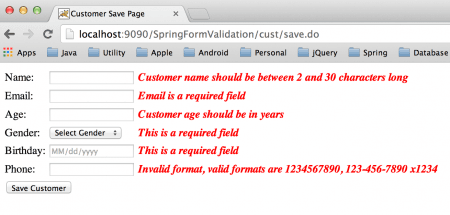
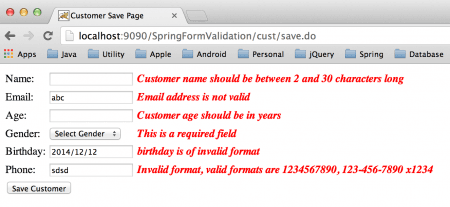
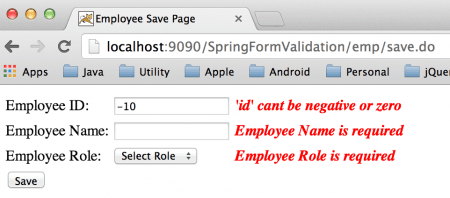
Vậy là chúng ta đã cùng nhau khám phá một khía cạnh quan trọng trong quy trình phát triển ứng dụng web với Spring MVC: xác thực dữ liệu từ người dùng. Bạn có thể tải về project ví dụ từ liên kết này.
Hy vọng những gì được trình bày có thể là giúp các bạn tự tin hơn khi xác thực form trong Spring MVC an toàn với các cách tiếp cận khác nhau và sử dụng resource bundle cho các thông báo lỗi đã được bản địa hóa.