- Sản phẩm & Dịch vụSản phẩm & Dịch vụ
- Giải phápGiải pháp
- Bảng giáBảng giá
- Công tyCông ty
- Tài liệuTài liệu

vi
vi
Chuyên mục với các bài viết hướng dẫn, nghiên cứu và phân tích chi tiết về kỹ thuật, các xu hướng công nghệ mới nhất dành cho lập trình viên.

Technical Writer

I have over 5 years of experience writing technical documentation for tech products, making them accessible and user-friendly. My focus is always on providing clear and precise information. @#@ Tôi đã có hơn 5 năm kinh nghiệm viết tài liệu kỹ thuật cho các sản phẩm công nghệ, giúp người dùng dễ dàng tiếp cận và sử dụng. Tôi luôn tập trung vào việc cung cấp thông tin chính xác và dễ hiểu.
Thảo luận (0)
Đăng nhập để thảo luận
Google Places API có thể được sử dụng để tìm các địa điểm lân cận. Trong hướng dẫn này, chúng ta sẽ phát triển một ứng dụng hiển thị các địa điểm gần vị trí hiện tại mà người dùng lựa chọn, đồng thời cung cấp khoảng cách ước tính và thời gian di chuyển từ vị trí hiện tại đến các địa điểm đó.

Chúng ta sẽ sử dụng Google Places API Web Service kết hợp với Distance Matrix API trong ứng dụng này.
Google Places API Web Service cho phép chúng ta truy vấn các địa điểm dựa trên một số tham số, chẳng hạn như loại địa điểm, địa điểm đó có đang mở cửa hay không, v.v.
Một yêu cầu Nearby Search sẽ có dạng một URL HTTP như sau:
<https://maps.googleapis.com/maps/api/place/nearbysearch/output?parameters`json`> là định dạng đầu r được **khuyến nghị**, bên cạnh đó còn có định dạng **XML**.
json là đnh dạng output được khuyến nghị, bên cạnh đó còn có định dạng xml.
Lưu ý: Nếu sử dụng rankby=distance, bạn phải cung cấp ít nhất một trong các tham số sau:
Các tham số tùy chọn bao gồm:
opennow: chỉ hiển thị các địa điểm đang mở cửa.pagetoken: dùng để phân trang khi có quá nhiều kết quả.Distance Matrix API được sử dụng để tính toán khoảng cách và thời gian di chuyển giữa hai hoặc nhiều điểm.
Một URL truy vấn Distance Matrix API có dạng như sau:
<https://maps.googleapis.com/maps/api/distancematrix/outputFormat?parameters>
Các tham số bắt buộc trong Distance Matrix API bao gồm: origins, destinations và key.
|.
Ngoài tọa độ, bạn cũng có thể truyền địa chỉ văn bản hoặc Place ID – dịch vụ sẽ tự động chuyển chúng sang latitude-longitude để thực hiện tính toán.
<https://maps.googleapis.com/maps/api/distancematrix/json?origins=Washington,DC&destinations=New+York+City,NY&key=YOUR_API_KEY>
Các tham số tùy chọn bao gồm:
driving, bicycling, walking, transittolls, indoor, v.v.Truy cập https://console.developers.google.com/ và bật các API sau:
Đi tới phần credentials và tạo một key mới. Đặt hạn chế khóa là None trong thời gian đầu.
Hãy bắt đầu phần chính của hướng dẫn. Chúng ta sẽ phát triển một ứng dụng cho phép tìm kiếm các địa điểm gần vị trí hiện tại và hiển thị chúng trong một RecyclerView.
Chúng ta sẽ tìm kiếm địa điểm dựa trên loại và từ khóa tên được nhập trong EditText, ngăn cách bởi dấu cách.
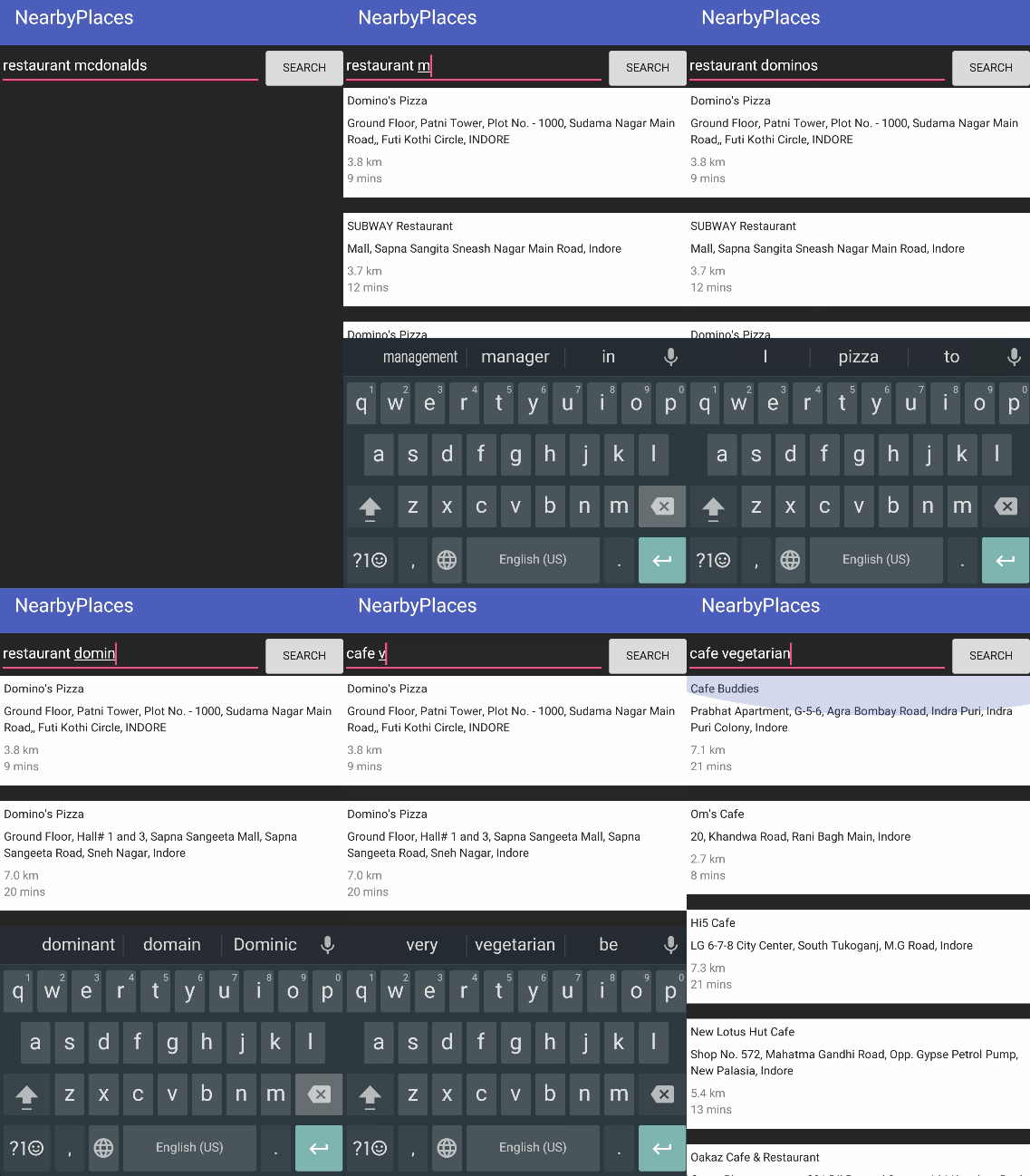
Ví dụ: restaurant dominos hoặc cafe vegetarian
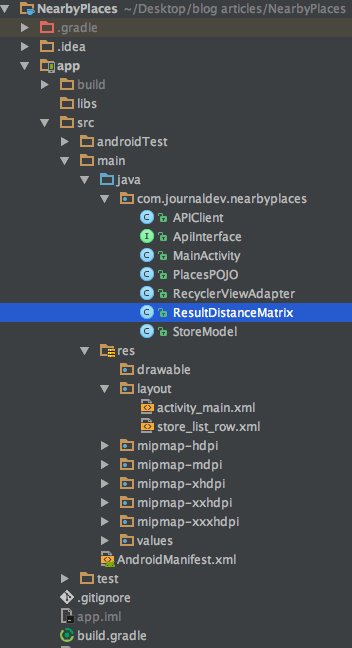
Dự án bao gồm một Activity duy nhất, một lớp Adapter cho RecyclerView, một lớp Model để lưu dữ liệu cho mỗi dòng trong RecyclerView, hai lớp POJO để chuyển đổi phản hồi JSON thành đối tượng Gson từ Google Places API và Distance Matrix API, cùng với APIClient và ApiInterface để sử dụng Retrofit và các endpoint.
Mã ví dụ Google Places API Example Code
Thêm các dependency sau vào file build.gradle
compile 'com.google.android.gms:play-services-location:10.2.1'
    compile 'com.google.android.gms:play-services-places:10.2.1'
    compile 'com.google.code.gson:gson:2.7'
    compile 'com.squareup.retrofit2:retrofit:2.1.0'
    compile 'com.squareup.retrofit2:converter-gson:2.1.0'
    compile 'com.squareup.okhttp3:logging-interceptor:3.4.1'
    compile 'com.squareup.okhttp3:okhttps:3.4.1'
    compile 'io.nlopez.smartlocation:library:3.3.1'
    compile 'com.android.support:cardview-v7:25.3.0'
    compile 'com.android.support:recyclerview-v7:25.3.0'
compile 'io.nlopez.smartlocation:library:3.3.1’ là một thư viện của bên thứ ba dùng để LocationTracking, giúp giảm bớt mã lặp.
Mã trong file APIClient.java được trình bày bên dưới:
package com.journaldev.nearbyplaces;import java.util.concurrent.TimeUnit; import okhttp3.OkHttpClient; import okhttp3.logging.HttpLoggingInterceptor; import retrofit2.Retrofit; import retrofit2.converter.gson.GsonConverterFactory;
public class APIClient {
private static Retrofit retrofit = null; public static final String GOOGLE_PLACE_API_KEY = "ADD_YOUR_API_KEY_HERE"; public static String base_url = "<https://maps.googleapis.com/maps/api/>"; public static Retrofit getClient() { HttpLoggingInterceptor interceptor = new HttpLoggingInterceptor(); interceptor.setLevel(HttpLoggingInterceptor.Level.BODY); OkHttpClient client = new OkHttpClient.Builder().readTimeout(30, TimeUnit.SECONDS).writeTimeout(30, TimeUnit.SECONDS).addInterceptor(interceptor).build(); retrofit = null; retrofit = new Retrofit.Builder() .baseUrl(base_url) .addConverterFactory(GsonConverterFactory.create()) .client(client) .build(); return retrofit; }}
Mã trong file ApiInterface.java được trình bày bên dưới:
package com.journaldev.nearbyplaces;import retrofit2.Call; import retrofit2.http.GET; import retrofit2.http.Query;
public interface ApiInterface {
@GET("place/nearbysearch/json?") Call<PlacesPOJO.Root> doPlaces(@Query(value = "type", encoded = true) String type, @Query(value = "location", encoded = true) String location, @Query(value = "name", encoded = true) String name, @Query(value = "opennow", encoded = true) boolean opennow, @Query(value = "rankby", encoded = true) String rankby, @Query(value = "key", encoded = true) String key); @GET("distancematrix/json") // origins/destinations: LatLng as string Call<ResultDistanceMatrix> getDistance(@Query("key") String key, @Query("origins") String origins, @Query("destinations") String destinations);}
PlacesPOJO.java là file chứa phản hồi từ Places API. Mã của nó được trình bày bên dưới:
package com.journaldev.nearbyplaces;import com.google.gson.annotations.SerializedName; import java.io.Serializable; import java.util.ArrayList; import java.util.List;
public class PlacesPOJO {
public class Root implements Serializable { @SerializedName("results") public List<CustomA> customA = new ArrayList<>(); @SerializedName("status") public String status; } public class CustomA implements Serializable { @SerializedName("geometry") public Geometry geometry; @SerializedName("vicinity") public String vicinity; @SerializedName("name") public String name; } public class Geometry implements Serializable{ @SerializedName("location") public LocationA locationA; } public class LocationA implements Serializable { @SerializedName("lat") public String lat; @SerializedName("lng") public String lng; }}
Lớp ResultDistanceMatrix.java chứa phản hồi từ Distance Matrix API. Mã của nó được trình bày bên dưới:
package com.journaldev.nearbyplaces;import com.google.gson.annotations.SerializedName;
import java.util.List;
public class ResultDistanceMatrix { @SerializedName("status") public String status;
@SerializedName("rows") public List<InfoDistanceMatrix> rows; public class InfoDistanceMatrix { @SerializedName("elements") public List elements; public class DistanceElement { @SerializedName("status") public String status; @SerializedName("duration") public ValueItem duration; @SerializedName("distance") public ValueItem distance; } public class ValueItem { @SerializedName("value") public long value; @SerializedName("text") public String text; } }}
File activity_main.xml được trình bày bên dưới:
<?xml version="1.0" encoding="utf-8"?>
<RelativeLayout xmlns:android="<https://schemas.android.com/apk/res/android>"
xmlns:tools="<https://schemas.android.com/tools>"
android:layout_width="match_parent"
android:layout_height="match_parent"
android:background="#212121"
tools:context="com.journaldev.nearbyplaces.MainActivity">
<EditText
android:id="@+id/editText"
android:layout_width="match_parent"
android:textColor="@android:color/white"
android:textColorHint="@android:color/white"
android:text="restaurant mcdonalds"
android:hint="type name"
android:layout_height="wrap_content"
android:layout_alignParentTop="true"
android:layout_toLeftOf="@+id/button"
android:layout_toStartOf="@+id/button" />
<Button
android:id="@+id/button"
android:layout_width="wrap_content"
android:layout_height="wrap_content"
android:layout_alignParentEnd="true"
android:layout_alignParentRight="true"
android:text="Search" />
<android.support.v7.widget.RecyclerView
android:id="@+id/recyclerView"
android:layout_width="match_parent"
android:layout_height="match_parent"
android:layout_below="@+id/editText"
android:scrollbars="vertical" />
</RelativeLayout>
Mã của lớp MainActivity.java được trình bày bên dưới:
package com.journaldev.nearbyplaces;import android.annotation.TargetApi; import android.content.DialogInterface; import android.content.pm.PackageManager; import android.location.Location; import android.os.Build; import android.support.v7.app.AlertDialog; import android.support.v7.app.AppCompatActivity; import android.os.Bundle; import android.support.v7.widget.LinearLayoutManager; import android.support.v7.widget.RecyclerView; import android.view.View; import android.widget.Button; import android.widget.EditText; import android.widget.Toast; import com.google.android.gms.maps.model.LatLng; import java.util.ArrayList; import java.util.List;
import io.nlopez.smartlocation.OnLocationUpdatedListener; import io.nlopez.smartlocation.SmartLocation; import retrofit2.Call; import retrofit2.Callback; import retrofit2.Response;
import static android.Manifest.permission.ACCESS_COARSE_LOCATION; import static android.Manifest.permission.ACCESS_FINE_LOCATION;
public class MainActivity extends AppCompatActivity {
private ArrayList<String> permissionsToRequest; private ArrayList<String> permissionsRejected = new ArrayList<>(); private ArrayList<String> permissions = new ArrayList<>(); private final static int ALL_PERMISSIONS_RESULT = 101; List<StoreModel> storeModels; ApiInterface apiService; String latLngString; LatLng latLng; RecyclerView recyclerView; EditText editText; Button button; List<PlacesPOJO.CustomA> results; @Override protected void onCreate(Bundle savedInstanceState) { super.onCreate(savedInstanceState); setContentView(R.layout.activity_main); permissions.add(ACCESS_FINE_LOCATION); permissions.add(ACCESS_COARSE_LOCATION); permissionsToRequest = findUnAskedPermissions(permissions); if (Build.VERSION.SDK_INT >= Build.VERSION_CODES.M) { if (permissionsToRequest.size() > 0) requestPermissions(permissionsToRequest.toArray(new String[permissionsToRequest.size()]), ALL_PERMISSIONS_RESULT); else { fetchLocation(); } } else { fetchLocation(); } apiService = APIClient.getClient().create(ApiInterface.class); recyclerView = (RecyclerView) findViewById(R.id.recyclerView); recyclerView.setNestedScrollingEnabled(false); recyclerView.setHasFixedSize(true); LinearLayoutManager layoutManager = new LinearLayoutManager(this); recyclerView.setLayoutManager(layoutManager); editText = (EditText) findViewById(R.id.editText); button = (Button) findViewById(R.id.button); button.setOnClickListener(new View.OnClickListener() { @Override public void onClick(View v) { String s = editText.getText().toString().trim(); String[] split = s.split("\\\\s+"); if (split.length != 2) { Toast.makeText(getApplicationContext(), "Please enter text in the required format", Toast.LENGTH_SHORT).show(); } else fetchStores(split[0], split[1]); } }); } private void fetchStores(String placeType, String businessName) { /** * For Locations In India McDonalds stores aren't returned accurately */ //Call<PlacesPOJO.Root> call = apiService.doPlaces(placeType, latLngString,"\\""+ businessName +"\\"", true, "distance", APIClient.GOOGLE_PLACE_API_KEY); Call<PlacesPOJO.Root> call = apiService.doPlaces(placeType, latLngString, businessName, true, "distance", APIClient.GOOGLE_PLACE_API_KEY); call.enqueue(new Callback<PlacesPOJO.Root>() { @Override public void onResponse(Call<PlacesPOJO.Root> call, Response<PlacesPOJO.Root> response) { PlacesPOJO.Root root = response.body(); if (response.isSuccessful()) { if (root.status.equals("OK")) { results = root.customA; storeModels = new ArrayList<>(); for (int i = 0; i < results.size(); i++) { if (i == 10) break; PlacesPOJO.CustomA info = results.get(i); fetchDistance(info); } } else { Toast.makeText(getApplicationContext(), "No matches found near you", Toast.LENGTH_SHORT).show(); } } else if (response.code() != 200) { Toast.makeText(getApplicationContext(), "Error " + response.code() + " found.", Toast.LENGTH_SHORT).show(); } } @Override public void onFailure(Call<PlacesPOJO.Root> call, Throwable t) { // Log error here since request failed call.cancel(); } }); } private ArrayList<String> findUnAskedPermissions(ArrayList<String> wanted) { ArrayList<String> result = new ArrayList<>(); for (String perm : wanted) { if (!hasPermission(perm)) { result.add(perm); } } return result; } private boolean hasPermission(String permission) { if (canMakeSmores()) { if (Build.VERSION.SDK_INT >= Build.VERSION_CODES.M) { return (checkSelfPermission(permission) == PackageManager.PERMISSION_GRANTED); } } return true; } private boolean canMakeSmores() { return (Build.VERSION.SDK_INT > Build.VERSION_CODES.LOLLIPOP_MR1); } @TargetApi(Build.VERSION_CODES.M) @Override public void onRequestPermissionsResult(int requestCode, String[] permissions, int[] grantResults) { switch (requestCode) { case ALL_PERMISSIONS_RESULT: for (String perms : permissionsToRequest) { if (!hasPermission(perms)) { permissionsRejected.add(perms); } } if (permissionsRejected.size() > 0) { if (Build.VERSION.SDK_INT >= Build.VERSION_CODES.M) { if (shouldShowRequestPermissionRationale(permissionsRejected.get(0))) { showMessageOKCancel("These permissions are mandatory for the application. Please allow access.", new DialogInterface.OnClickListener() { @Override public void onClick(DialogInterface dialog, int which) { if (Build.VERSION.SDK_INT >= Build.VERSION_CODES.M) { requestPermissions(permissionsRejected.toArray(new String[permissionsRejected.size()]), ALL_PERMISSIONS_RESULT); } } }); return; } } } else { fetchLocation(); } break; } } private void showMessageOKCancel(String message, DialogInterface.OnClickListener okListener) { new AlertDialog.Builder(MainActivity.this) .setMessage(message) .setPositiveButton("OK", okListener) .setNegativeButton("Cancel", null) .create() .show(); } private void fetchLocation() { SmartLocation.with(this).location() .oneFix() .start(new OnLocationUpdatedListener() { @Override public void onLocationUpdated(Location location) { latLngString = location.getLatitude() + "," + location.getLongitude(); latLng = new LatLng(location.getLatitude(), location.getLongitude()); } }); } private void fetchDistance(final PlacesPOJO.CustomA info) { Call<ResultDistanceMatrix> call = apiService.getDistance(APIClient.GOOGLE_PLACE_API_KEY, latLngString, info.geometry.locationA.lat + "," + info.geometry.locationA.lng); call.enqueue(new Callback<ResultDistanceMatrix>() { @Override public void onResponse(Call<ResultDistanceMatrix> call, Response<ResultDistanceMatrix> response) { ResultDistanceMatrix resultDistance = response.body(); if ("OK".equalsIgnoreCase(resultDistance.status)) { ResultDistanceMatrix.InfoDistanceMatrix infoDistanceMatrix = resultDistance.rows.get(0); ResultDistanceMatrix.InfoDistanceMatrix.DistanceElement distanceElement = infoDistanceMatrix.elements.get(0); if ("OK".equalsIgnoreCase(distanceElement.status)) { ResultDistanceMatrix.InfoDistanceMatrix.ValueItem itemDuration = distanceElement.duration; ResultDistanceMatrix.InfoDistanceMatrix.ValueItem itemDistance = distanceElement.distance; String totalDistance = String.valueOf(itemDistance.text); String totalDuration = String.valueOf(itemDuration.text); storeModels.add(new StoreModel(info.name, info.vicinity, totalDistance, totalDuration)); if (storeModels.size() == 10 || storeModels.size() == results.size()) { RecyclerViewAdapter adapterStores = new RecyclerViewAdapter(results, storeModels); recyclerView.setAdapter(adapterStores); } } } } @Override public void onFailure(Call<ResultDistanceMatrix> call, Throwable t) { call.cancel(); } }); }}
Trong đoạn mã trên, trước tiên chúng ta yêu cầu quyền truy cập ở thời gian chạy, sau đó lấy vị trí hiện tại bằng cách sử dụng thư viện SmartLocation.
Khi đã có được vị trí, chúng ta truyền từ đầu tiên trong EditText vào tham số type và từ thứ hai vào tham số name của phương thức fetchStores(), phương thức này cuối cùng sẽ gọi tới Google Places API Web Service.
Chúng ta giới hạn kết quả tìm kiếm còn 10 địa điểm.
Đối với mỗi kết quả, chúng ta tính toán khoảng cách và thời gian di chuyển đến địa điểm đó bên trong phương thức fetchDistance().
Sau khi tính xong cho tất cả các địa điểm, dữ liệu sẽ được đưa vào RecyclerViewAdapter.java thông qua một lớp dữ liệu là StoreModel.java.
Mã của StoreModel.java được trình bày bên dưới:
package com.journaldev.nearbyplaces;public class StoreModel {
public String name, address, distance, duration; public StoreModel(String name, String address, String distance, String duration) { this.name = name; this.address = address; this.distance = distance; this.duration = duration; }}
Giao diện cho từng dòng trong RecyclerView được trình bày trong file XML bên dưới: store_list_row.xml
<?xml version="1.0" encoding="utf-8"?>
<LinearLayout xmlns:android="<https://schemas.android.com/apk/res/android>"
android:layout_width="match_parent"
android:layout_height="wrap_content"
android:layout_marginBottom="@dimen/activity_horizontal_margin"
android:orientation="vertical">
<android.support.v7.widget.CardView xmlns:card_view="<https://schemas.android.com/apk/res-auto>"
android:id="@+id/card_view"
android:layout_width="match_parent"
android:layout_height="wrap_content"
card_view:cardCornerRadius="0dp"
card_view:cardElevation="5dp">
<LinearLayout
android:layout_width="match_parent"
android:layout_height="wrap_content"
android:orientation="vertical"
android:padding="5dp">
<TextView
android:id="@+id/txtStoreName"
android:layout_width="wrap_content"
android:layout_height="wrap_content"
android:paddingBottom="5dp"
android:textColor="#212121" />
<TextView
android:id="@+id/txtStoreAddr"
android:layout_width="wrap_content"
android:layout_height="wrap_content"
android:paddingBottom="5dp"
android:textColor="#212121" />
<TextView
android:id="@+id/txtStoreDist"
android:layout_width="wrap_content"
android:layout_height="wrap_content"
android:paddingBottom="5dp" />
</LinearLayout>
</android.support.v7.widget.CardView>
</LinearLayout>
Mã của file RecyclerViewAdapter.java được trình bày bên dưới:
public class RecyclerViewAdapter extends RecyclerView.Adapter<RecyclerViewAdapter.MyViewHolder> {
private List<PlacesPOJO.CustomA> stLstStores;
private List<StoreModel> models;
public RecyclerViewAdapter(List<PlacesPOJO.CustomA> stores, List<StoreModel> storeModels) {
stLstStores = stores;
models = storeModels;
}
@Override
public MyViewHolder onCreateViewHolder(ViewGroup parent, int viewType) {
final View view = LayoutInflater.from(parent.getContext())
.inflate(R.layout.store_list_row, parent, false);
return new MyViewHolder(view);
}
@Override
public void onBindViewHolder(MyViewHolder holder, int position) {
holder.setData(stLstStores.get(holder.getAdapterPosition()), holder, models.get(holder.getAdapterPosition()));
}
@Override
public int getItemCount() {
return Math.min(5, stLstStores.size());
}
public class MyViewHolder extends RecyclerView.ViewHolder {
TextView txtStoreName;
TextView txtStoreAddr;
TextView txtStoreDist;
StoreModel model;
public MyViewHolder(View itemView) {
super(itemView);
this.txtStoreDist = (TextView) itemView.findViewById(R.id.txtStoreDist);
this.txtStoreName = (TextView) itemView.findViewById(R.id.txtStoreName);
this.txtStoreAddr = (TextView) itemView.findViewById(R.id.txtStoreAddr);
}
public void setData(PlacesPOJO.CustomA info, MyViewHolder holder, StoreModel storeModel) {
this.model = storeModel;
holder.txtStoreDist.setText(model.distance + "\\n" + model.duration);
holder.txtStoreName.setText(info.name);
holder.txtStoreAddr.setText(info.vicinity);
}
}
}
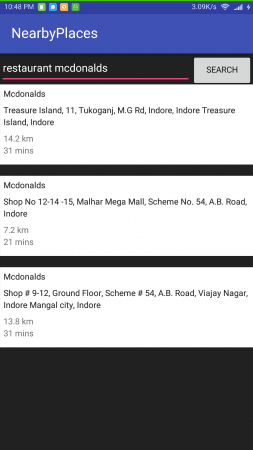
Kết quả đầu ra của ứng dụng ví dụ sử dụng Google Places API được trình bày bên dưới:
Lưu ý: Places API không thực sự chính xác đối với các chuỗi cửa hàng như McDonald’s và một số chuỗi đồ ăn nhanh khác, đặc biệt là với các địa điểm tại Ấn Độ.
Một cách khắc phục là truyền giá trị vào tham số name trong dấu ngoặc kép, ví dụ như:
Call call = apiService.doPlaces(placeType, latLngString,"\\""+ businessName +"\\"", true, "distance", APIClient.GOOGLE_PLACE_API_KEY);
Kết quả hiển thị tại vị trí của tôi được trình bày bên dưới: