
- Sản phẩm & Dịch vụSản phẩm & Dịch vụ
- Giải phápGiải pháp
- Bảng giáBảng giá
- Công tyCông ty
- Tài liệuTài liệu

vi
vi
Chuyên mục với các bài viết hướng dẫn, nghiên cứu và phân tích chi tiết về kỹ thuật, các xu hướng công nghệ mới nhất dành cho lập trình viên.

Web Developer

I’m passionate about web development and sharing my insights through articles, with over 8 years of experience. I hope these sharings inspire you and help build a strong web development community. @#@ Tôi đam mê phát triển web và chia sẻ những hiểu biết của mình thông qua các bài viết, với hơn 8 năm kinh nghiệm. Tôi hy vọng những chia sẻ này sẽ truyền cảm hứng cho các bạn và giúp xây dựng một cộng đồng phát triển web mạnh mẽ.
Thảo luận (0)
Đăng nhập để thảo luận
Lớp HttpURLConnection từ gói java.net có thể được dùng để gửi một Java HTTP Request một cách lập trình. Trong bài viết này, bạn sẽ học cách sử dụng Java HttpURLConnection để gửi các yêu cầu GET và POST, sau đó in ra phản hồi từ máy chủ.

Để thực hiện ví dụ về HttpURLConnection này, bạn cần tìm hiểu về Spring MVC vì nó cung cấp các URL cho các phương thức HTTP GET và POST. Bạn cũng nên cân nhắc việc triển khai tới một máy chủ Tomcat localhost.
localhost:8080/SpringMVCExample/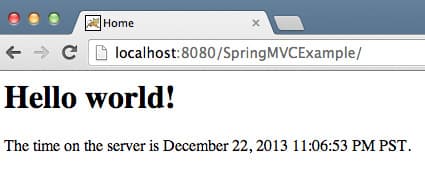
localhost:8080/SpringMVCExample/login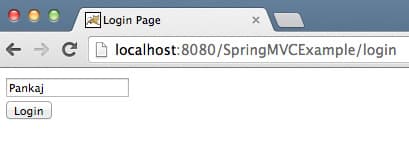
Java HTTP POST Request (Yêu cầu HTTP POST trong Java):
localhost:8080/SpringMVCExample?userName=Pankajlocalhost:8080/SpringMVCExample/login?userName=Pankaj&pwd=apple123 – cho nhiều tham số (param)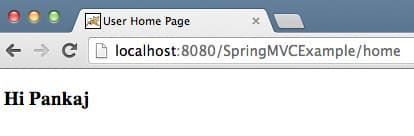
Trang HTML của trang đăng nhập chứa biểu mẫu sau:
<!DOCTYPE html PUBLIC "-//W3C//DTD HTML 4.01 Transitional//EN" "<https://www.w3.org/TR/html4/loose.dtd>">
<html>
<head>
<meta http-equiv="Content-Type" content="text/html; charset=UTF-8">
<title>Login Page</title>
</head>
<body>
<form action="home" method="post">
<input type="text" name="userName"><br>
<input type="submit" value="Login">
</form>
</body>
</html>
localhost:8080/SpringMVCExample/homeBạn có thể tạo một POST request đến:
localhost:8080/SpringMVCExample/home?userName=Pankaj.
Đây sẽ là cơ sở cho ví dụ về HttpURLConnection.
Để gửi các Java HTTP request bằng lớp HttpURLConnection, bạn có thể làm theo các bước sau:
URL từ chuỗi URL STRING của yêu cầu GET hoặc POST.openConnection() trên đối tượng URL. Phương thức này sẽ trả về một phiên bản của HttpURLConnection.HttpURLConnection (giá trị mặc định là GET).setRequestProperty() trên phiên bản HttpURLConnection để đặt các giá trị request header (tiêu đề yêu cầu) (ví dụ: “User-Agent”, “Accept-Language”, v.v.).getResponseCode() để lấy response HTTP code (mã phản hồi HTTP). Nhờ đó, chúng ta biết liệu yêu cầu đã được xử lý thành công hay có bất kỳ HTTP error message nào xảy ra.Reader và InputStream để đọc và xử lý phản hồi.OutputStream từ phiên bản HttpURLConnection và ghi các tham số POST vào đó.Dưới đây là một chương trình ví dụ sử dụng HttpURLConnection để gửi các yêu cầu GET và POST trong Java:
HttpURLConnectionExample.javapackage com.journaldev.utils;
import java.io.BufferedReader; import java.io.IOException; import java.io.InputStreamReader; import java.io.OutputStream; import java.net.HttpURLConnection; import java.net.URL;
public class HttpURLConnectionExample {
private static final String USER_AGENT = "Mozilla/5.0"; private static final String GET_URL = "<https://localhost:9090/SpringMVCExample>"; private static final String POST_URL = "<https://localhost:9090/SpringMVCExample/home>"; private static final String POST_PARAMS = "userName=Pankaj"; public static void main(String[] args) throws IOException { sendGET(); System.out.println("GET DONE"); sendPOST(); System.out.println("POST DONE"); } private static void sendGET() throws IOException { URL obj = new URL(GET_URL); HttpURLConnection con = (HttpURLConnection) obj.openConnection(); con.setRequestMethod("GET"); con.setRequestProperty("User-Agent", USER_AGENT); int responseCode = con.getResponseCode(); System.out.println("GET Response Code :: " + responseCode); if (responseCode == HttpURLConnection.HTTP_OK) { // success BufferedReader in = new BufferedReader(new InputStreamReader(con.getInputStream())); String inputLine; StringBuffer response = new StringBuffer(); while ((inputLine = in.readLine()) != null) { response.append(inputLine); } in.close(); // print result System.out.println(response.toString()); } else { System.out.println("GET request did not work."); } } private static void sendPOST() throws IOException { URL obj = new URL(POST_URL); HttpURLConnection con = (HttpURLConnection) obj.openConnection(); con.setRequestMethod("POST"); con.setRequestProperty("User-Agent", USER_AGENT); // For POST only - START con.setDoOutput(true); OutputStream os = con.getOutputStream(); os.write(POST_PARAMS.getBytes()); os.flush(); os.close(); // For POST only - END int responseCode = con.getResponseCode(); System.out.println("POST Response Code :: " + responseCode); if (responseCode == HttpURLConnection.HTTP_OK) { //success BufferedReader in = new BufferedReader(new InputStreamReader(con.getInputStream())); String inputLine; StringBuffer response = new StringBuffer(); while ((inputLine = in.readLine()) != null) { response.append(inputLine); } in.close(); // print result System.out.println(response.toString()); } else { System.out.println("POST request did not work."); } }}
Biên dịch và chạy mã. Nó sẽ tạo ra đầu ra sau:
Output
GET Response Code :: 200
<html><head>	<title>Home</title></head><body><h1>	Hello world!  </h1><P>  The time on the server is March 6, 2015 9:31:04 PM IST. </P></body></html>
GET DONE
POST Response Code :: 200
<!DOCTYPE html PUBLIC "-//W3C//DTD HTML 4.01 Transitional//EN" "<https://www.w3.org/TR/html4/loose.dtd>"><html><head><meta http-equiv="Content-Type" content="text/html; charset=UTF-8"><title>User Home Page</title></head><body><h3>Hi Pankaj</h3></body></html>
POST DONE
Hãy so sánh đầu ra này với phản hồi HTTP của trình duyệt.
Nếu bạn cần gửi các yêu cầu GET và POST qua giao thức HTTPS, bạn cần sử dụng javax.net.ssl.HttpsURLConnection thay vì java.net.HttpURLConnection. HttpsURLConnection sẽ xử lý việc SSL handshake và mã hóa.
Trong bài viết này, bạn đã học cách sử dụng HttpURLConnection trong một chương trình Java để gửi các yêu cầu GET và POST, sau đó in ra phản hồi.