Cách biên dịch và chạy chương trình Java từ một chương trình Java khác
3 phút đọc22/09/2025
Về tác giả
I have over 5 years of experience writing technical documentation for tech products, making them accessible and user-friendly. My focus is always on providing clear and precise information.
@#@
Tôi đã có hơn 5 năm kinh nghiệm viết tài liệu kỹ thuật cho các sản phẩm công nghệ, giúp người dùng dễ dàng tiếp cận và sử dụng. Tôi luôn tập trung vào việc cung cấp thông tin chính xác và dễ hiểu.
Cập nhật thông tin mới nhấtNhận các thông tin mới nhất về mối đe dọa, báo cáo an ninh mạng từ CyStack về hòm thư điện tử của bạn
{"success":true,"head":"<title>Cách biên dịch và chạy chương trình Java từ một chương trình Java khác - CyStack Tutorial</title>\n<meta name=\"description\" content=\"Bạn có bao giờ nghĩ rằng một chương trình Java cũng có thể tự biên dịch và chạy một chương trình Java khác?Điều này hoàn toàn khả thi bằng cách sử dụng\"/>\n<meta name=\"robots\" content=\"index, follow, max-snippet:-1, max-video-preview:-1, max-image-preview:large\"/>\n<link rel=\"canonical\" href=\"https://blog.cystack.org/tutorial/vi/2025/09/22/bien-dich-va-chay-chuong-trinh-java/\" />\n<meta property=\"og:locale\" content=\"en_US\" />\n<meta property=\"og:type\" content=\"article\" />\n<meta property=\"og:title\" content=\"Cách biên dịch và chạy chương trình Java từ một chương trình Java khác - CyStack Tutorial\" />\n<meta property=\"og:description\" content=\"Bạn có bao giờ nghĩ rằng một chương trình Java cũng có thể tự biên dịch và chạy một chương trình Java khác?Điều này hoàn toàn khả thi bằng cách sử dụng\" />\n<meta property=\"og:url\" content=\"https://blog.cystack.org/tutorial/vi/2025/09/22/bien-dich-va-chay-chuong-trinh-java/\" />\n<meta property=\"og:site_name\" content=\"CyStack Tutorial\" />\n<meta property=\"article:tag\" content=\"vi\" />\n<meta property=\"article:section\" content=\"Java\" />\n<meta property=\"og:updated_time\" content=\"2026-08-03T17:18:43+07:00\" />\n<meta property=\"og:image\" content=\"https://s2.cystack.net/tutorial/22113155/bien-dich-va-chay-chuong-trinh-java.jpg\" />\n<meta property=\"og:image:secure_url\" content=\"https://s2.cystack.net/tutorial/22113155/bien-dich-va-chay-chuong-trinh-java.jpg\" />\n<meta property=\"og:image:width\" content=\"1200\" />\n<meta property=\"og:image:height\" content=\"630\" />\n<meta property=\"og:image:alt\" content=\"biên dịch và chạy chương trình Java\" />\n<meta property=\"og:image:type\" content=\"image/jpeg\" />\n<meta property=\"article:published_time\" content=\"2025-09-22T11:32:31+07:00\" />\n<meta property=\"article:modified_time\" content=\"2026-08-03T17:18:43+07:00\" />\n<meta name=\"twitter:card\" content=\"summary_large_image\" />\n<meta name=\"twitter:title\" content=\"Cách biên dịch và chạy chương trình Java từ một chương trình Java khác - CyStack Tutorial\" />\n<meta name=\"twitter:description\" content=\"Bạn có bao giờ nghĩ rằng một chương trình Java cũng có thể tự biên dịch và chạy một chương trình Java khác?Điều này hoàn toàn khả thi bằng cách sử dụng\" />\n<meta name=\"twitter:image\" content=\"https://s2.cystack.net/tutorial/22113155/bien-dich-va-chay-chuong-trinh-java.jpg\" />\n<meta name=\"twitter:label1\" content=\"Written by\" />\n<meta name=\"twitter:data1\" content=\"Chris Pham\" />\n<meta name=\"twitter:label2\" content=\"Time to read\" />\n<meta name=\"twitter:data2\" content=\"3 minutes\" />\n<script type=\"application/ld+json\" class=\"rank-math-schema\">{\"@context\":\"https://schema.org\",\"@graph\":[{\"@type\":[\"Person\",\"Organization\"],\"@id\":\"https://blog.cystack.org/tutorial/#person\",\"name\":\"CyStack Tutorial\"},{\"@type\":\"WebSite\",\"@id\":\"https://blog.cystack.org/tutorial/#website\",\"url\":\"https://blog.cystack.org/tutorial\",\"name\":\"CyStack Tutorial\",\"publisher\":{\"@id\":\"https://blog.cystack.org/tutorial/#person\"},\"inLanguage\":\"en-US\"},{\"@type\":\"ImageObject\",\"@id\":\"https://s2.cystack.net/tutorial/22113155/bien-dich-va-chay-chuong-trinh-java.jpg\",\"url\":\"https://s2.cystack.net/tutorial/22113155/bien-dich-va-chay-chuong-trinh-java.jpg\",\"width\":\"1200\",\"height\":\"630\",\"caption\":\"bi\\u00ean d\\u1ecbch v\\u00e0 ch\\u1ea1y ch\\u01b0\\u01a1ng tr\\u00ecnh Java\",\"inLanguage\":\"en-US\"},{\"@type\":\"BreadcrumbList\",\"@id\":\"https://blog.cystack.org/tutorial/vi/2025/09/22/bien-dich-va-chay-chuong-trinh-java/#breadcrumb\",\"itemListElement\":[{\"@type\":\"ListItem\",\"position\":\"1\",\"item\":{\"@id\":\"https://blog.cystack.org/tutorial\",\"name\":\"Home\"}},{\"@type\":\"ListItem\",\"position\":\"2\",\"item\":{\"@id\":\"https://blog.cystack.org/tutorial/vi/category/java/\",\"name\":\"Java\"}},{\"@type\":\"ListItem\",\"position\":\"3\",\"item\":{\"@id\":\"https://blog.cystack.org/tutorial/vi/2025/09/22/bien-dich-va-chay-chuong-trinh-java/\",\"name\":\"C\\u00e1ch bi\\u00ean d\\u1ecbch v\\u00e0 ch\\u1ea1y ch\\u01b0\\u01a1ng tr\\u00ecnh Java t\\u1eeb m\\u1ed9t ch\\u01b0\\u01a1ng tr\\u00ecnh Java kh\\u00e1c\"}}]},{\"@type\":\"WebPage\",\"@id\":\"https://blog.cystack.org/tutorial/vi/2025/09/22/bien-dich-va-chay-chuong-trinh-java/#webpage\",\"url\":\"https://blog.cystack.org/tutorial/vi/2025/09/22/bien-dich-va-chay-chuong-trinh-java/\",\"name\":\"C\\u00e1ch bi\\u00ean d\\u1ecbch v\\u00e0 ch\\u1ea1y ch\\u01b0\\u01a1ng tr\\u00ecnh Java t\\u1eeb m\\u1ed9t ch\\u01b0\\u01a1ng tr\\u00ecnh Java kh\\u00e1c - CyStack Tutorial\",\"datePublished\":\"2025-09-22T11:32:31+07:00\",\"dateModified\":\"2026-08-03T17:18:43+07:00\",\"isPartOf\":{\"@id\":\"https://blog.cystack.org/tutorial/#website\"},\"primaryImageOfPage\":{\"@id\":\"https://s2.cystack.net/tutorial/22113155/bien-dich-va-chay-chuong-trinh-java.jpg\"},\"inLanguage\":\"en-US\",\"breadcrumb\":{\"@id\":\"https://blog.cystack.org/tutorial/vi/2025/09/22/bien-dich-va-chay-chuong-trinh-java/#breadcrumb\"}},{\"@type\":\"Person\",\"@id\":\"https://blog.cystack.org/tutorial/author/codeweaver/\",\"name\":\"Chris Pham\",\"url\":\"https://blog.cystack.org/tutorial/author/codeweaver/\",\"image\":{\"@type\":\"ImageObject\",\"@id\":\"https://secure.gravatar.com/avatar/7a3584c941fa360ac061b2a8f15684ced7b92daa1f09481be135a684d989e9b9?s=96&d=mm&r=g\",\"url\":\"https://secure.gravatar.com/avatar/7a3584c941fa360ac061b2a8f15684ced7b92daa1f09481be135a684d989e9b9?s=96&d=mm&r=g\",\"caption\":\"Chris Pham\",\"inLanguage\":\"en-US\"}},{\"@type\":\"BlogPosting\",\"headline\":\"C\\u00e1ch bi\\u00ean d\\u1ecbch v\\u00e0 ch\\u1ea1y ch\\u01b0\\u01a1ng tr\\u00ecnh Java t\\u1eeb m\\u1ed9t ch\\u01b0\\u01a1ng tr\\u00ecnh Java kh\\u00e1c - CyStack Tutorial\",\"keywords\":\"Java,ch\\u1ea1y ch\\u01b0\\u01a1ng tr\\u00ecnh Java\",\"datePublished\":\"2025-09-22T11:32:31+07:00\",\"dateModified\":\"2026-08-03T17:18:43+07:00\",\"articleSection\":\"Java\",\"author\":{\"@id\":\"https://blog.cystack.org/tutorial/author/codeweaver/\",\"name\":\"Chris Pham\"},\"publisher\":{\"@id\":\"https://blog.cystack.org/tutorial/#person\"},\"description\":\"B\\u1ea1n c\\u00f3 bao gi\\u1edd ngh\\u0129 r\\u1eb1ng m\\u1ed9t ch\\u01b0\\u01a1ng tr\\u00ecnh Java c\\u0169ng c\\u00f3 th\\u1ec3 t\\u1ef1 bi\\u00ean d\\u1ecbch v\\u00e0 ch\\u1ea1y m\\u1ed9t ch\\u01b0\\u01a1ng tr\\u00ecnh Java kh\\u00e1c?\\u0110i\\u1ec1u n\\u00e0y ho\\u00e0n to\\u00e0n kh\\u1ea3 thi b\\u1eb1ng c\\u00e1ch s\\u1eed d\\u1ee5ng\",\"name\":\"C\\u00e1ch bi\\u00ean d\\u1ecbch v\\u00e0 ch\\u1ea1y ch\\u01b0\\u01a1ng tr\\u00ecnh Java t\\u1eeb m\\u1ed9t ch\\u01b0\\u01a1ng tr\\u00ecnh Java kh\\u00e1c - CyStack Tutorial\",\"@id\":\"https://blog.cystack.org/tutorial/vi/2025/09/22/bien-dich-va-chay-chuong-trinh-java/#richSnippet\",\"isPartOf\":{\"@id\":\"https://blog.cystack.org/tutorial/vi/2025/09/22/bien-dich-va-chay-chuong-trinh-java/#webpage\"},\"image\":{\"@id\":\"https://s2.cystack.net/tutorial/22113155/bien-dich-va-chay-chuong-trinh-java.jpg\"},\"inLanguage\":\"en-US\",\"mainEntityOfPage\":{\"@id\":\"https://blog.cystack.org/tutorial/vi/2025/09/22/bien-dich-va-chay-chuong-trinh-java/#webpage\"}}]}</script>\n"}
Bạn có bao giờ nghĩ rằng một chương trình Java cũng có thể tự biên dịch và chạy một chương trình Java khác?
Điều này hoàn toàn khả thi bằng cách sử dụng Runtime.exec(String cmd) để gửi lệnh trực tiếp đến hệ điều hành, qua đó thực hiện việc biên dịch và chạy chương trình mong muốn.

Biên dịch và chạy chương trình Java từ một chương trình khác
Hãy cùng viết một chương trình Java đơn giản, chương trình này sẽ được compile và run từ một chương trình Java khác.
package com.journaldev.files;
public class Test {
public static void main(String[] args) {
    System.out.println("Start");
    for(String str : args){
        System.out.println(str);
    }

}

}
Dưới đây là chương trình khác, trong đó tôi biên dịch và chạy class Test.
package com.journaldev.files;
import java.io.BufferedReader;
import java.io.InputStream;
import java.io.InputStreamReader;
public class CompileRunJavaProgram {
public static void main(String[] args) {
    try {
        runProcess("pwd");
        System.out.println("**********");
        runProcess("javac -cp src src/com/journaldev/files/Test.java");
        System.out.println("**********");
        runProcess("java -cp src com/journaldev/files/Test Hi Pankaj");
    } catch (Exception e) {
        e.printStackTrace();
    }

}

private static void printLines(String cmd, InputStream ins) throws Exception {
    String line = null;
    BufferedReader in = new BufferedReader(
        new InputStreamReader(ins));
    while ((line = in.readLine()) != null) {
        System.out.println(cmd + " " + line);
    }
  }

  private static void runProcess(String command) throws Exception {
    Process pro = Runtime.getRuntime().exec(command);
    printLines(command + " stdout:", pro.getInputStream());
    printLines(command + " stderr:", pro.getErrorStream());
    pro.waitFor();
    System.out.println(command + " exitValue() " + pro.exitValue());
  }

}
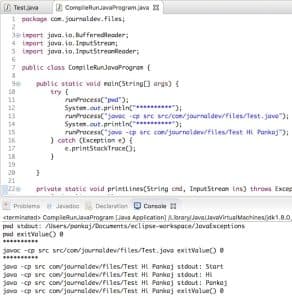
Chú ý sự khác nhau giữa lệnh javacvà java. Chúng ta cần làm như vậy vì working directory của Eclipse là thư mục gốc của project, trong khi thư mục chứa mã nguồn các class của tôi là src. Khi tôi chạy chương trình trên từ Eclipse, đây là kết quả đầu ra:
pwd stdout: /Users/pankaj/Documents/eclipse-workspace/JavaExceptions
pwd exitValue() 0
**********
Path Serapartor = /
javac -cp src src/com/journaldev/files/Test.java exitValue() 0
**********
java -cp src com/journaldev/files/Test Hi Pankaj stdout: Start
java -cp src com/journaldev/files/Test Hi Pankaj stdout: Hi
java -cp src com/journaldev/files/Test Hi Pankaj stdout: Pankaj
java -cp src com/journaldev/files/Test Hi Pankaj exitValue() 0
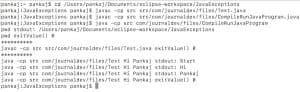
Đây là kết quả đầu ra khi tôi chạy cùng chương trình từ command line, với working directory là thư mục gốc của project.
pankaj:~ pankaj$ cd /Users/pankaj/Documents/eclipse-workspace/JavaExceptions
pankaj:JavaExceptions pankaj$ javac -cp src src/com/journaldev/files/Test.java
pankaj:JavaExceptions pankaj$ javac -cp src src/com/journaldev/files/CompileRunJavaProgram.java
pankaj:JavaExceptions pankaj$ java -cp src com/journaldev/files/CompileRunJavaProgram
pwd stdout: /Users/pankaj/Documents/eclipse-workspace/JavaExceptions
pwd exitValue() 0
**********
javac -cp src src/com/journaldev/files/Test.java exitValue() 0
**********
java -cp src com/journaldev/files/Test Hi Pankaj stdout: Start
java -cp src com/journaldev/files/Test Hi Pankaj stdout: Hi
java -cp src com/journaldev/files/Test Hi Pankaj stdout: Pankaj
java -cp src com/journaldev/files/Test Hi Pankaj exitValue() 0
pankaj:JavaExceptions pankaj$
Chương trình trên sẽ chạy tốt trên các hệ thống Unix, nhưng sẽ không hoạt động trên Windows vì file separator trên Windows khác với Unix. Để đảm bảo chương trình độc lập nền tảng, chúng ta có thể truyền các lệnh dưới dạng argument cho hàm main. Hàm main sẽ trông như sau:
public static void main(String[] args) {
    try {
        if(args.length < 2) throw new Exception("Mandatory Arguments missing");
        runProcess(args[0]);
        runProcess(args[1]);
    } catch (Exception e) {
        e.printStackTrace();
    }
}
Chúng ta cũng có thể dùng File.separator để tạo lệnh theo cách độc lập nền tảng. Ngoài ra, có thể lấy giá trị này từ phương thức System.getProperty, ví dụ: System.getProperty("file.separator"). Chương trình trên có thể được chỉnh sửa như sau để trở thành mã độc lập hệ thống.
String separator = File.separator;
System.out.println("File Serapartor = "+separator);
separator = System.getProperty("file.separator");
System.out.println("File Serapartor = "+separator);
runProcess("javac -cp src src"+separator+"com"+separator+"journaldev"+separator+"files"+separator+"Test.java");
System.out.println("**********");
runProcess("java -cp src com"+separator+"journaldev"+separator+"files"+separator+"Test Hi Pankaj");
Bạn sẽ nhận được kết quả giống như trên. Đó là tất cả về cách sử dụng Runtime.exec để compile và run một chương trình Java từ một chương trình Java khác. Các phương thức printLines() và runProcess() được lấy từ bài viết này.



