
- Sản phẩm & Dịch vụSản phẩm & Dịch vụ
- Giải phápGiải pháp
- Bảng giáBảng giá
- Công tyCông ty
- Tài liệuTài liệu

vi
vi
Chuyên mục với các bài viết hướng dẫn, nghiên cứu và phân tích chi tiết về kỹ thuật, các xu hướng công nghệ mới nhất dành cho lập trình viên.

Technical Writer

I have over 5 years of experience writing technical documentation for tech products, making them accessible and user-friendly. My focus is always on providing clear and precise information. @#@ Tôi đã có hơn 5 năm kinh nghiệm viết tài liệu kỹ thuật cho các sản phẩm công nghệ, giúp người dùng dễ dàng tiếp cận và sử dụng. Tôi luôn tập trung vào việc cung cấp thông tin chính xác và dễ hiểu.
Thảo luận (0)
Đăng nhập để thảo luận
Bộ nhớ ngoài Android có thể được dùng để ghi và lưu dữ liệu, đọc các tệp cấu hình, v.v. Bài viết này là phần tiếp theo của hướng dẫn về bộ nhớ trong trong loạt bài hướng dẫn về lưu trữ dữ liệu có cấu trúc trên Android.

Bộ nhớ ngoài chẳng hạn như thẻ SD, cũng có thể được dùng để lưu trữ dữ liệu ứng dụng. Tuy nhiên, không có biện pháp bảo mật nào được áp dụng cho các tệp bạn lưu trên loại bộ nhớ này. Về cơ bản, có hai dạng bộ nhớ ngoài:
Tất cả các ứng dụng đều có quyền đọc và ghi các tệp trên bộ nhớ ngoài, và người dùng có thể xóa chúng bất cứ lúc nào. Do đó, chúng ta cần kiểm tra xem thẻ SD có đang khả dụng và có thể ghi được không. Chỉ khi bộ nhớ ngoài sẵn sàng, chúng ta mới có thể lưu dữ liệu. Nếu không, tính năng lưu nên được vô hiệu hóa.
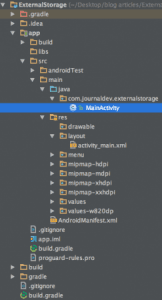 Đầu tiên, cần đảm bảo ứng dụng có quyền đọc và ghi dữ liệu vào thẻ SD của người dùng. Mở tệp
 AndroidManifest.xml và thêm các quyền sau:
<uses-permission android:name="android.permission.WRITE_EXTERNAL_STORAGE"/>
<uses-permission android:name="android.permission.READ_EXTERNAL_STORAGE"/>
Bộ nhớ ngoài có thể bị khóa khi người dùng kết nối nó dưới dạng thiết bị lưu trữ USB. Vì vậy, điều quan trọng là phải kiểm tra xem bộ nhớ đó có đang khả dụng và không ở trạng thái chỉ đọc hay không.
if (!isExternalStorageAvailable() || isExternalStorageReadOnly()) {
    saveButton.setEnabled(false);
}
private static boolean isExternalStorageReadOnly() {
String extStorageState = Environment.getExternalStorageState();
if (Environment.MEDIA_MOUNTED_READ_ONLY.equals(extStorageState)) {
return true;
}
return false;
}
private static boolean isExternalStorageAvailable() {
String extStorageState = Environment.getExternalStorageState();
if (Environment.MEDIA_MOUNTED.equals(extStorageState)) {
return true;
}
return false;
}
Phương thức getExternalStorageState() là một phương thức tĩnh của Environment để xác định xem bộ nhớ ngoài hiện có khả dụng hay không. Nếu điều kiện sai, tính năng lưu sẽ bị vô hiệu hóa.
Layout activity_main.xml có dạng như sau:
<?xml version="1.0" encoding="utf-8"?>
<LinearLayout xmlns:android="<http://schemas.android.com/apk/res/android>"
android:layout_width="fill_parent"
android:layout_height="fill_parent"
android:orientation="vertical">
<TextView
android:layout_width="fill_parent"
android:layout_height="wrap_content"
android:text="Reading and Writing to External Storage"
android:textSize="24sp"/>
<EditText
android:id="@+id/myInputText"
android:layout_width="match_parent"
android:layout_height="wrap_content"
android:ems="10"
android:lines="5"
android:minLines="3"
android:gravity="top|left"
android:inputType="textMultiline">
<requestFocus />
</EditText>
<LinearLayout
android:layout_width="match_parent"
android:layout_height="wrap_content"
android:orientation="horizontal"
android:weightSum="1.0"
android:layout_marginTop="20dp">
<Button
android:id="@+id/saveExternalStorage"
android:layout_width="match_parent"
android:layout_height="wrap_content"
android:text="SAVE"
android:layout_weight="0.5"/>
<Button
android:id="@+id/getExternalStorage"
android:layout_width="match_parent"
android:layout_height="wrap_content"
android:layout_weight="0.5"
android:text="READ" />
</LinearLayout>
<TextView
android:id="@+id/response"
android:layout_width="wrap_content"
android:layout_height="wrap_content"
android:padding="5dp"
android:text=""
android:textAppearance="?android:attr/textAppearanceMedium" />
</LinearLayout>
Khác với hướng dẫn trước dùng Android Toast, ở đây chúng ta hiển thị kết quả lưu/đọc dữ liệu từ bộ nhớ ngoài trực tiếp trên một TextView, bên cạnh các nút chức năng. Dưới đây là code của class MainActivity.java:
package com.journaldev.externalstorage;
import java.io.BufferedReader;
import java.io.DataInputStream;
import java.io.File;
import java.io.FileInputStream;
import java.io.FileOutputStream;
import java.io.IOException;
import java.io.InputStreamReader;
import android.os.Bundle;
import android.app.Activity;
import android.os.Environment;
import android.view.View;
import android.view.View.OnClickListener;
import android.widget.Button;
import android.widget.EditText;
import android.widget.TextView;
class MainActivity extends Activity {
EditText inputText;
TextView response;
Button saveButton, readButton;
private String filename = "SampleFile.txt";
private String filepath = "MyFileStorage";
File myExternalFile;
String myData = "";

@Override
protected void onCreate(Bundle savedInstanceState) {
    super.onCreate(savedInstanceState);
    setContentView(R.layout.activity_main);

    inputText = (EditText) findViewById(R.id.myInputText);
    response = (TextView) findViewById(R.id.response);

    saveButton = (Button) findViewById(R.id.saveExternalStorage);
    saveButton.setOnClickListener(new OnClickListener() {
        @Override
        public void onClick(View v) {
            try {
                FileOutputStream fos = new FileOutputStream(myExternalFile);
                fos.write(inputText.getText().toString().getBytes());
                fos.close();
            } catch (IOException e) {
                e.printStackTrace();
            }
            inputText.setText("");
            response.setText("SampleFile.txt saved to External Storage...");
        }
    });

    readButton = (Button) findViewById(R.id.getExternalStorage);
    readButton.setOnClickListener(new OnClickListener() {
        @Override
        public void onClick(View v) {
            try {
                FileInputStream fis = new FileInputStream(myExternalFile);
                DataInputStream in = new DataInputStream(fis);
                BufferedReader br = new BufferedReader(new InputStreamReader(in));
                String strLine;
                while ((strLine = br.readLine()) != null) {
                    myData = myData + strLine;
                }
                in.close();
            } catch (IOException e) {
                e.printStackTrace();
            }
            inputText.setText(myData);
            response.setText("SampleFile.txt data retrieved from Internal Storage...");
        }
    });

    if (!isExternalStorageAvailable() || isExternalStorageReadOnly()) {
        saveButton.setEnabled(false);
    } else {
        myExternalFile = new File(getExternalFilesDir(filepath), filename);
    }
}

private static boolean isExternalStorageReadOnly() {
    String extStorageState = Environment.getExternalStorageState();
    if (Environment.MEDIA_MOUNTED_READ_ONLY.equals(extStorageState)) {
        return true;
    }
    return false;
}

private static boolean isExternalStorageAvailable() {
    String extStorageState = Environment.getExternalStorageState();
    if (Environment.MEDIA_MOUNTED.equals(extStorageState)) {
        return true;
    }
    return false;
}

}
Environment.getExternalStorageState(): Trả về đường dẫn đến thẻ SD nội bộ, ví dụ: /mnt/sdcard.getExternalFilesDir(): Trả về đường dẫn đến thư mục files bên trong Android/data/data/application_package/ trên thẻ SD. Thư mục này được sử dụng để lưu trữ các tệp cần thiết cho ứng dụng (như hình ảnh tải từ web hoặc tệp cache). Khi ứng dụng bị gỡ cài đặt, mọi dữ liệu trong thư mục này cũng sẽ bị xóa.Nếu bộ nhớ ngoài không khả dụng, chúng ta sẽ vô hiệu hóa nút lưu theo điều kiện if đã được giải thích ở phần trước. Dưới đây là hình ảnh ứng dụng đang chạy trên trình giả lập Android, minh họa quá trình ghi và đọc dữ liệu từ tệp.
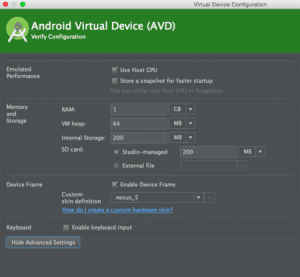
Lưu ý: Đảm bảo rằng trình giả lập Android của bạn được cấu hình để có thẻ SD như trong hộp thoại AVD. Điều chỉnh bằng cách vào: Tools → Android → Android Virtual Device → Show Advance Settings, sau đó chỉnh sửa cấu hình.
Hướng dẫn này đã trình bày cách đọc, ghi và lưu tệp trên bộ nhớ ngoài của Android. Bằng cách kiểm tra trạng thái bộ nhớ ngoài và sử dụng các phương thức phù hợp, bạn có thể đảm bảo ứng dụng của mình hoạt động hiệu quả với các thiết bị lưu trữ ngoài.